# TesterArmy | Documentation
# Welcome
**Welcome to TesterArmy!**
We're super excited to have you here. Let's explore how you can set up automated testing for your software.
TesterArmy is a testing automation software that's built from the ground up around AI agents. On every change in your product, our army of testers clicks through your product like real users.
All we need to test your app is a URL, we'll handle authentication, bot detection, agent orchestration and more. This helps teams focus on what's important - building the product.
## Next steps
What makes TesterArmy different from static test scripts and how our AI agents work.
Sign up and run your first test in under 5 minutes.
## Need Help?
Ask questions and share your projects with the community.
Get in touch with our team for personalized help.
# Introduction
### What is TesterArmy?
TesterArmy is a testing automation software that's built from the ground up around AI agents. On every change in your product, our army of testers clicks through your product like real users.
Our agents can:
* Test complex workflows
* Analyze your app using vision to spot regressions
* Handle auth (Google, Passwords, OTPs)
* Generate and read email inboxes
* Upload files
* Solve captchas
### How is it different from static test scripts?
Static test scripts written with tools like Playwright are relying on selectors - the moment something changes in your app you have to update the tests. Creation and maintanance of those tests takes hours every week which could be spent improving the product.
Most of those tests can't be run in production environments because they get blocked as bots, handling authentication requires you to do hacks like setting static OTP codes and still your app can be broken due to things you didn't take into account when writing tests.
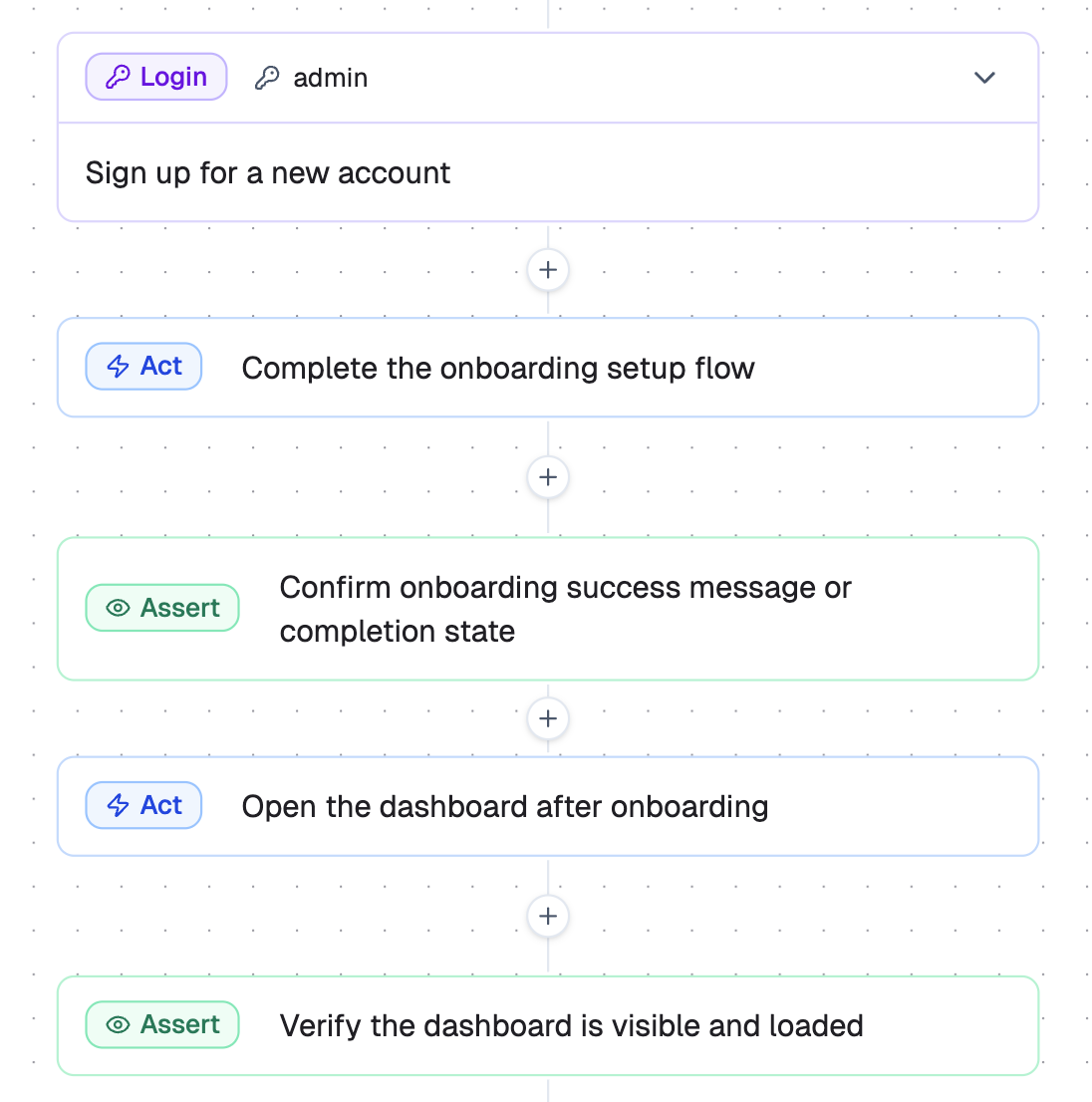
With TesterArmy you can create tests by breaking them down into simple steps like: Login, Complete onboarding, Create a new project. Then our agent figures out how to complete all of those steps and catch regressions if something goes wrong. It heavily relies on vision to ensure we catch issues that could be easily missed by simple selector checks. Creating tests in TesterArmy takes minutes and can be done by non technical staff.
## Next steps
Run your first test.
Set up credentials for authenticated testing.
Run tests from the command line.
# Quick Start
## 1. Create an account
Sign up at [tester.army](https://tester.army/sign-in).
## 2. Create a project
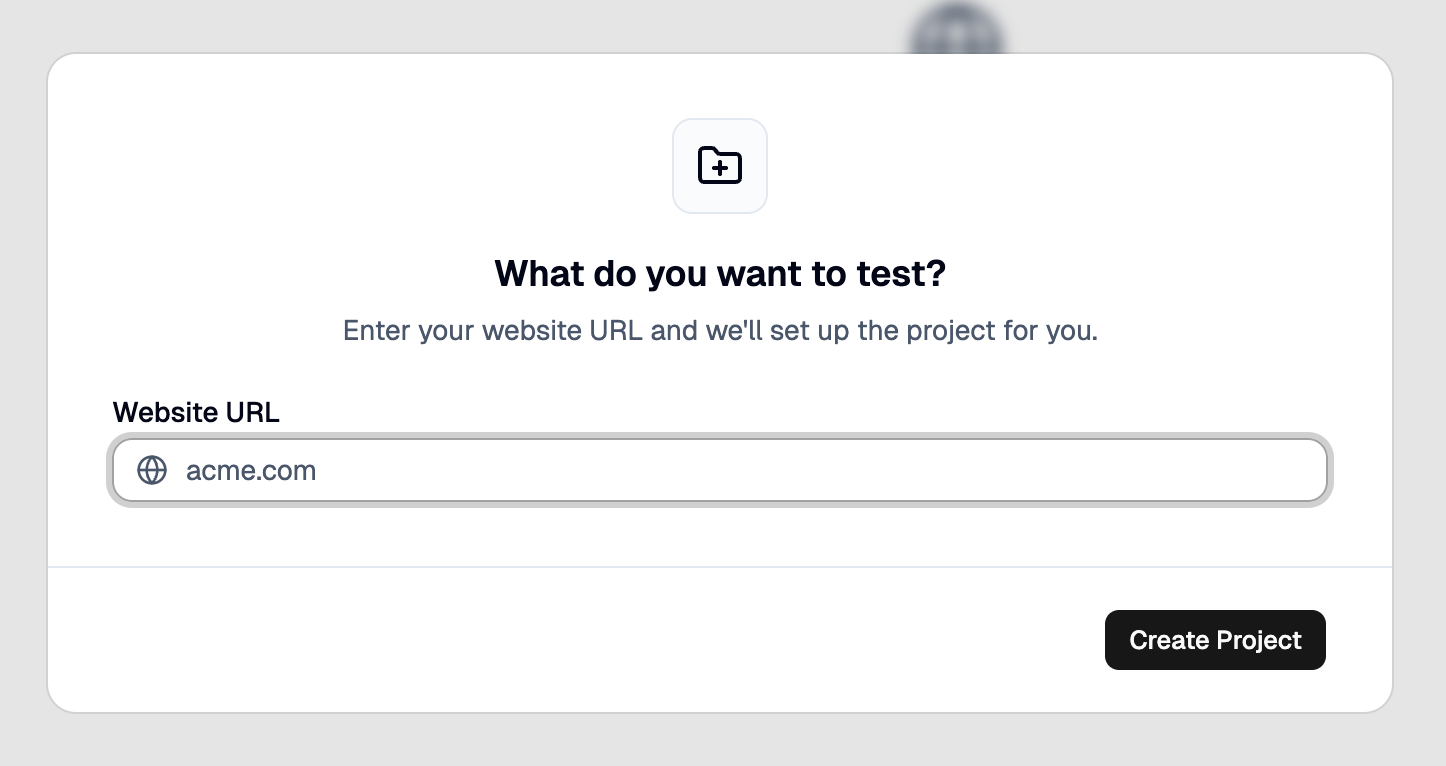
Click **New Project** in the dashboard sidebar. Enter your app name and target URL (e.g., `https://staging.myapp.com`). Click **Create**.
## 3. Create a test
Click on create a new test and type-in your prompt. This will generate a test plan that you can tweak. After approving the plan, click **Run**.
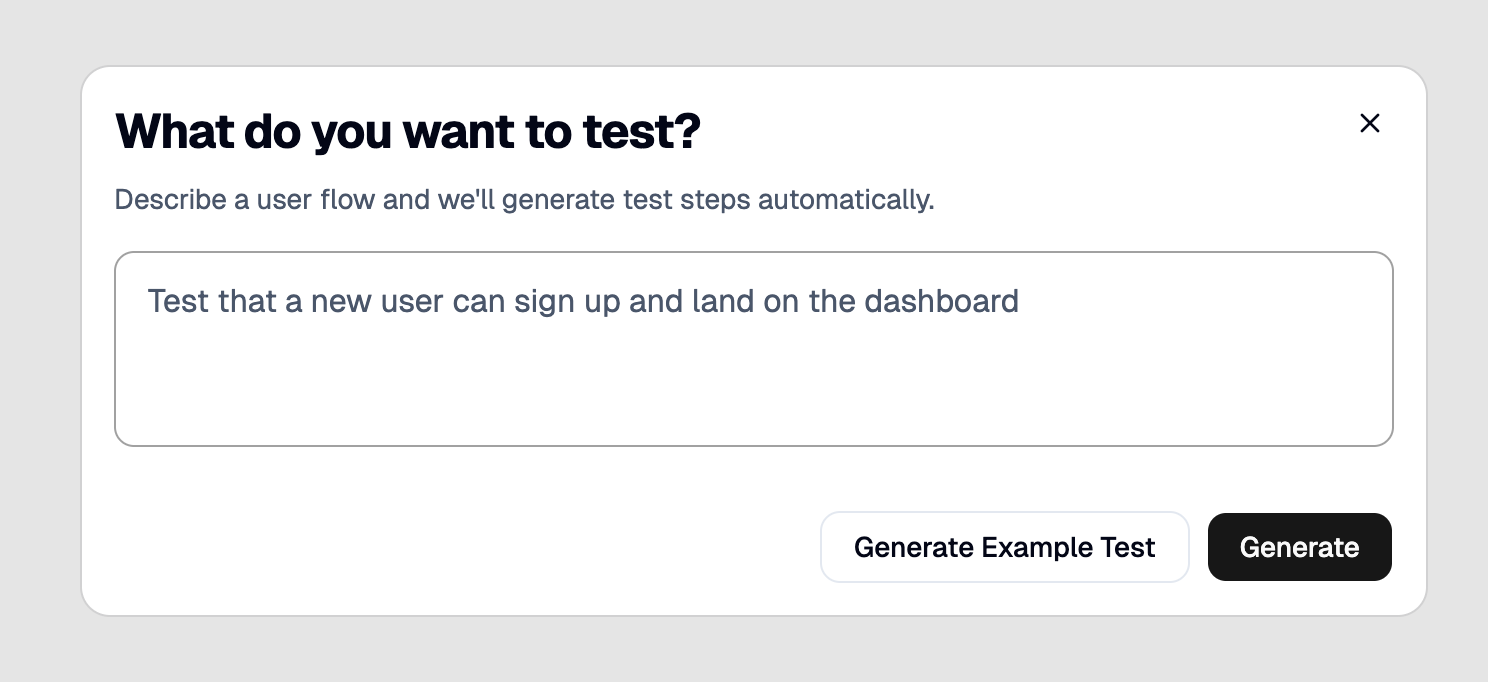
This will generate a step-by-step test plan that you can tweak before running:

After reviewing the steps, click **Run**.
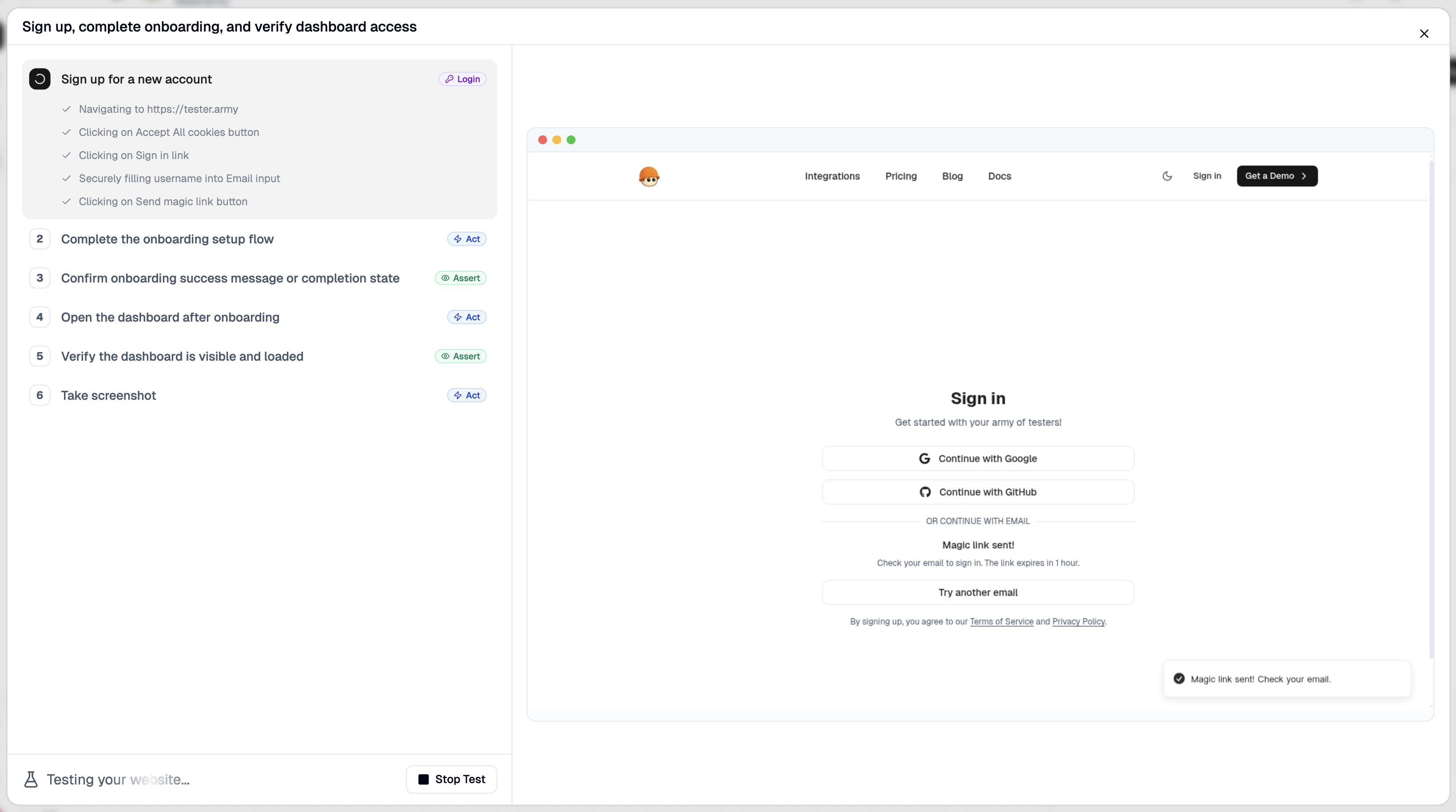
This will open a cloud based browser and our agent will execute the steps and give you feedback if something goes wrong.
Congrats! You successfully created and executed your very first test!
Testing is all about consistency, you should set up [Production Monitoring](/run/production-monitoring) or [PR Testing](/run/pull-request-testing) to guarantee everything keeps working.
## Next steps
Automatically test every pull request on deploy.
Monitor your production with recurring test runs.
# Run Mode
Run Mode controls whether tests in a group execute at the same time or one after another. By default, groups run concurrently.
## Concurrent (default)
All tests start simultaneously. Each test runs independently with no ordering guarantee. Best for groups where tests do not share state or depend on each other.
## Sequential
Tests run one at a time, in the order shown in the group. The next test starts only after the previous one finishes. Best when tests share state, depend on each other, or target a shared environment that cannot handle parallel sessions.
## Set up Run Mode
1. Open **Project → Tests** tab.
2. Click the **Configure Trigger** button on the group you want to configure.
3. In the **Run Mode** section at the top of the panel, pick **Concurrent** or
**Sequential**.
4. Click **Save**.
Groups in Sequential mode get a small "Sequential" badge next to the group name
in the Tests tab. Concurrent is the default and shows no badge.

## Reorder tests
When a group is set to Sequential, a drag handle appears next to each test. Drag tests to reorder them. Changes save instantly.
# Preparation Test
A **Preparation Test** lets one test in a group log in (or perform any setup),
save the resulting browser session, and have every other test in the same
group reuse that session. This avoids re-running login steps in dozens of
dependent tests and keeps your suite fast.
## How it works
* Pick one test in a group and mark it as the **Preparation Test**.
* Whenever the group is run (manually via **Run all**, on a schedule, or via
webhook), the prep test runs first.
* After the prep test completes successfully, its final browser session is
written to a one-shot Kernel profile that's scoped to that single batch.
* Web tests later in the same batch open their browser with that profile
attached read-only, so they start already logged in.
* Non-web tests still stay in the same prep-first batch ordering, but they do
not load the saved browser session.
* Once every test in the batch finishes, the profile is deleted automatically.
Each batch gets its own isolated session, so:
* The prep test always starts from a clean slate — no state leaks in from a
previous run.
* Two batches can run in parallel without colliding on the same session.
* Nothing is left behind to grow over time.
If the prep test fails, the dependent tests in that batch are cancelled and
the profile is still cleaned up.
## Solo runs of dependent tests
Running a dependent test on its own (the **Run** button on a single test view,
or hitting the test's API endpoint) automatically runs the group's
preparation test first and then this test, so you always iterate against the
same post-login state the group run would produce. The prep test and its
session profile are scoped to that single run and cleaned up when the test
finishes.
When a test belongs to multiple groups that each have a preparation test, the
**Preparation** card above the step flow includes a group selector. Picking a
group switches which prep flow the next **Run** click will execute. If no
selection is made, we prefer the first non-default group with a preparation
test configured; the default group is only used as a fallback. Running the
prep test itself on its own does not trigger an extra prep pass — it just
runs the test directly.
## Set the preparation test
Set or change the preparation test from the **Configure Trigger** panel on
the **Tests** tab: click **Configure Trigger** on the group, open the
**Preparation Test** section, pick the test that should save the session, or
choose **No preparation test** to clear it. Changes take effect when you
press **Save**.
On a test's own page, the **Preparation** card above the step flow shows the
currently configured prep test (if any) and links out to it, so you can
inspect the setup that runs before your test without leaving the iteration
loop.
## How the group is shown
Once a prep test is set, both the **Tests** tab and the **Results** tab render
the group as three sections:
* A **Preparation step** header above the prep test row.
* The prep test itself.
* A **Tests using session** divider, followed by every consumer test.
Consumer tests show a small key icon next to their name; hovering reveals which
test owns the session being reused.
# Pull Request Testing
Pull Request Testing runs tests against every preview deployment and posts results as a GitHub comment. You can run two kinds of tests on each PR, and they work side by side:
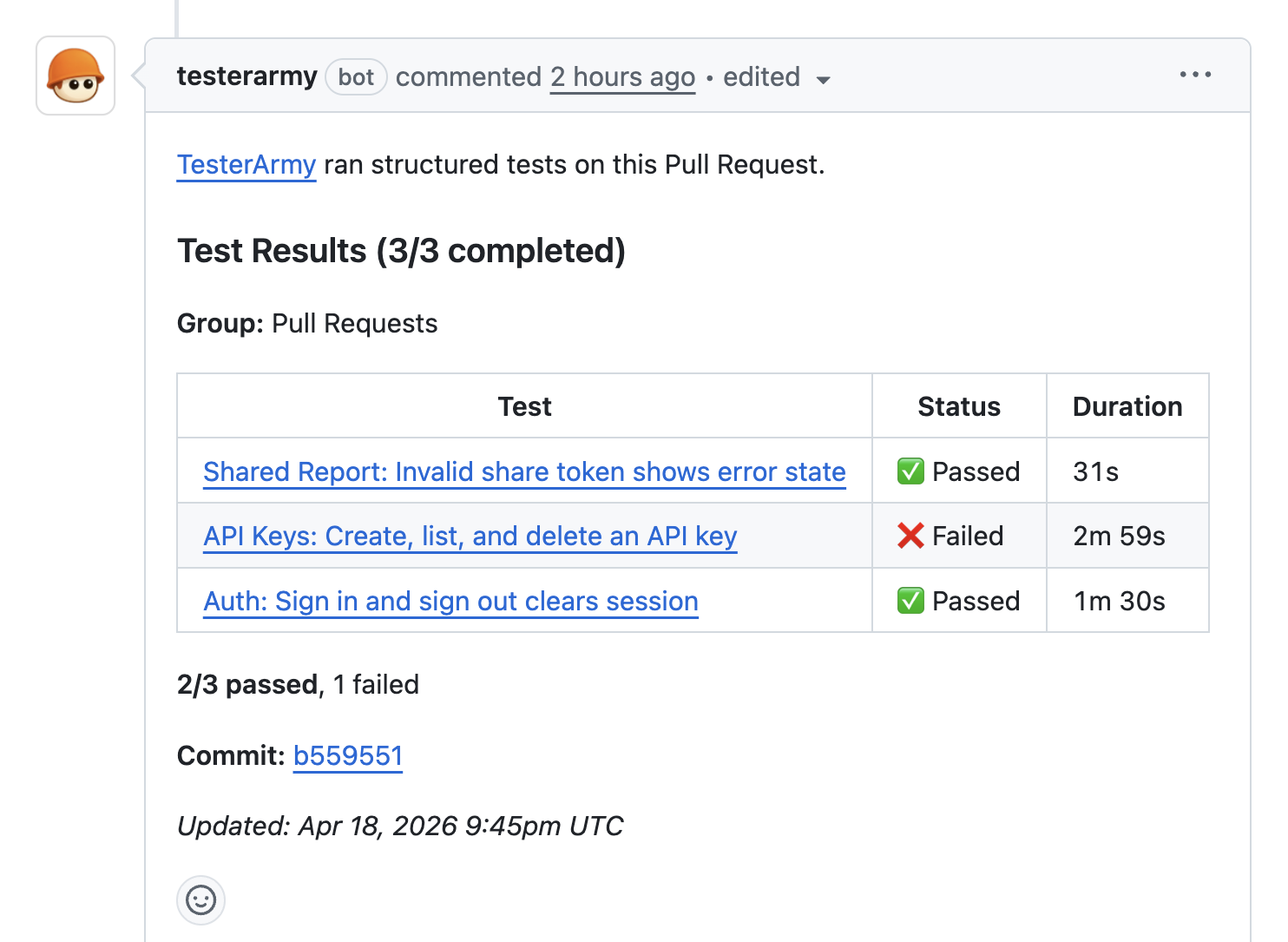
* **[Test group runs](#test-group-runs)** - a predefined test group runs against the preview URL. Great for catching regressions in existing application flows.
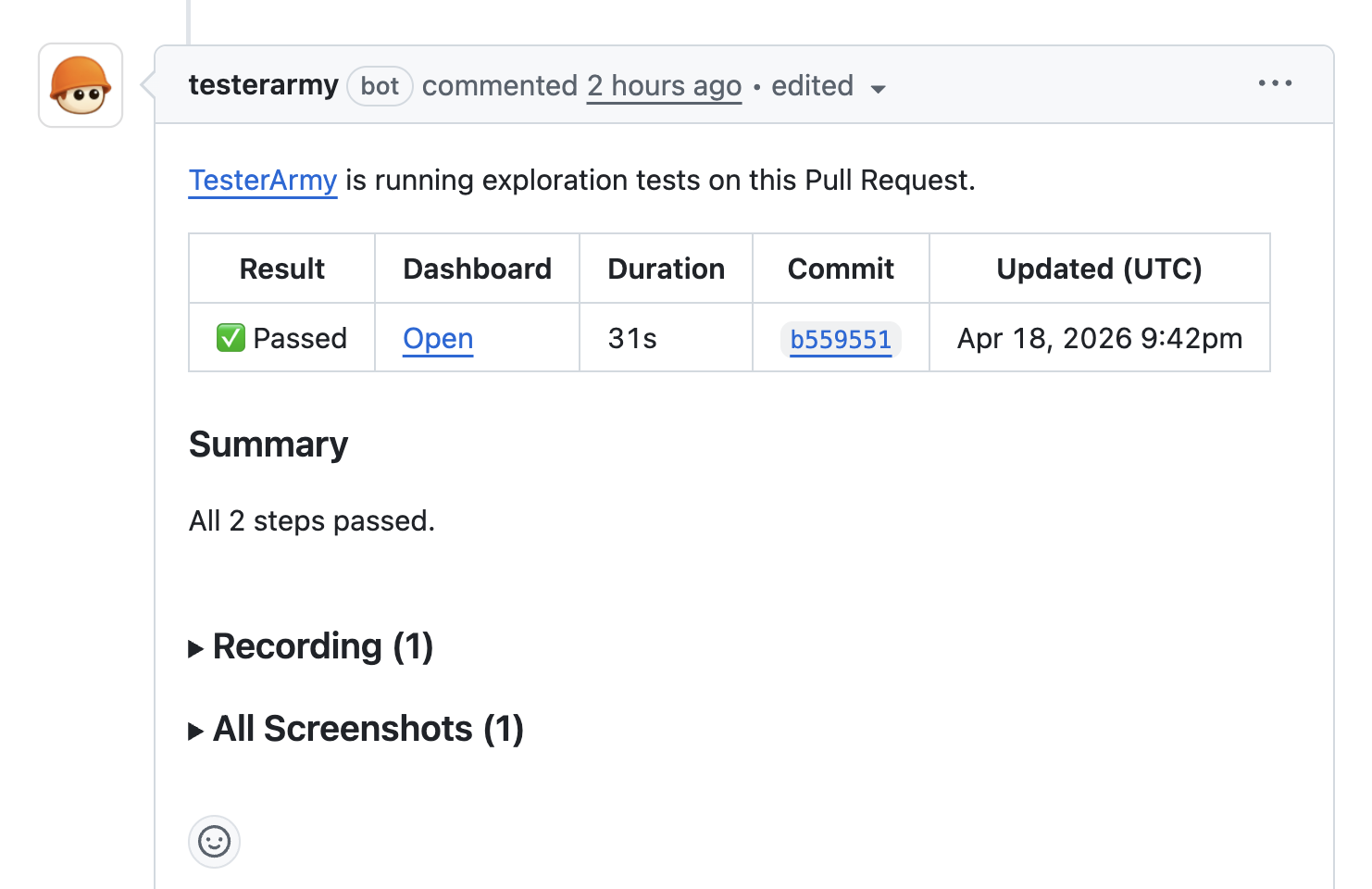
* **[Exploration agent](#exploration-agent)** - an AI agent reads the PR context, generates a targeted test plan, and executes it in a real browser. Great for surfacing issues nobody thought to write a test for yet.
## Prerequisites
* [GitHub App](https://github.com/apps/testerarmy/installations/new) installed and connected to the repository.
* A project linked to a GitHub repository.
* For Vercel: connect Vercel and choose the single Vercel project this repo should test. Use [Vercel](/integrations/vercel), [Coolify](/integrations/coolify), or [Custom infrastructure](/integrations/custom-infrastructure) depending on how previews are delivered.
## Supported providers
* [**Vercel**](/integrations/vercel) - triggered via GitHub deployment status events, then verified against the selected Vercel project. No webhook needed.
* [**Coolify**](/integrations/coolify) - via webhook configured in Coolify notifications.
* [**Custom infrastructure**](/integrations/custom-infrastructure) - via group webhooks, triggered from your own CI (GitHub Actions, GitLab CI, Jenkins, shell scripts, etc.).
## Test group runs
Reviewers see pass/fail results directly in the PR without leaving GitHub, and broken changes get caught before merge.
### Setup
1. Open your project and go to the **PR Testing** tab.
2. Enable **Test groups for PR runs** and select the test group to run on pull requests. All tests in this group will execute against every new deployment preview.
3. In **Integrations → Vercel**, connect Vercel and choose the matching Vercel project.
4. If Vercel deployment protection is enabled, add a [bypass token](/integrations/vercel#deployment-protection-bypass).
Optional: in **Integrations → GitHub**, choose a target branch if you only want PRs aimed at one base branch, such as `main`, to trigger automatic runs.
Every new preview deployment now triggers the selected test group automatically.
If the selected group uses a [Preparation Test](/run/prep-test), PR runs honor it too: the prep test runs first, web consumers reuse the saved session, and non-web consumers stay in the batch without browser-session reuse.
## Exploration agent
The plan is tailored to each PR and considers:
* **PR title and description** - understands intent.
* **Changed files** - focuses on affected areas.
* **Application context** - project memory, test accounts, uploaded files.
It covers functional checks, visual verification, and edge cases relevant to the changes. For Vercel previews, connect GitHub, connect Vercel, and select the Vercel project that should be allowed to trigger tests. Add a bypass token only if previews are protected.
## How it works
1. A pull request is opened or updated.
2. The deployment provider creates a preview and signals TesterArmy (via GitHub deployment status events for Vercel, or a webhook for Coolify).
3. For Vercel, TesterArmy verifies that the deployment URL belongs to the selected Vercel project.
4. TesterArmy resolves the PR from the commit SHA, checks the optional GitHub target-branch filter against the PR base branch, and triggers the configured test group and/or the exploration agent against the preview URL.
5. Results are posted as a single comment on the PR.
6. On subsequent pushes, the same comment is updated in place rather than creating a new one.
## Troubleshooting
### No comment appears on the PR
1. **GitHub App not connected** - verify installation in Project Settings.
2. **Permissions** - the GitHub App needs **Pull requests: Read & Write**.
3. **No tests configured** - if you're relying on test groups, make sure one is enabled in the **PR Testing** tab.
4. **Vercel project not selected** - open **Integrations → Vercel** and choose the Vercel project this repo should test.
5. **Target branch filter mismatch** - open **Integrations → GitHub** and confirm the PR is targeting the configured base branch.
### Tests run against the production URL
1. **Deployment not detected** - TesterArmy only triggers on preview deployments. Verify the deployment shows up in your provider's dashboard.
2. **Bypass token missing** - if the preview URL returns an auth screen, add a [bypass token](/integrations/vercel#deployment-protection-bypass).
3. **Wrong Vercel project selected** - if the repo is linked to multiple Vercel projects, only the selected Vercel project is allowed to trigger tests.
4. **Wrong PR target branch** - if a GitHub target branch is selected, only PRs targeting that base branch will trigger automatic runs.
# Production Monitoring
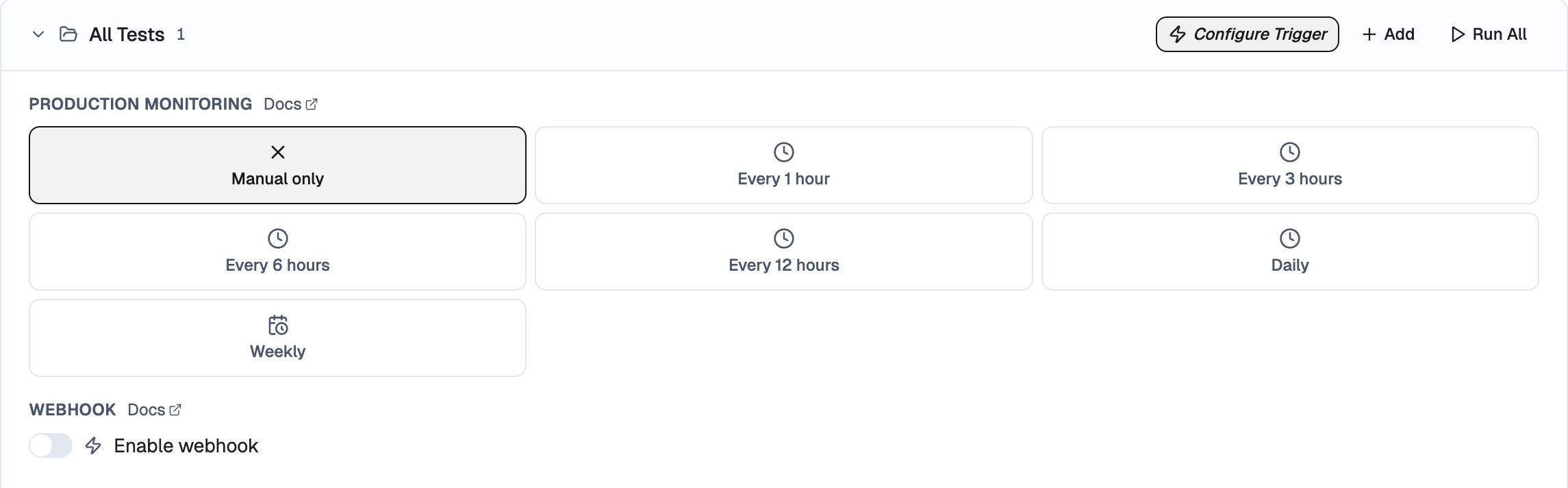
Production Monitoring execute tests at a fixed time, on repeat. Use them for nightly smoke checks, regression catching, or monitoring key flows outside of PR activity.
## Set up Production Monitoring
1. Open **Project → Tests** tab.
2. Click the **Triggers** button.
3. Click **New Production Monitoring**.
4. Set:
* **Frequency**: Hourly, Daily, or Weekly
* **Time and timezone**
* **Day of week** (weekly only)
* **Test group** to execute - each production monitor runs a test group you've already [created](/get-started/quick-start)
5. Save.
## Failure notifications
If any test in a monitored run fails, you'll receive an email notification so you can act on it right away. You can also get failure alerts in [Slack](/integrations/slack) by connecting your workspace.
## Tips
Keep each monitor focused. A monitor that tries to test login, billing, and settings in one go is harder to act on when it fails. Split those into separate groups instead.
# Group Webhooks
Group webhooks let you run every test in a group with one HTTP call. Works with any CI/CD pipeline, deployment tool, or custom automation.
## Setup
1. Open your project → **Tests** tab.
2. Expand a group and click the **trigger badge** (lightning icon).
3. Toggle **Enable webhook** on.
4. Click **Save**.
5. Copy the URL - the secret is shown once.
## Trigger
```bash
curl -X POST https://tester.army/api/v1/groups/webhook/{id}/{secret}
```
All tests in the group are queued against the project's configured URL.
### Optional body
You can pass JSON to attach commit metadata:
```bash
curl -X POST https://tester.army/api/v1/groups/webhook/{id}/{secret} \
-H "Content-Type: application/json" \
-d '{
"commitSha": "abc123"
}'
```
### Mobile app override
You can override the iOS app build used by mobile tests in the group.
**By bundle ID** — resolves to the latest uploaded app matching that bundle identifier:
```bash
curl -X POST https://tester.army/api/v1/groups/webhook/{id}/{secret} \
-H "Content-Type: application/json" \
-d '{
"mobile": {
"bundleId": "com.example.app",
"buildId": "44"
}
}'
```
**By app ID** — targets a specific uploaded build by its UUID (returned from the upload API):
```bash
curl -X POST https://tester.army/api/v1/groups/webhook/{id}/{secret} \
-H "Content-Type: application/json" \
-d '{
"mobile": {
"appId": ""
}
}'
```
Use `appId` when multiple builds share the same bundle ID and you need to pin a specific upload.
**By remote artifact** — provide an HTTPS URL and filename for remote build artifacts:
```bash
curl -X POST https://tester.army/api/v1/groups/webhook/{id}/{secret} \
-H "Content-Type: application/json" \
-d '{
"mobile": {
"artifactUrl": "https://example.com/builds/MyApp.app.zip",
"artifactFilename": "MyApp.app.zip",
"buildId": "eas-982"
}
}'
```
Only one of `bundleId`, `appId`, or `artifactUrl` can be provided per request.
### Response
```json
{
"received": true,
"status": "queued",
"runIds": ["uuid-1", "uuid-2"],
"count": 2
}
```
When the batch contains iOS tests, the response includes `metadata.mobile`:
```json
{
"received": true,
"status": "queued",
"runIds": ["uuid-1", "uuid-2"],
"count": 2,
"metadata": {
"mobile": {
"resolvedAppId": "11111111-1111-1111-8111-111111111111",
"source": "app_id",
"buildId": "44",
"temporary": false
}
}
}
```
* `source: "test_default"` means each iOS test used its saved app selection.
* `source: "app_id"` means the webhook used an already uploaded project app, selected by `bundleId` or `appId`.
* `source: "artifact_url"` means TesterArmy imported the artifact for this batch.
Artifact-imported apps are temporary. They are removed automatically after every run in the webhook batch reaches a terminal state.
## Failure notifications
When a webhook-triggered batch completes and any test fails, TesterArmy sends the failure summary by email only when the batch does **not** include GitHub commit context. Batches triggered with `commitSha` report back through GitHub instead of email.
## Limits
* **1 webhook per group.** Delete and recreate to regenerate the secret.
* Subject to your team's usage limits - returns `429` if exceeded.
* Webhook must be **active** (saved) to accept requests. Inactive webhooks return `403`.
# Test Credentials
Save login credentials in your project so the AI agent can authenticate automatically during test runs. No passwords in test prompts.
## Adding credentials
1. Go to **Project → Test Accounts**
2. Click **Add Credential**
3. Fill in:
* **Label** - identifies the credential (e.g., "admin", "viewer")
* **Username** - email or username
* **Password** - stored encrypted
4. Click **Save**
You can add multiple credentials per project for different roles (admin, regular user, read-only viewer, etc.). You can also add credentials for Google, GitHub for OAuth flows.
# Agent Mail Inboxes
TesterArmy can generate temporary email inboxes for your tests. This is useful for flows that require email verification - sign ups, OTP codes, password resets, invitation links.
Each test run can create a fresh inbox or reuse a static one assigned to the project. The agent reads incoming emails, extracts verification codes or links, and continues the test flow automatically.
## How it works
1. The agent creates an inbox (e.g., `test-abc123@inbox.testerarmy.com`)
2. Signs up or triggers an email-based flow using that address
3. Waits for the email to arrive
4. Reads the email content, extracts the OTP code or verification link
5. Continues the test (enters the code, clicks the link)
## Static inboxes
You can assign a permanent inbox to your project under **Project → Test Accounts**. This is useful when you need to re-use the same email across multiple test runs (e.g., testing login for an already-registered account).
# HTTP Basic Auth
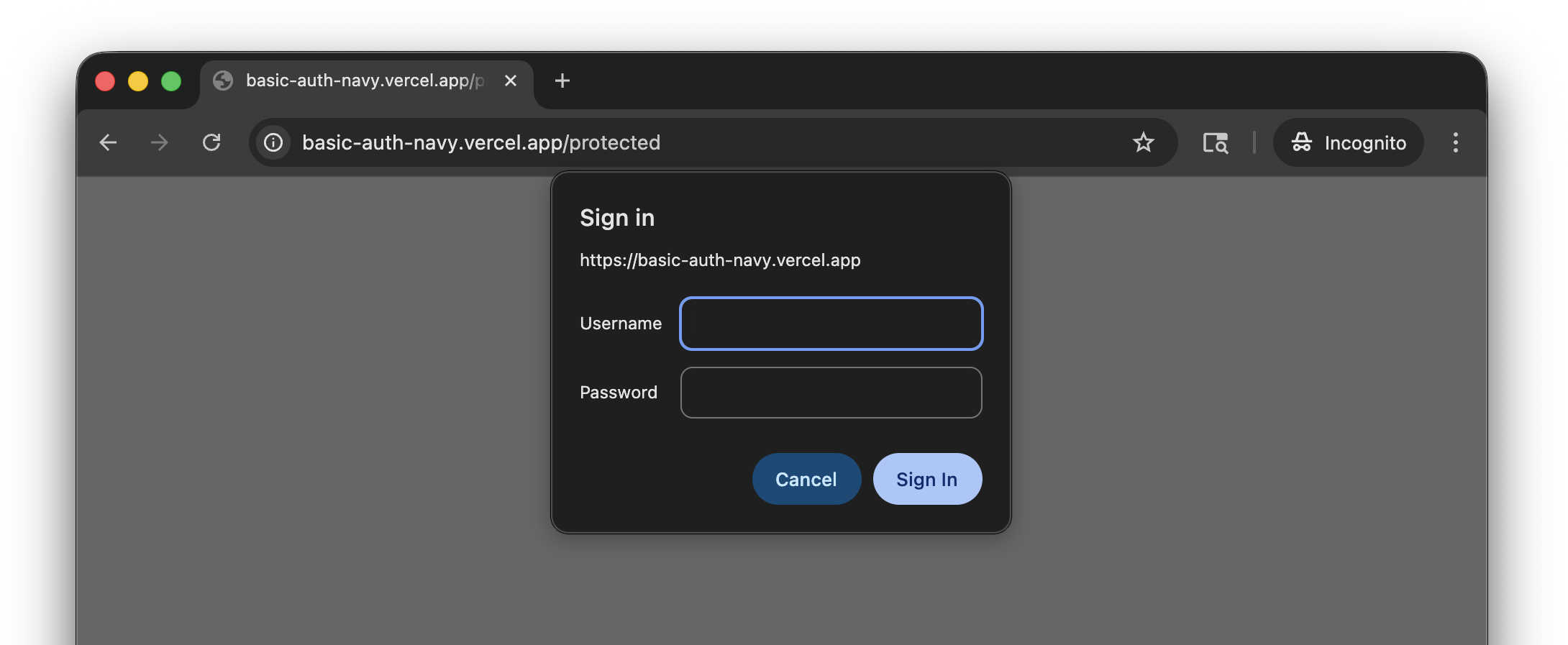
If your staging or preview site is behind HTTP Basic Authentication, save credentials in TesterArmy so the AI agent can access it during test runs.
## Setup
1. Go to **Project Settings → Integrations → Site Protection**.
2. Click **Set up** on the HTTP Basic Auth card.
3. Enter the **username** and **password**.
4. Click **Save**.
Credentials are stored encrypted and sent automatically with every test run for that project.
# Overview
> **Warning: Early Access**
>
> Mobile testing is currently in early access. To get access, please [contact
> us](https://tester.army/meet).
TesterArmy runs your app on cloud simulators and uses AI agents to test it like a real user.
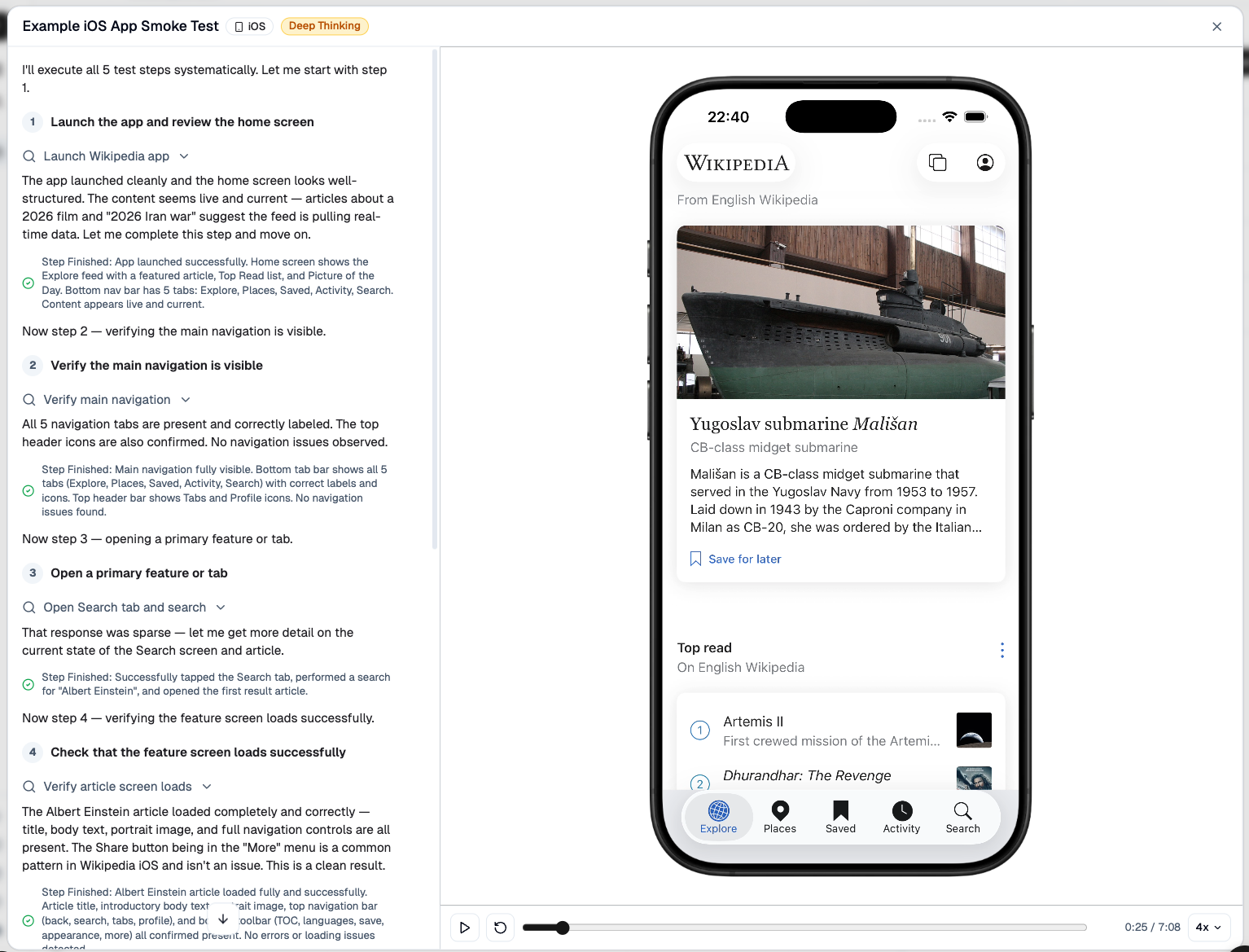
## Recommended setup
1. Build an iOS Simulator version of your app and zip the `.app` bundle.
2. Upload that build to TesterArmy and create your first mobile test.
3. Run the test manually to confirm everything works.
4. Add GitHub Actions so the same tests run automatically on every change.
If you want a working reference, see the [mobile GitHub Action](https://github.com/tester-army/mobile-github-action) and the [mobile example app](https://github.com/tester-army/mobile-example).
## Supported platforms
| Platform | System Version | Type |
| -------- | -------------- | --------- |
| iOS | 26.0 | Simulator |
Android support is coming soon. [Let us know](mailto:support@tester.army) if you'd like to be notified when it's available.
## Requirements
TesterArmy currently supports simulator builds only. For iOS, that means you need a `.app` bundle built for **iOS Simulator**, not an `.ipa` built for physical devices.
For manual uploads, archive the simulator build as `.app.zip` or `.app.tar.gz`. If you use our GitHub Action, you can pass the `.app` directory directly and the action handles the upload for you.
See [App Uploads](/mobile/app-uploads) for the build and zip steps.
## Limitations
Currently we support running tests on simulators only, so features like camera access and biometric access (Face ID, Touch ID) are not supported.
If you need to run tests on real devices please [contact us](mailto:support@tester.army).
## Next steps
Build a simulator .app, zip it, upload it, and create your first mobile test.
Run your existing mobile tests automatically in CI with our GitHub Action.
# App Uploads
Before you can automate mobile tests in CI, you need a simulator build to test against.
## What you need to upload
TesterArmy currently supports iOS Simulator builds in one of these formats:
* `.app.zip`
* `.app.tar.gz`
> **Warning: Simulator builds only**
>
> Do not upload an `.ipa`. That is a device build. TesterArmy needs a `.app` bundle built for **iOS
> Simulator**.
## Build for iOS Simulator
If you already have an Xcode project, build a simulator app with `xcodebuild`:
```bash
xcodebuild -workspace ios/MyApp.xcworkspace \
-scheme MyApp \
-configuration Release \
-sdk iphonesimulator \
-destination 'generic/platform=iOS Simulator' \
-derivedDataPath ios/build \
build
```
The simulator app bundle usually ends up here:
```bash
ios/build/Build/Products/Release-iphonesimulator/MyApp.app
```
If you are using Expo / React Native, the [mobile example app](https://github.com/tester-army/mobile-example) is a good reference. Its build flow looks like this:
```bash
npx expo prebuild --platform ios
xcodebuild -workspace ios/testerarmy.xcworkspace \
-scheme testerarmy \
-configuration Release \
-sdk iphonesimulator \
-destination 'generic/platform=iOS Simulator' \
-derivedDataPath ios/build \
build
```
## Zip the `.app` bundle
For dashboard uploads and direct API uploads, archive the `.app` bundle after the build completes:
```bash
cd ios/build/Build/Products/Release-iphonesimulator
zip -r MyApp.app.zip MyApp.app
# or using tar
# tar -czf MyApp.app.tar.gz MyApp.app
```
You should end up with a file like `MyApp.app.zip`.
## Upload via the dashboard
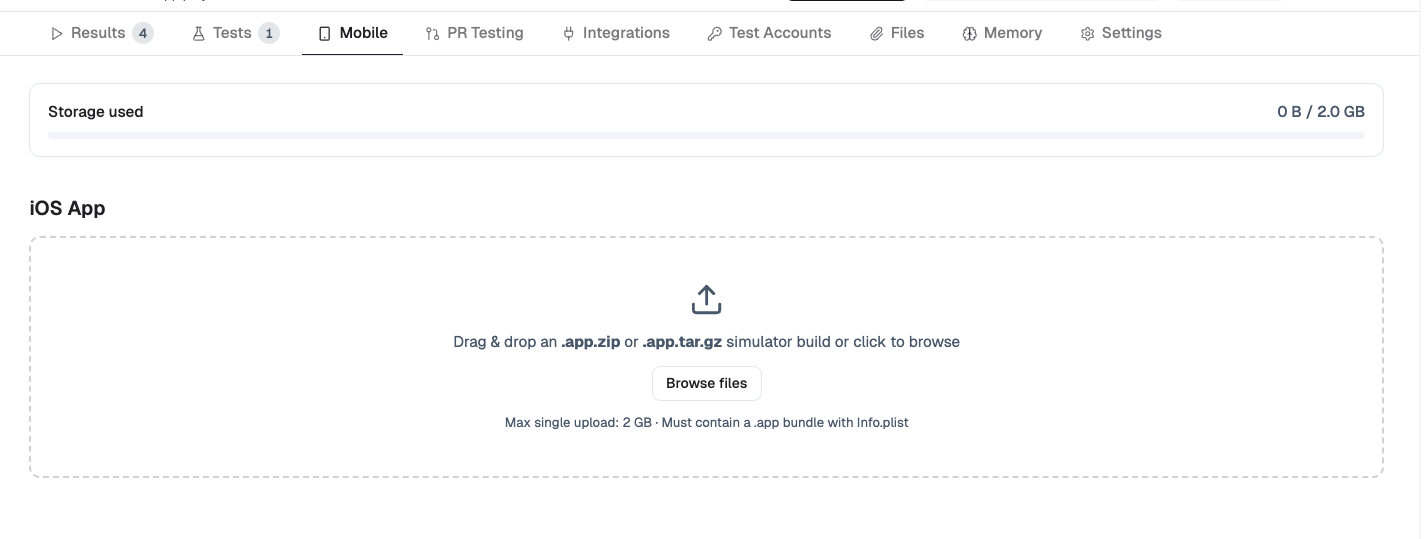
Go to your project and click the **Mobile** tab. Then click **Browse Files** and select the `.app.zip` or `.app.tar.gz` file you built.
## Create your first mobile test
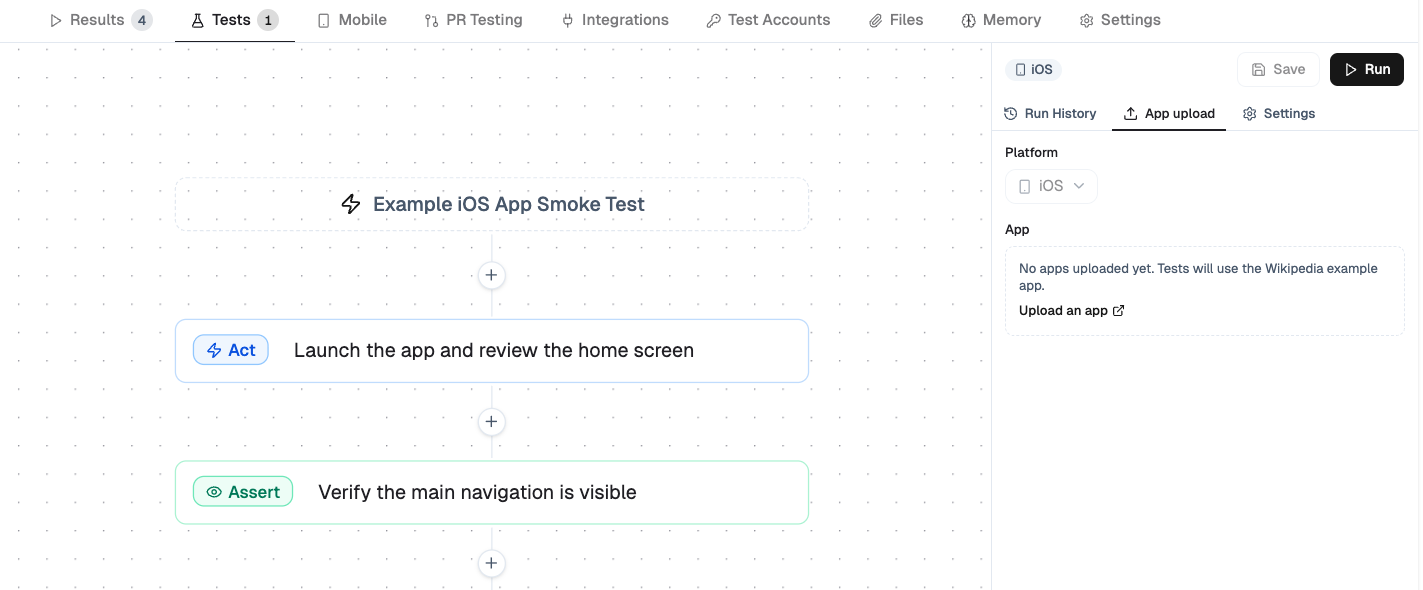
Before adding CI, create at least one mobile test in the dashboard:
1. Upload your simulator build.
2. Create a new test or open an existing one.
3. In the test's **App Upload** tab, select the uploaded app.
4. Run the test manually and make sure it passes.
When writing prompts, guide the agent like you would guide a human user.
**Weak prompt example:** *"Open settings"*
**Strong prompt example:** *"Tap the profile icon in the top right, open Settings, and verify the notifications toggle is visible"*
Specific prompts produce more reliable tests and make CI failures easier to understand.
If you need to manage uploads programmatically outside GitHub Actions, see the API Reference tab.
## Notes
* Use `removeAfter` to auto-delete temporary uploads created during CI.
* Each project has a 2 GB storage limit.
* Our GitHub Action can upload the `.app` directory directly, so you do not need to zip it when running through GitHub Actions.
# GitHub Actions
GitHub Actions is the recommended way to run mobile tests automatically.
You only need to provide a simulator build and your TesterArmy credentials. TesterArmy handles the cloud simulator setup, app installation, test execution, and run orchestration for you, so you do not need to manage simulators in your CI pipeline.
Before you set it up, make sure you have already:
* built and uploaded a simulator app,
* created at least one mobile test in TesterArmy,
* run that test manually once,
* added the test to a group with a webhook.
If you want a working reference, see the [mobile GitHub Action](https://github.com/tester-army/mobile-github-action) and the [mobile example app](https://github.com/tester-army/mobile-example).
## What you need
Add these GitHub secrets to your repository:
| Secret | Description |
| ------------------------ | ------------------------------------------------------ |
| `TESTERARMY_API_KEY` | API key from **Team Settings → API Keys** |
| `TESTERARMY_PROJECT_ID` | Your TesterArmy project ID from **Project Settings** |
| `TESTERARMY_WEBHOOK_URL` | Group webhook URL for the mobile tests you want to run |
You can find webhook details in [Group Webhooks](/run/group-webhooks).
## Recommended workflow
The most reliable setup is:
1. Build the iOS Simulator app on a macOS runner.
2. Upload the `.app` bundle as a GitHub artifact.
3. Download that artifact on Linux.
4. Run `tester-army/mobile-github-action` to upload the app, trigger the webhook, wait for results, and clean up.
```yaml
name: Mobile Tests
on:
push:
branches:
- main
pull_request:
workflow_dispatch:
jobs:
build:
name: Build iOS Simulator app
runs-on: macos-latest
steps:
- name: Check out repository
uses: actions/checkout@v5
- name: Build iOS Simulator app
shell: bash
run: |
set -euo pipefail
xcodebuild \
-workspace ios/MyApp.xcworkspace \
-scheme MyApp \
-configuration Release \
-sdk iphonesimulator \
-destination 'generic/platform=iOS Simulator' \
-derivedDataPath ios/build \
build
- name: Copy .app to artifact directory
shell: bash
run: |
set -euo pipefail
mkdir -p .build
cp -R ios/build/Build/Products/Release-iphonesimulator/MyApp.app .build/MyApp.app
- name: Upload .app artifact
uses: actions/upload-artifact@v5
with:
name: ios-simulator-app
path: .build/MyApp.app
retention-days: 1
test:
name: Run TesterArmy tests
needs: build
runs-on: ubuntu-latest
steps:
- name: Download .app artifact
uses: actions/download-artifact@v5
with:
name: ios-simulator-app
path: .build/MyApp.app
- name: Upload app and run TesterArmy tests
id: mobile
uses: tester-army/mobile-github-action@v1
with:
app_path: .build/MyApp.app
api_key: ${{ secrets.TESTERARMY_API_KEY }}
project_id: ${{ secrets.TESTERARMY_PROJECT_ID }}
webhook_url: ${{ secrets.TESTERARMY_WEBHOOK_URL }}
delete_app_after_run: "true"
remove_after: "3600"
timeout_seconds: "1800"
- name: Print overall status
run: echo "Overall status: ${{ steps.mobile.outputs.overall_status }}"
```
> **Info: No manual upload step in CI**
>
> The GitHub Action accepts either a `.app` directory or an archived app file. If you pass a `.app`
> directory, the action zips and uploads it for you.
## What the action does
`tester-army/mobile-github-action` handles the full CI flow for you:
1. Uploads the app to TesterArmy.
2. Provisions the cloud simulator environment and installs the app for the run.
3. Triggers your mobile test group webhook and orchestrates the run lifecycle.
4. Polls until the runs finish or the timeout is reached.
5. Deletes the uploaded app after the run if cleanup is enabled.
Results are written to the GitHub step summary so you can quickly see pass/fail status, duration, issues, and screenshots.
## Important options
| Input | Required | Description |
| ----------------------- | -------- | ----------------------------------------------------------------- |
| `app_path` | Yes | Path to the `.app`, `.app.zip`, or `.app.tar.gz` you want to test |
| `api_key` | Yes | TesterArmy API key |
| `project_id` | Yes | TesterArmy project ID |
| `webhook_url` | Yes | Group webhook URL |
| `delete_app_after_run` | No | Delete the uploaded app when the run finishes |
| `remove_after` | No | Auto-delete the upload after a number of seconds |
| `timeout_seconds` | No | Maximum time to wait for all runs to finish |
| `poll_interval_seconds` | No | How often the action checks for run completion |
## Outputs
The action exposes these outputs:
* `app_id` — the uploaded TesterArmy app ID
* `run_ids` — a JSON array of created run IDs
* `overall_status` — `passed`, `failed`, or `timed_out`
You can use `overall_status` in later workflow steps if you want custom reporting or notifications.
## Troubleshooting
### The app upload fails immediately
Make sure you are building for **iOS Simulator** and passing a `.app`, `.app.zip`, or `.app.tar.gz` file. An `.ipa` will not work.
### The action cannot find your build
Double-check the `.app` path inside the build job. The most common output path is:
```bash
ios/build/Build/Products/Release-iphonesimulator/MyApp.app
```
### The workflow starts but no tests run
Make sure your `TESTERARMY_WEBHOOK_URL` points to a group that already contains mobile tests.
### The workflow times out
Increase `timeout_seconds` for slower builds or longer test suites. The default is 30 minutes.
## Related docs
* [App Uploads](/mobile/app-uploads)
* API Reference tab
* [Group Webhooks](/run/group-webhooks)
# Vercel
GitHub remains the event source for Vercel PR testing, but you now need to install the TesterArmy Vercel integration and choose which single Vercel project this TesterArmy project should care about.
## Setup
1. [Install the GitHub App](https://github.com/apps/testerarmy/installations/new)
2. Authorize for your org or user account and select the target repositories.
3. In your TesterArmy project, choose the installation and repository.
4. Open **Integrations → Vercel**.
5. Click **Connect Vercel**. This opens the TesterArmy Vercel integration page on Vercel.
6. Install the integration for the personal account or Vercel team that owns the target project.
7. Back in TesterArmy, refresh the Vercel project list and select the Vercel project that matches this repository.
8. Optional: in **Integrations → GitHub**, choose the PR target branch to allow if you only want automatic runs for one base branch.
TesterArmy detects Vercel preview deployments via GitHub `deployment_status` events, then verifies that the deployment belongs to the selected Vercel project before any tests are queued.
## Why selection is required
One GitHub repository can be connected to multiple Vercel projects.
TesterArmy needs one explicit choice so it can safely ignore deployments from the wrong Vercel project instead of running tests against the wrong preview.
Only deployments from the selected Vercel project will trigger tests.
If a GitHub target branch is configured, the deployment must also belong to a PR targeting that base branch.
## Deployment protection bypass
If Vercel deployment protection blocks preview URLs, add a bypass token after you select the Vercel project:
1. In Vercel: **Project Settings → Deployment Protection → Protection Bypass for Automation** - create and copy the token.
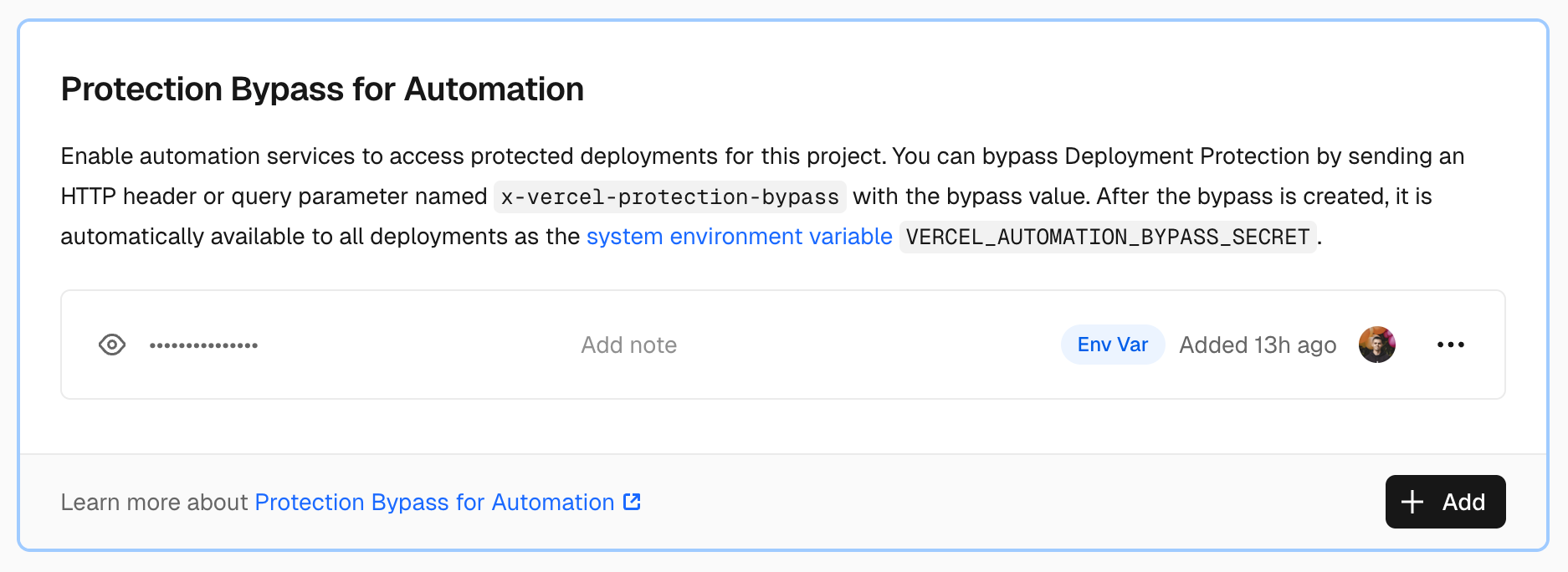
2. In TesterArmy: **Project Settings → Integrations → Vercel** → paste the token.
## Status states
* **Connected, no project selected** - connect succeeded, but you still need to choose the Vercel project.
* **Active** - the selected Vercel project is accessible and used for verification.
* **Requires reconnect** - Vercel auth expired or was revoked.
* **Missing access** - the selected Vercel project is no longer accessible to the connected Vercel account.
## Troubleshooting
### No PR comment appears
1. **GitHub App not connected** - verify installation in Project Settings.
2. **Permissions** - the GitHub App needs **Pull requests: Read & Write**.
3. **Vercel not selected** - connect Vercel and choose the single Vercel project this project should test.
4. **Wrong Vercel project** - if the repo is linked to multiple Vercel projects, only the selected one is allowed to trigger tests.
# Coolify
Coolify deployments are detected via a webhook you configure in Coolify's notification settings. Results are posted as GitHub PR comments.
## Setup
1. Go to **Project → Settings → CI/CD** and select **Coolify**.
2. Click **Add Webhook** and copy the generated URL.
3. In Coolify: [**Notifications → Webhook**](https://coolify.io/docs/knowledge-base/notifications) - paste the URL and enable deployment events.
TesterArmy uses `pull_request_id` from the Coolify payload to identify the PR.
## Docker Compose workaround
Coolify has a [known issue](https://github.com/coollabsio/coolify/issues/8958) where Docker Compose deployments don't send the preview URL. Other build packs (Nixpacks, Dockerfile, Static) work out of the box.
**Workaround:** set a **Preview URL pattern** when creating the webhook:
```
https://{{pr_number}}.myapp.com
```
TesterArmy substitutes the PR number from the payload to build the URL.
## Troubleshooting
### Missing deployment URL
`Webhook payload does not contain a deployment URL`
* **Docker Compose** - configure a Preview URL pattern (see above).
* **No domain configured** - your app needs a domain set in Coolify.
### No PR comment appears
1. **GitHub App not connected** - verify installation in Project Settings.
2. **Missing PR number** - Coolify only sends `pull_request_id` for preview deployments, not production.
3. **Permissions** - the GitHub App needs **Pull requests: Read & Write**.
# Custom Infrastructure
If your app isn't deployed on Vercel or Coolify, you can still wire up PR testing with a group webhook. Trigger it from GitHub Actions, GitLab CI, Jenkins, a shell script, or any other system that can send an HTTP request after a deployment finishes.
## How it works
1. You create a webhook on a test group in the TesterArmy dashboard.
2. After your own CI deploys a preview, it `POST`s to the webhook URL with the commit SHA (and optionally the preview URL).
3. TesterArmy runs the tests in the group against that URL and posts a GitHub check run back on the commit.
## 1. Generate the webhook
1. Open your project → **Tests** tab.
2. Expand the test group you want to run on each deploy.
3. Click the **trigger badge** (lightning icon) and toggle **Enable webhook** on.
4. Copy the URL that's shown - the secret is only revealed once.
The URL looks like:
```
https://tester.army/api/v1/groups/webhook/{id}/{secret}
```
Store it as a secret in your CI system. See [Group Webhooks](/run/group-webhooks) for the full reference (rate limits, mobile overrides, response format).
## 2. Trigger it from your CI
Call the webhook after your deployment step. Pass `commitSha` so results link back to the PR on GitHub, and `targetUrl` if you need to override the URL under test.
### GitHub Actions
```yaml
- name: Run TesterArmy tests
run: |
curl -X POST "${{ secrets.TESTERARMY_WEBHOOK_URL }}" \
-H "Content-Type: application/json" \
-d "{\"commitSha\":\"${{ github.sha }}\",\"targetUrl\":\"${{ secrets.TESTERARMY_TARGET_URL }}\"}"
```
### GitLab CI
```yaml
testerarmy:
stage: test
script:
- |
curl -X POST "$TESTERARMY_WEBHOOK_URL" \
-H "Content-Type: application/json" \
-d "{\"commitSha\":\"$CI_COMMIT_SHA\",\"targetUrl\":\"$TESTERARMY_TARGET_URL\"}"
```
### Any shell
```bash
curl -X POST "$TESTERARMY_WEBHOOK_URL" \
-H "Content-Type: application/json" \
-d '{"commitSha":"'"$COMMIT_SHA"'","targetUrl":"'"$DEPLOY_URL"'"}'
```
## Payload fields
| Field | Required | Description |
| ----------- | -------------------- | --------------------------------------------------------------------------------------------------------------------- |
| `commitSha` | No (but recommended) | Links results to the commit on GitHub as a check run. Without it, tests still run but nothing is posted to GitHub. |
| `targetUrl` | No | Overrides the URL under test for this run. If omitted, tests run against the URL configured in your project settings. |
## Results
* **GitHub** - a commit check run on the SHA appears in the PR checks tab.
* **TesterArmy dashboard** - full run details with screenshots and logs.
For a walkthrough focused on a staging environment, see [Testing Staging Environment](/guides/testing-staging).
## Troubleshooting
### No check run on the PR
1. **Missing `commitSha`** - the webhook runs tests, but can't post to GitHub without it.
2. **GitHub App not connected** - verify installation in Project Settings.
3. **Permissions** - the GitHub App needs **Checks: Read & Write**.
### `401 Unauthorized`
The webhook ID or secret is wrong. Regenerate the webhook on the group and update your CI secret.
### `403 Forbidden`
The webhook is disabled. Open the group's trigger panel and toggle **Enable webhook** back on.
### Tests run against the wrong URL
Tests use `targetUrl` from the payload if provided, otherwise the URL configured in your project settings. Check both.
# Slack
Receive test failure notifications directly in a Slack channel. When production monitoring or webhook-triggered tests fail, TesterArmy posts a summary with links to each failed run.
## Setup
1. Go to **Project → Settings → Integrations → Slack** and click **Add to Slack**.
2. Authorize the TesterArmy app for your Slack workspace.
3. On Slack's authorization screen, pick the channel where TesterArmy should post failure alerts.
4. Return to TesterArmy and confirm that the integration shows the selected channel.
TesterArmy posts a welcome message to the selected channel after setup completes.
If you want to use a private channel, the person installing the Slack app must already be a member
of that channel so it appears in Slack's picker.
TesterArmy prefers Slack for failure alerts when a Slack channel is connected. If Slack delivery is
unavailable, the app falls back to email notifications.
## Changing the channel
1. Go to **Project → Settings → Integrations → Slack**.
2. Click **Change channel**.
3. If this project is still using the legacy Slack bot connection, disconnect it first.
4. Slack opens its authorization flow so you can pick a different destination channel.
5. Finish setup and confirm that the integration shows the new channel.
# Testing Staging Environment
This guide walks through testing a staging environment deployed on your own infrastructure. You'll use group webhooks with a `commitSha` to trigger tests after deployment and get results as GitHub commit check runs.
## Prerequisites
* [GitHub App](https://github.com/apps/testerarmy/installations/new) installed and connected to your repository.
* A project with tests organized in a group.
## 1. Create a test group webhook
1. Open your project → **Tests** tab.
2. Expand the group you want to run against staging.
3. Click the **trigger badge** (lightning icon).
4. Toggle **Enable webhook** on and click **Save**.
5. Copy the webhook URL - the secret is shown once.
The URL looks like:
```
https://tester.army/api/v1/groups/webhook/{id}/{secret}
```
See [Group Webhooks](/run/group-webhooks) for more details.
## 2. Trigger after deployment
Once your staging deployment completes, call the webhook with the commit SHA. This links test results to the commit on GitHub as a check run.
### GitHub Actions
Add a step after your deployment job:
```yaml
- name: Run TesterArmy tests
run: |
curl -X POST "${{ secrets.TESTERARMY_WEBHOOK_URL }}" \
-H "Content-Type: application/json" \
-d "{\"commitSha\":\"${{ github.sha }}\",\"targetUrl\":\"${{ secrets.TESTERARMY_TARGET_URL }}\"}"
```
Add these to your repository secrets (**Settings -> Secrets and variables -> Actions**):
* `TESTERARMY_WEBHOOK_URL` - the full webhook URL including the secret.
* `TESTERARMY_TARGET_URL` - staging environment URL (e.g. `https://staging.myapp.com`).
`targetUrl` is optional - if omitted, tests run against the URL configured in your project settings.
## 3. View results
When tests finish, results appear in two places:
* **GitHub** - a commit check run on the SHA, visible in the PR checks tab.
* **TesterArmy dashboard** - full run details with screenshots and logs.
## How `commitSha` works
Without `commitSha`, TesterArmy runs the tests but has no way to report back to GitHub. Passing it enables the integration:
1. Tests are queued against `targetUrl` when provided, otherwise the project's configured URL.
2. A **pending** check run is created on the commit.
3. When tests complete, the check run updates with the batch summary.
## Troubleshooting
### No check run appears on GitHub
1. **GitHub App not connected** - verify installation in Project Settings.
2. **Missing `commitSha`** - the webhook still runs tests, but can't post results to GitHub without it.
3. **Permissions** - the GitHub App needs **Checks: Read & Write**.
### Tests run against the wrong URL
Tests run against `targetUrl` if provided in the webhook body, otherwise the URL configured in your project settings. Make sure one of them points to your staging environment.
# Getting Started
`testerarmy` (alias `ta`) is an agent-first QA runner. It works standalone for interactive use or as a skill for coding agents like Claude Code, Codex, and OpenCode.
Your coding agent spawns testing agents to validate changes - keeping the feedback loop tight without polluting main agent context.
## Install
```bash
npm install -g testerarmy
```
Or use without installing:
```bash
npx testerarmy --help
```
Both `testerarmy` and `ta` map to the same CLI.
## Agent skill (recommended)
If you use a coding agent, install the official skill for tighter integration:
```bash
npx skills add tester-army/cli
```
This gives your agent structured instructions for running tests, interpreting results, and iterating on failures.
Repository: [github.com/tester-army/cli](https://github.com/tester-army/cli)
## Authenticate
Run `ta auth` and paste your API key when prompted:
```bash
ta auth
```
Get your key from the TesterArmy dashboard under **Team Settings → API Keys**.
You can also pass the key directly:
```bash
ta auth --api-key YOUR_KEY
```
Or set it as an environment variable (useful for CI):
```bash
export TESTERARMY_API_KEY="YOUR_KEY"
```
## Verify
```bash
ta status
```
Use `--json` for machine-readable output:
```bash
ta status --json
```
## Sign out
```bash
ta signout
# or
ta logout
```
## Next steps
Run tests against your dev server.
# Local Development
Use the CLI to validate changes against your local dev server before pushing.
## Set your target URL
Set the target once for the session:
```bash
export TESTERARMY_TARGET_URL="http://localhost:3000"
```
Or pass it per-run:
```bash
ta tests run --url http://localhost:3000
```
## Run tests
Start your dev server, then run dashboard-defined tests locally:
```bash
# Run a single test
ta tests run
# Run all tests in a group
ta tests run --group --project
```
## Headed mode
Watch the AI agent work in a visible browser:
```bash
ta tests run --headed
```
Useful for debugging flaky tests or understanding agent behavior.
## Debug mode
Save detailed logs and transcripts to `.testerarmy/`:
```bash
ta tests run --debug
```
Check `.testerarmy//debug-run.json` for the full stream/tool transcript.
## Inspect artifacts
Every run writes to `.testerarmy//`:
* `run-meta.json` - run metadata
* `result.json` - pass/fail results
* `debug-run.json` - full transcript (with `--debug`)
List recent runs:
```bash
ta list
```
## Typical workflow
```bash
# 1) Start dev server
pnpm dev
# 2) Set target
export TESTERARMY_TARGET_URL="http://localhost:3000"
# 3) Make changes
# 4) Run targeted test
ta tests run
# 5) Check results, iterate
ta list
```
## CI usage
Set `TESTERARMY_API_KEY` and `TESTERARMY_TARGET_URL` as environment variables in your pipeline:
```bash
ta tests run --group --project --parallel 3 --json
```
Exit code `1` on any test failure - your pipeline fails automatically.
```yaml
- name: Run QA tests
run: npx testerarmy tests run --group --project --parallel 3 --json
env:
TESTERARMY_API_KEY: ${{ secrets.TESTERARMY_API_KEY }}
TESTERARMY_TARGET_URL: ${{ steps.deploy.outputs.url }}
```
# LLMs
> LLM endpoints for docs index and full docs text.
* [llms.txt](/llms.txt)
* [llms-full.txt](/llms-full.txt)
# List projects
GET https://tester.army/v1/projects
List projects available to the authenticated API key's team.
Reference: https://docs.tester.army/api-reference/tester-army-api/projects/list-projects
## OpenAPI Specification
```yaml
openapi: 3.1.0
info:
title: testerarmy
version: 1.0.0
paths:
/v1/projects:
get:
operationId: list-projects
summary: List projects
description: List projects available to the authenticated API key's team.
tags:
- subpackage_projects
parameters:
- name: Authorization
in: header
description: API key authentication using Bearer token format
required: true
schema:
type: string
responses:
'200':
description: List of projects
content:
application/json:
schema:
$ref: '#/components/schemas/Projects_listProjects_Response_200'
'400':
description: Bad Request - Invalid input parameters
content:
application/json:
schema:
$ref: '#/components/schemas/ListProjectsRequestBadRequestError'
'401':
description: Unauthorized - Invalid or missing API key
content:
application/json:
schema:
$ref: '#/components/schemas/ListProjectsRequestUnauthorizedError'
'429':
description: Too Many Requests - Usage limit exceeded
content:
application/json:
schema:
$ref: '#/components/schemas/ListProjectsRequestTooManyRequestsError'
'500':
description: Internal Server Error
content:
application/json:
schema:
$ref: '#/components/schemas/ListProjectsRequestInternalServerError'
'504':
description: Gateway Timeout - Test execution exceeded time limit
content:
application/json:
schema:
$ref: '#/components/schemas/ListProjectsRequestGatewayTimeoutError'
servers:
- url: https://tester.army
components:
schemas:
V1ProjectsGetResponsesContentApplicationJsonSchemaProjectsItems:
type: object
properties:
id:
type: string
format: uuid
shortId:
type: string
name:
type: string
url:
type:
- string
- 'null'
format: uri
required:
- id
- shortId
- name
- url
title: V1ProjectsGetResponsesContentApplicationJsonSchemaProjectsItems
Projects_listProjects_Response_200:
type: object
properties:
projects:
type: array
items:
$ref: >-
#/components/schemas/V1ProjectsGetResponsesContentApplicationJsonSchemaProjectsItems
required:
- projects
title: Projects_listProjects_Response_200
ListProjectsRequestBadRequestError:
type: object
properties:
error:
type: string
description: Error code or type
message:
type: string
description: Human-readable error message
required:
- error
- message
title: ListProjectsRequestBadRequestError
ListProjectsRequestUnauthorizedError:
type: object
properties:
error:
type: string
description: Error code or type
message:
type: string
description: Human-readable error message
required:
- error
- message
title: ListProjectsRequestUnauthorizedError
ListProjectsRequestTooManyRequestsError:
type: object
properties:
error:
type: string
description: Error code or type
message:
type: string
description: Human-readable error message
required:
- error
- message
title: ListProjectsRequestTooManyRequestsError
ListProjectsRequestInternalServerError:
type: object
properties:
error:
type: string
description: Error code or type
message:
type: string
description: Human-readable error message
required:
- error
- message
title: ListProjectsRequestInternalServerError
ListProjectsRequestGatewayTimeoutError:
type: object
properties:
error:
type: string
description: Error code or type
message:
type: string
description: Human-readable error message
required:
- error
- message
title: ListProjectsRequestGatewayTimeoutError
securitySchemes:
bearerAuth:
type: http
scheme: bearer
description: API key authentication using Bearer token format
```
## SDK Code Examples
```python
import requests
url = "https://tester.army/v1/projects"
headers = {"Authorization": "Bearer "}
response = requests.get(url, headers=headers)
print(response.json())
```
```javascript
const url = 'https://tester.army/v1/projects';
const options = {method: 'GET', headers: {Authorization: 'Bearer '}};
try {
const response = await fetch(url, options);
const data = await response.json();
console.log(data);
} catch (error) {
console.error(error);
}
```
```go
package main
import (
"fmt"
"net/http"
"io"
)
func main() {
url := "https://tester.army/v1/projects"
req, _ := http.NewRequest("GET", url, nil)
req.Header.Add("Authorization", "Bearer ")
res, _ := http.DefaultClient.Do(req)
defer res.Body.Close()
body, _ := io.ReadAll(res.Body)
fmt.Println(res)
fmt.Println(string(body))
}
```
```ruby
require 'uri'
require 'net/http'
url = URI("https://tester.army/v1/projects")
http = Net::HTTP.new(url.host, url.port)
http.use_ssl = true
request = Net::HTTP::Get.new(url)
request["Authorization"] = 'Bearer '
response = http.request(request)
puts response.read_body
```
```java
import com.mashape.unirest.http.HttpResponse;
import com.mashape.unirest.http.Unirest;
HttpResponse response = Unirest.get("https://tester.army/v1/projects")
.header("Authorization", "Bearer ")
.asString();
```
```php
request('GET', 'https://tester.army/v1/projects', [
'headers' => [
'Authorization' => 'Bearer ',
],
]);
echo $response->getBody();
```
```csharp
using RestSharp;
var client = new RestClient("https://tester.army/v1/projects");
var request = new RestRequest(Method.GET);
request.AddHeader("Authorization", "Bearer ");
IRestResponse response = client.Execute(request);
```
```swift
import Foundation
let headers = ["Authorization": "Bearer "]
let request = NSMutableURLRequest(url: NSURL(string: "https://tester.army/v1/projects")! as URL,
cachePolicy: .useProtocolCachePolicy,
timeoutInterval: 10.0)
request.httpMethod = "GET"
request.allHTTPHeaderFields = headers
let session = URLSession.shared
let dataTask = session.dataTask(with: request as URLRequest, completionHandler: { (data, response, error) -> Void in
if (error != nil) {
print(error as Any)
} else {
let httpResponse = response as? HTTPURLResponse
print(httpResponse)
}
})
dataTask.resume()
```
# List project mobile apps
GET https://tester.army/v1/projects/{projectId}/mobile
List uploaded mobile apps for a mobile project.
Reference: https://docs.tester.army/api-reference/tester-army-api/projects/list-project-mobile-apps
## OpenAPI Specification
```yaml
openapi: 3.1.0
info:
title: testerarmy
version: 1.0.0
paths:
/v1/projects/{projectId}/mobile:
get:
operationId: list-project-mobile-apps
summary: List project mobile apps
description: List uploaded mobile apps for a mobile project.
tags:
- subpackage_projects
parameters:
- name: projectId
in: path
description: Project ID
required: true
schema:
type: string
format: uuid
- name: Authorization
in: header
description: API key authentication using Bearer token format
required: true
schema:
type: string
responses:
'200':
description: List of project mobile apps
content:
application/json:
schema:
$ref: >-
#/components/schemas/Projects_listProjectMobileApps_Response_200
'400':
description: Bad Request - Invalid input parameters
content:
application/json:
schema:
$ref: >-
#/components/schemas/ListProjectMobileAppsRequestBadRequestError
'401':
description: Unauthorized - Invalid or missing API key
content:
application/json:
schema:
$ref: >-
#/components/schemas/ListProjectMobileAppsRequestUnauthorizedError
'404':
description: Project not found
content:
application/json:
schema:
$ref: '#/components/schemas/ListProjectMobileAppsRequestNotFoundError'
'429':
description: Too Many Requests - Usage limit exceeded
content:
application/json:
schema:
$ref: >-
#/components/schemas/ListProjectMobileAppsRequestTooManyRequestsError
'500':
description: Internal Server Error
content:
application/json:
schema:
$ref: >-
#/components/schemas/ListProjectMobileAppsRequestInternalServerError
'504':
description: Gateway Timeout - Test execution exceeded time limit
content:
application/json:
schema:
$ref: >-
#/components/schemas/ListProjectMobileAppsRequestGatewayTimeoutError
servers:
- url: https://tester.army
components:
schemas:
V1ProjectsProjectIdMobileGetResponsesContentApplicationJsonSchemaAppsItemsPlatform:
type: string
enum:
- ios
- android
title: >-
V1ProjectsProjectIdMobileGetResponsesContentApplicationJsonSchemaAppsItemsPlatform
V1ProjectsProjectIdMobileGetResponsesContentApplicationJsonSchemaAppsItemsSource:
type: string
enum:
- manual_upload
- group_webhook_artifact
- api_upload
title: >-
V1ProjectsProjectIdMobileGetResponsesContentApplicationJsonSchemaAppsItemsSource
V1ProjectsProjectIdMobileGetResponsesContentApplicationJsonSchemaAppsItems:
type: object
properties:
id:
type: string
format: uuid
platform:
$ref: >-
#/components/schemas/V1ProjectsProjectIdMobileGetResponsesContentApplicationJsonSchemaAppsItemsPlatform
filename:
type: string
bundleId:
type:
- string
- 'null'
appVersion:
type:
- string
- 'null'
buildVersion:
type:
- string
- 'null'
fileSize:
type: number
format: double
source:
$ref: >-
#/components/schemas/V1ProjectsProjectIdMobileGetResponsesContentApplicationJsonSchemaAppsItemsSource
expiresAt:
type:
- string
- 'null'
format: date-time
removeAfter:
type:
- integer
- 'null'
createdAt:
type: string
format: date-time
required:
- id
- platform
- filename
- bundleId
- appVersion
- buildVersion
- fileSize
- source
- expiresAt
- removeAfter
- createdAt
title: >-
V1ProjectsProjectIdMobileGetResponsesContentApplicationJsonSchemaAppsItems
Projects_listProjectMobileApps_Response_200:
type: object
properties:
apps:
type: array
items:
$ref: >-
#/components/schemas/V1ProjectsProjectIdMobileGetResponsesContentApplicationJsonSchemaAppsItems
required:
- apps
title: Projects_listProjectMobileApps_Response_200
ListProjectMobileAppsRequestBadRequestError:
type: object
properties:
error:
type: string
description: Error code or type
message:
type: string
description: Human-readable error message
required:
- error
- message
title: ListProjectMobileAppsRequestBadRequestError
ListProjectMobileAppsRequestUnauthorizedError:
type: object
properties:
error:
type: string
description: Error code or type
message:
type: string
description: Human-readable error message
required:
- error
- message
title: ListProjectMobileAppsRequestUnauthorizedError
ListProjectMobileAppsRequestNotFoundError:
type: object
properties:
error:
type: string
description: Error code or type
message:
type: string
description: Human-readable error message
required:
- error
- message
title: ListProjectMobileAppsRequestNotFoundError
ListProjectMobileAppsRequestTooManyRequestsError:
type: object
properties:
error:
type: string
description: Error code or type
message:
type: string
description: Human-readable error message
required:
- error
- message
title: ListProjectMobileAppsRequestTooManyRequestsError
ListProjectMobileAppsRequestInternalServerError:
type: object
properties:
error:
type: string
description: Error code or type
message:
type: string
description: Human-readable error message
required:
- error
- message
title: ListProjectMobileAppsRequestInternalServerError
ListProjectMobileAppsRequestGatewayTimeoutError:
type: object
properties:
error:
type: string
description: Error code or type
message:
type: string
description: Human-readable error message
required:
- error
- message
title: ListProjectMobileAppsRequestGatewayTimeoutError
securitySchemes:
bearerAuth:
type: http
scheme: bearer
description: API key authentication using Bearer token format
```
## SDK Code Examples
```python
import requests
url = "https://tester.army/v1/projects/projectId/mobile"
headers = {"Authorization": "Bearer "}
response = requests.get(url, headers=headers)
print(response.json())
```
```javascript
const url = 'https://tester.army/v1/projects/projectId/mobile';
const options = {method: 'GET', headers: {Authorization: 'Bearer '}};
try {
const response = await fetch(url, options);
const data = await response.json();
console.log(data);
} catch (error) {
console.error(error);
}
```
```go
package main
import (
"fmt"
"net/http"
"io"
)
func main() {
url := "https://tester.army/v1/projects/projectId/mobile"
req, _ := http.NewRequest("GET", url, nil)
req.Header.Add("Authorization", "Bearer ")
res, _ := http.DefaultClient.Do(req)
defer res.Body.Close()
body, _ := io.ReadAll(res.Body)
fmt.Println(res)
fmt.Println(string(body))
}
```
```ruby
require 'uri'
require 'net/http'
url = URI("https://tester.army/v1/projects/projectId/mobile")
http = Net::HTTP.new(url.host, url.port)
http.use_ssl = true
request = Net::HTTP::Get.new(url)
request["Authorization"] = 'Bearer '
response = http.request(request)
puts response.read_body
```
```java
import com.mashape.unirest.http.HttpResponse;
import com.mashape.unirest.http.Unirest;
HttpResponse response = Unirest.get("https://tester.army/v1/projects/projectId/mobile")
.header("Authorization", "Bearer ")
.asString();
```
```php
request('GET', 'https://tester.army/v1/projects/projectId/mobile', [
'headers' => [
'Authorization' => 'Bearer ',
],
]);
echo $response->getBody();
```
```csharp
using RestSharp;
var client = new RestClient("https://tester.army/v1/projects/projectId/mobile");
var request = new RestRequest(Method.GET);
request.AddHeader("Authorization", "Bearer ");
IRestResponse response = client.Execute(request);
```
```swift
import Foundation
let headers = ["Authorization": "Bearer "]
let request = NSMutableURLRequest(url: NSURL(string: "https://tester.army/v1/projects/projectId/mobile")! as URL,
cachePolicy: .useProtocolCachePolicy,
timeoutInterval: 10.0)
request.httpMethod = "GET"
request.allHTTPHeaderFields = headers
let session = URLSession.shared
let dataTask = session.dataTask(with: request as URLRequest, completionHandler: { (data, response, error) -> Void in
if (error != nil) {
print(error as Any)
} else {
let httpResponse = response as? HTTPURLResponse
print(httpResponse)
}
})
dataTask.resume()
```
# Upload a project mobile app
POST https://tester.army/v1/projects/{projectId}/mobile
Content-Type: multipart/form-data
Upload a mobile app binary to a mobile project. Optionally set removeAfter to delete temporary uploads after a delay.
Reference: https://docs.tester.army/api-reference/tester-army-api/projects/upload-a-project-mobile-app
## OpenAPI Specification
```yaml
openapi: 3.1.0
info:
title: testerarmy
version: 1.0.0
paths:
/v1/projects/{projectId}/mobile:
post:
operationId: upload-a-project-mobile-app
summary: Upload a project mobile app
description: >-
Upload a mobile app binary to a mobile project. Optionally set
removeAfter to delete temporary uploads after a delay.
tags:
- subpackage_projects
parameters:
- name: projectId
in: path
description: Project ID
required: true
schema:
type: string
format: uuid
- name: Authorization
in: header
description: API key authentication using Bearer token format
required: true
schema:
type: string
responses:
'201':
description: Mobile app uploaded successfully
content:
application/json:
schema:
$ref: >-
#/components/schemas/Projects_uploadAProjectMobileApp_Response_201
'400':
description: Bad Request - Invalid input parameters
content:
application/json:
schema:
$ref: >-
#/components/schemas/UploadAProjectMobileAppRequestBadRequestError
'401':
description: Unauthorized - Invalid or missing API key
content:
application/json:
schema:
$ref: >-
#/components/schemas/UploadAProjectMobileAppRequestUnauthorizedError
'404':
description: Project not found
content:
application/json:
schema:
$ref: >-
#/components/schemas/UploadAProjectMobileAppRequestNotFoundError
'429':
description: Too Many Requests - Usage limit exceeded
content:
application/json:
schema:
$ref: >-
#/components/schemas/UploadAProjectMobileAppRequestTooManyRequestsError
'500':
description: Internal Server Error
content:
application/json:
schema:
$ref: >-
#/components/schemas/UploadAProjectMobileAppRequestInternalServerError
'504':
description: Gateway Timeout - Test execution exceeded time limit
content:
application/json:
schema:
$ref: >-
#/components/schemas/UploadAProjectMobileAppRequestGatewayTimeoutError
requestBody:
content:
multipart/form-data:
schema:
type: object
properties:
file:
type: string
format: binary
removeAfter:
type: string
description: Optional expiration in seconds for temporary uploads
required:
- file
servers:
- url: https://tester.army
components:
schemas:
V1ProjectsProjectIdMobilePostResponsesContentApplicationJsonSchemaAppPlatform:
type: string
enum:
- ios
- android
title: >-
V1ProjectsProjectIdMobilePostResponsesContentApplicationJsonSchemaAppPlatform
V1ProjectsProjectIdMobilePostResponsesContentApplicationJsonSchemaAppSource:
type: string
enum:
- manual_upload
- group_webhook_artifact
- api_upload
title: >-
V1ProjectsProjectIdMobilePostResponsesContentApplicationJsonSchemaAppSource
V1ProjectsProjectIdMobilePostResponsesContentApplicationJsonSchemaApp:
type: object
properties:
id:
type: string
format: uuid
platform:
$ref: >-
#/components/schemas/V1ProjectsProjectIdMobilePostResponsesContentApplicationJsonSchemaAppPlatform
filename:
type: string
bundleId:
type:
- string
- 'null'
appVersion:
type:
- string
- 'null'
buildVersion:
type:
- string
- 'null'
fileSize:
type: number
format: double
source:
$ref: >-
#/components/schemas/V1ProjectsProjectIdMobilePostResponsesContentApplicationJsonSchemaAppSource
expiresAt:
type:
- string
- 'null'
format: date-time
removeAfter:
type:
- integer
- 'null'
createdAt:
type: string
format: date-time
required:
- id
- platform
- filename
- bundleId
- appVersion
- buildVersion
- fileSize
- source
- expiresAt
- removeAfter
- createdAt
title: V1ProjectsProjectIdMobilePostResponsesContentApplicationJsonSchemaApp
Projects_uploadAProjectMobileApp_Response_201:
type: object
properties:
app:
$ref: >-
#/components/schemas/V1ProjectsProjectIdMobilePostResponsesContentApplicationJsonSchemaApp
required:
- app
title: Projects_uploadAProjectMobileApp_Response_201
UploadAProjectMobileAppRequestBadRequestError:
type: object
properties:
error:
type: string
description: Error code or type
message:
type: string
description: Human-readable error message
required:
- error
- message
title: UploadAProjectMobileAppRequestBadRequestError
UploadAProjectMobileAppRequestUnauthorizedError:
type: object
properties:
error:
type: string
description: Error code or type
message:
type: string
description: Human-readable error message
required:
- error
- message
title: UploadAProjectMobileAppRequestUnauthorizedError
UploadAProjectMobileAppRequestNotFoundError:
type: object
properties:
error:
type: string
description: Error code or type
message:
type: string
description: Human-readable error message
required:
- error
- message
title: UploadAProjectMobileAppRequestNotFoundError
UploadAProjectMobileAppRequestTooManyRequestsError:
type: object
properties:
error:
type: string
description: Error code or type
message:
type: string
description: Human-readable error message
required:
- error
- message
title: UploadAProjectMobileAppRequestTooManyRequestsError
UploadAProjectMobileAppRequestInternalServerError:
type: object
properties:
error:
type: string
description: Error code or type
message:
type: string
description: Human-readable error message
required:
- error
- message
title: UploadAProjectMobileAppRequestInternalServerError
UploadAProjectMobileAppRequestGatewayTimeoutError:
type: object
properties:
error:
type: string
description: Error code or type
message:
type: string
description: Human-readable error message
required:
- error
- message
title: UploadAProjectMobileAppRequestGatewayTimeoutError
securitySchemes:
bearerAuth:
type: http
scheme: bearer
description: API key authentication using Bearer token format
```
## SDK Code Examples
```python
import requests
url = "https://tester.army/v1/projects/projectId/mobile"
files = { "file": "open('string', 'rb')" }
payload = { "removeAfter": }
headers = {"Authorization": "Bearer "}
response = requests.post(url, data=payload, files=files, headers=headers)
print(response.json())
```
```javascript
const url = 'https://tester.army/v1/projects/projectId/mobile';
const form = new FormData();
form.append('file', 'string');
form.append('removeAfter', '');
const options = {method: 'POST', headers: {Authorization: 'Bearer '}};
options.body = form;
try {
const response = await fetch(url, options);
const data = await response.json();
console.log(data);
} catch (error) {
console.error(error);
}
```
```go
package main
import (
"fmt"
"strings"
"net/http"
"io"
)
func main() {
url := "https://tester.army/v1/projects/projectId/mobile"
payload := strings.NewReader("-----011000010111000001101001\r\nContent-Disposition: form-data; name=\"file\"; filename=\"string\"\r\nContent-Type: application/octet-stream\r\n\r\n\r\n-----011000010111000001101001\r\nContent-Disposition: form-data; name=\"removeAfter\"\r\n\r\n\r\n-----011000010111000001101001--\r\n")
req, _ := http.NewRequest("POST", url, payload)
req.Header.Add("Authorization", "Bearer ")
res, _ := http.DefaultClient.Do(req)
defer res.Body.Close()
body, _ := io.ReadAll(res.Body)
fmt.Println(res)
fmt.Println(string(body))
}
```
```ruby
require 'uri'
require 'net/http'
url = URI("https://tester.army/v1/projects/projectId/mobile")
http = Net::HTTP.new(url.host, url.port)
http.use_ssl = true
request = Net::HTTP::Post.new(url)
request["Authorization"] = 'Bearer '
request.body = "-----011000010111000001101001\r\nContent-Disposition: form-data; name=\"file\"; filename=\"string\"\r\nContent-Type: application/octet-stream\r\n\r\n\r\n-----011000010111000001101001\r\nContent-Disposition: form-data; name=\"removeAfter\"\r\n\r\n\r\n-----011000010111000001101001--\r\n"
response = http.request(request)
puts response.read_body
```
```java
import com.mashape.unirest.http.HttpResponse;
import com.mashape.unirest.http.Unirest;
HttpResponse response = Unirest.post("https://tester.army/v1/projects/projectId/mobile")
.header("Authorization", "Bearer ")
.body("-----011000010111000001101001\r\nContent-Disposition: form-data; name=\"file\"; filename=\"string\"\r\nContent-Type: application/octet-stream\r\n\r\n\r\n-----011000010111000001101001\r\nContent-Disposition: form-data; name=\"removeAfter\"\r\n\r\n\r\n-----011000010111000001101001--\r\n")
.asString();
```
```php
request('POST', 'https://tester.army/v1/projects/projectId/mobile', [
'multipart' => [
[
'name' => 'file',
'filename' => 'string',
'contents' => null
]
]
'headers' => [
'Authorization' => 'Bearer ',
],
]);
echo $response->getBody();
```
```csharp
using RestSharp;
var client = new RestClient("https://tester.army/v1/projects/projectId/mobile");
var request = new RestRequest(Method.POST);
request.AddHeader("Authorization", "Bearer ");
request.AddParameter("undefined", "-----011000010111000001101001\r\nContent-Disposition: form-data; name=\"file\"; filename=\"string\"\r\nContent-Type: application/octet-stream\r\n\r\n\r\n-----011000010111000001101001\r\nContent-Disposition: form-data; name=\"removeAfter\"\r\n\r\n\r\n-----011000010111000001101001--\r\n", ParameterType.RequestBody);
IRestResponse response = client.Execute(request);
```
```swift
import Foundation
let headers = ["Authorization": "Bearer "]
let parameters = [
[
"name": "file",
"fileName": "string"
],
[
"name": "removeAfter",
"value":
]
]
let boundary = "---011000010111000001101001"
var body = ""
var error: NSError? = nil
for param in parameters {
let paramName = param["name"]!
body += "--\(boundary)\r\n"
body += "Content-Disposition:form-data; name=\"\(paramName)\""
if let filename = param["fileName"] {
let contentType = param["content-type"]!
let fileContent = String(contentsOfFile: filename, encoding: String.Encoding.utf8)
if (error != nil) {
print(error as Any)
}
body += "; filename=\"\(filename)\"\r\n"
body += "Content-Type: \(contentType)\r\n\r\n"
body += fileContent
} else if let paramValue = param["value"] {
body += "\r\n\r\n\(paramValue)"
}
}
let request = NSMutableURLRequest(url: NSURL(string: "https://tester.army/v1/projects/projectId/mobile")! as URL,
cachePolicy: .useProtocolCachePolicy,
timeoutInterval: 10.0)
request.httpMethod = "POST"
request.allHTTPHeaderFields = headers
request.httpBody = postData as Data
let session = URLSession.shared
let dataTask = session.dataTask(with: request as URLRequest, completionHandler: { (data, response, error) -> Void in
if (error != nil) {
print(error as Any)
} else {
let httpResponse = response as? HTTPURLResponse
print(httpResponse)
}
})
dataTask.resume()
```
# Delete a project mobile app
DELETE https://tester.army/v1/projects/{projectId}/mobile/{appId}
Delete a previously uploaded mobile app from a mobile project.
Reference: https://docs.tester.army/api-reference/tester-army-api/projects/delete-a-project-mobile-app
## OpenAPI Specification
```yaml
openapi: 3.1.0
info:
title: testerarmy
version: 1.0.0
paths:
/v1/projects/{projectId}/mobile/{appId}:
delete:
operationId: delete-a-project-mobile-app
summary: Delete a project mobile app
description: Delete a previously uploaded mobile app from a mobile project.
tags:
- subpackage_projects
parameters:
- name: projectId
in: path
description: Project ID
required: true
schema:
type: string
format: uuid
- name: appId
in: path
description: Mobile app ID
required: true
schema:
type: string
format: uuid
- name: Authorization
in: header
description: API key authentication using Bearer token format
required: true
schema:
type: string
responses:
'200':
description: Mobile app deleted
content:
application/json:
schema:
$ref: >-
#/components/schemas/Projects_deleteAProjectMobileApp_Response_200
'400':
description: Bad Request - Invalid input parameters
content:
application/json:
schema:
$ref: >-
#/components/schemas/DeleteAProjectMobileAppRequestBadRequestError
'401':
description: Unauthorized - Invalid or missing API key
content:
application/json:
schema:
$ref: >-
#/components/schemas/DeleteAProjectMobileAppRequestUnauthorizedError
'404':
description: Project or mobile app not found
content:
application/json:
schema:
$ref: >-
#/components/schemas/DeleteAProjectMobileAppRequestNotFoundError
'429':
description: Too Many Requests - Usage limit exceeded
content:
application/json:
schema:
$ref: >-
#/components/schemas/DeleteAProjectMobileAppRequestTooManyRequestsError
'500':
description: Internal Server Error
content:
application/json:
schema:
$ref: >-
#/components/schemas/DeleteAProjectMobileAppRequestInternalServerError
'504':
description: Gateway Timeout - Test execution exceeded time limit
content:
application/json:
schema:
$ref: >-
#/components/schemas/DeleteAProjectMobileAppRequestGatewayTimeoutError
servers:
- url: https://tester.army
components:
schemas:
Projects_deleteAProjectMobileApp_Response_200:
type: object
properties:
deleted:
type: boolean
required:
- deleted
title: Projects_deleteAProjectMobileApp_Response_200
DeleteAProjectMobileAppRequestBadRequestError:
type: object
properties:
error:
type: string
description: Error code or type
message:
type: string
description: Human-readable error message
required:
- error
- message
title: DeleteAProjectMobileAppRequestBadRequestError
DeleteAProjectMobileAppRequestUnauthorizedError:
type: object
properties:
error:
type: string
description: Error code or type
message:
type: string
description: Human-readable error message
required:
- error
- message
title: DeleteAProjectMobileAppRequestUnauthorizedError
DeleteAProjectMobileAppRequestNotFoundError:
type: object
properties:
error:
type: string
description: Error code or type
message:
type: string
description: Human-readable error message
required:
- error
- message
title: DeleteAProjectMobileAppRequestNotFoundError
DeleteAProjectMobileAppRequestTooManyRequestsError:
type: object
properties:
error:
type: string
description: Error code or type
message:
type: string
description: Human-readable error message
required:
- error
- message
title: DeleteAProjectMobileAppRequestTooManyRequestsError
DeleteAProjectMobileAppRequestInternalServerError:
type: object
properties:
error:
type: string
description: Error code or type
message:
type: string
description: Human-readable error message
required:
- error
- message
title: DeleteAProjectMobileAppRequestInternalServerError
DeleteAProjectMobileAppRequestGatewayTimeoutError:
type: object
properties:
error:
type: string
description: Error code or type
message:
type: string
description: Human-readable error message
required:
- error
- message
title: DeleteAProjectMobileAppRequestGatewayTimeoutError
securitySchemes:
bearerAuth:
type: http
scheme: bearer
description: API key authentication using Bearer token format
```
## SDK Code Examples
```python
import requests
url = "https://tester.army/v1/projects/projectId/mobile/appId"
headers = {"Authorization": "Bearer "}
response = requests.delete(url, headers=headers)
print(response.json())
```
```javascript
const url = 'https://tester.army/v1/projects/projectId/mobile/appId';
const options = {method: 'DELETE', headers: {Authorization: 'Bearer '}};
try {
const response = await fetch(url, options);
const data = await response.json();
console.log(data);
} catch (error) {
console.error(error);
}
```
```go
package main
import (
"fmt"
"net/http"
"io"
)
func main() {
url := "https://tester.army/v1/projects/projectId/mobile/appId"
req, _ := http.NewRequest("DELETE", url, nil)
req.Header.Add("Authorization", "Bearer ")
res, _ := http.DefaultClient.Do(req)
defer res.Body.Close()
body, _ := io.ReadAll(res.Body)
fmt.Println(res)
fmt.Println(string(body))
}
```
```ruby
require 'uri'
require 'net/http'
url = URI("https://tester.army/v1/projects/projectId/mobile/appId")
http = Net::HTTP.new(url.host, url.port)
http.use_ssl = true
request = Net::HTTP::Delete.new(url)
request["Authorization"] = 'Bearer '
response = http.request(request)
puts response.read_body
```
```java
import com.mashape.unirest.http.HttpResponse;
import com.mashape.unirest.http.Unirest;
HttpResponse response = Unirest.delete("https://tester.army/v1/projects/projectId/mobile/appId")
.header("Authorization", "Bearer ")
.asString();
```
```php
request('DELETE', 'https://tester.army/v1/projects/projectId/mobile/appId', [
'headers' => [
'Authorization' => 'Bearer ',
],
]);
echo $response->getBody();
```
```csharp
using RestSharp;
var client = new RestClient("https://tester.army/v1/projects/projectId/mobile/appId");
var request = new RestRequest(Method.DELETE);
request.AddHeader("Authorization", "Bearer ");
IRestResponse response = client.Execute(request);
```
```swift
import Foundation
let headers = ["Authorization": "Bearer "]
let request = NSMutableURLRequest(url: NSURL(string: "https://tester.army/v1/projects/projectId/mobile/appId")! as URL,
cachePolicy: .useProtocolCachePolicy,
timeoutInterval: 10.0)
request.httpMethod = "DELETE"
request.allHTTPHeaderFields = headers
let session = URLSession.shared
let dataTask = session.dataTask(with: request as URLRequest, completionHandler: { (data, response, error) -> Void in
if (error != nil) {
print(error as Any)
} else {
let httpResponse = response as? HTTPURLResponse
print(httpResponse)
}
})
dataTask.resume()
```
# Initiate a project mobile app upload
POST https://tester.army/v1/projects/{projectId}/mobile/upload
Content-Type: application/json
Create a presigned upload for a mobile app binary.
Reference: https://docs.tester.army/api-reference/tester-army-api/projects/initiate-a-project-mobile-app-upload
## OpenAPI Specification
```yaml
openapi: 3.1.0
info:
title: testerarmy
version: 1.0.0
paths:
/v1/projects/{projectId}/mobile/upload:
post:
operationId: initiate-a-project-mobile-app-upload
summary: Initiate a project mobile app upload
description: Create a presigned upload for a mobile app binary.
tags:
- subpackage_projects
parameters:
- name: projectId
in: path
description: Project ID
required: true
schema:
type: string
format: uuid
- name: Authorization
in: header
description: API key authentication using Bearer token format
required: true
schema:
type: string
responses:
'200':
description: Presigned upload details
content:
application/json:
schema:
$ref: >-
#/components/schemas/Projects_initiateAProjectMobileAppUpload_Response_200
'400':
description: Bad Request - Invalid input parameters
content:
application/json:
schema:
$ref: >-
#/components/schemas/InitiateAProjectMobileAppUploadRequestBadRequestError
'401':
description: Unauthorized - Invalid or missing API key
content:
application/json:
schema:
$ref: >-
#/components/schemas/InitiateAProjectMobileAppUploadRequestUnauthorizedError
'429':
description: Too Many Requests - Usage limit exceeded
content:
application/json:
schema:
$ref: >-
#/components/schemas/InitiateAProjectMobileAppUploadRequestTooManyRequestsError
'500':
description: Internal Server Error
content:
application/json:
schema:
$ref: >-
#/components/schemas/InitiateAProjectMobileAppUploadRequestInternalServerError
'504':
description: Gateway Timeout - Test execution exceeded time limit
content:
application/json:
schema:
$ref: >-
#/components/schemas/InitiateAProjectMobileAppUploadRequestGatewayTimeoutError
requestBody:
content:
application/json:
schema:
type: object
properties:
filename:
type: string
fileSize:
type: integer
removeAfter:
type: integer
required:
- filename
- fileSize
servers:
- url: https://tester.army
components:
schemas:
Projects_initiateAProjectMobileAppUpload_Response_200:
type: object
properties:
uploadUrl:
type: string
format: uri
storageKey:
type: string
filename:
type: string
fileSize:
type: integer
removeAfter:
type:
- integer
- 'null'
required:
- uploadUrl
- storageKey
- filename
- fileSize
- removeAfter
title: Projects_initiateAProjectMobileAppUpload_Response_200
InitiateAProjectMobileAppUploadRequestBadRequestError:
type: object
properties:
error:
type: string
description: Error code or type
message:
type: string
description: Human-readable error message
required:
- error
- message
title: InitiateAProjectMobileAppUploadRequestBadRequestError
InitiateAProjectMobileAppUploadRequestUnauthorizedError:
type: object
properties:
error:
type: string
description: Error code or type
message:
type: string
description: Human-readable error message
required:
- error
- message
title: InitiateAProjectMobileAppUploadRequestUnauthorizedError
InitiateAProjectMobileAppUploadRequestTooManyRequestsError:
type: object
properties:
error:
type: string
description: Error code or type
message:
type: string
description: Human-readable error message
required:
- error
- message
title: InitiateAProjectMobileAppUploadRequestTooManyRequestsError
InitiateAProjectMobileAppUploadRequestInternalServerError:
type: object
properties:
error:
type: string
description: Error code or type
message:
type: string
description: Human-readable error message
required:
- error
- message
title: InitiateAProjectMobileAppUploadRequestInternalServerError
InitiateAProjectMobileAppUploadRequestGatewayTimeoutError:
type: object
properties:
error:
type: string
description: Error code or type
message:
type: string
description: Human-readable error message
required:
- error
- message
title: InitiateAProjectMobileAppUploadRequestGatewayTimeoutError
securitySchemes:
bearerAuth:
type: http
scheme: bearer
description: API key authentication using Bearer token format
```
## SDK Code Examples
```python
import requests
url = "https://tester.army/v1/projects/projectId/mobile/upload"
payload = {
"filename": "string",
"fileSize": 1
}
headers = {
"Authorization": "Bearer ",
"Content-Type": "application/json"
}
response = requests.post(url, json=payload, headers=headers)
print(response.json())
```
```javascript
const url = 'https://tester.army/v1/projects/projectId/mobile/upload';
const options = {
method: 'POST',
headers: {Authorization: 'Bearer ', 'Content-Type': 'application/json'},
body: '{"filename":"string","fileSize":1}'
};
try {
const response = await fetch(url, options);
const data = await response.json();
console.log(data);
} catch (error) {
console.error(error);
}
```
```go
package main
import (
"fmt"
"strings"
"net/http"
"io"
)
func main() {
url := "https://tester.army/v1/projects/projectId/mobile/upload"
payload := strings.NewReader("{\n \"filename\": \"string\",\n \"fileSize\": 1\n}")
req, _ := http.NewRequest("POST", url, payload)
req.Header.Add("Authorization", "Bearer ")
req.Header.Add("Content-Type", "application/json")
res, _ := http.DefaultClient.Do(req)
defer res.Body.Close()
body, _ := io.ReadAll(res.Body)
fmt.Println(res)
fmt.Println(string(body))
}
```
```ruby
require 'uri'
require 'net/http'
url = URI("https://tester.army/v1/projects/projectId/mobile/upload")
http = Net::HTTP.new(url.host, url.port)
http.use_ssl = true
request = Net::HTTP::Post.new(url)
request["Authorization"] = 'Bearer '
request["Content-Type"] = 'application/json'
request.body = "{\n \"filename\": \"string\",\n \"fileSize\": 1\n}"
response = http.request(request)
puts response.read_body
```
```java
import com.mashape.unirest.http.HttpResponse;
import com.mashape.unirest.http.Unirest;
HttpResponse response = Unirest.post("https://tester.army/v1/projects/projectId/mobile/upload")
.header("Authorization", "Bearer ")
.header("Content-Type", "application/json")
.body("{\n \"filename\": \"string\",\n \"fileSize\": 1\n}")
.asString();
```
```php
request('POST', 'https://tester.army/v1/projects/projectId/mobile/upload', [
'body' => '{
"filename": "string",
"fileSize": 1
}',
'headers' => [
'Authorization' => 'Bearer ',
'Content-Type' => 'application/json',
],
]);
echo $response->getBody();
```
```csharp
using RestSharp;
var client = new RestClient("https://tester.army/v1/projects/projectId/mobile/upload");
var request = new RestRequest(Method.POST);
request.AddHeader("Authorization", "Bearer ");
request.AddHeader("Content-Type", "application/json");
request.AddParameter("application/json", "{\n \"filename\": \"string\",\n \"fileSize\": 1\n}", ParameterType.RequestBody);
IRestResponse response = client.Execute(request);
```
```swift
import Foundation
let headers = [
"Authorization": "Bearer ",
"Content-Type": "application/json"
]
let parameters = [
"filename": "string",
"fileSize": 1
] as [String : Any]
let postData = JSONSerialization.data(withJSONObject: parameters, options: [])
let request = NSMutableURLRequest(url: NSURL(string: "https://tester.army/v1/projects/projectId/mobile/upload")! as URL,
cachePolicy: .useProtocolCachePolicy,
timeoutInterval: 10.0)
request.httpMethod = "POST"
request.allHTTPHeaderFields = headers
request.httpBody = postData as Data
let session = URLSession.shared
let dataTask = session.dataTask(with: request as URLRequest, completionHandler: { (data, response, error) -> Void in
if (error != nil) {
print(error as Any)
} else {
let httpResponse = response as? HTTPURLResponse
print(httpResponse)
}
})
dataTask.resume()
```
# Confirm a project mobile app upload
POST https://tester.army/v1/projects/{projectId}/mobile/upload/confirm
Content-Type: application/json
Confirm a completed presigned upload and attach it to the project.
Reference: https://docs.tester.army/api-reference/tester-army-api/projects/confirm-a-project-mobile-app-upload
## OpenAPI Specification
```yaml
openapi: 3.1.0
info:
title: testerarmy
version: 1.0.0
paths:
/v1/projects/{projectId}/mobile/upload/confirm:
post:
operationId: confirm-a-project-mobile-app-upload
summary: Confirm a project mobile app upload
description: Confirm a completed presigned upload and attach it to the project.
tags:
- subpackage_projects
parameters:
- name: projectId
in: path
description: Project ID
required: true
schema:
type: string
format: uuid
- name: Authorization
in: header
description: API key authentication using Bearer token format
required: true
schema:
type: string
responses:
'201':
description: Mobile app uploaded successfully
content:
application/json:
schema:
$ref: >-
#/components/schemas/Projects_confirmAProjectMobileAppUpload_Response_201
'400':
description: Bad Request - Invalid input parameters
content:
application/json:
schema:
$ref: >-
#/components/schemas/ConfirmAProjectMobileAppUploadRequestBadRequestError
'401':
description: Unauthorized - Invalid or missing API key
content:
application/json:
schema:
$ref: >-
#/components/schemas/ConfirmAProjectMobileAppUploadRequestUnauthorizedError
'429':
description: Too Many Requests - Usage limit exceeded
content:
application/json:
schema:
$ref: >-
#/components/schemas/ConfirmAProjectMobileAppUploadRequestTooManyRequestsError
'500':
description: Internal Server Error
content:
application/json:
schema:
$ref: >-
#/components/schemas/ConfirmAProjectMobileAppUploadRequestInternalServerError
'504':
description: Gateway Timeout - Test execution exceeded time limit
content:
application/json:
schema:
$ref: >-
#/components/schemas/ConfirmAProjectMobileAppUploadRequestGatewayTimeoutError
requestBody:
content:
application/json:
schema:
type: object
properties:
storageKey:
type: string
filename:
type: string
fileSize:
type: integer
removeAfter:
type: integer
required:
- storageKey
- filename
- fileSize
servers:
- url: https://tester.army
components:
schemas:
V1ProjectsProjectIdMobileUploadConfirmPostResponsesContentApplicationJsonSchemaAppPlatform:
type: string
enum:
- ios
- android
title: >-
V1ProjectsProjectIdMobileUploadConfirmPostResponsesContentApplicationJsonSchemaAppPlatform
V1ProjectsProjectIdMobileUploadConfirmPostResponsesContentApplicationJsonSchemaAppSource:
type: string
enum:
- manual_upload
- group_webhook_artifact
- api_upload
title: >-
V1ProjectsProjectIdMobileUploadConfirmPostResponsesContentApplicationJsonSchemaAppSource
V1ProjectsProjectIdMobileUploadConfirmPostResponsesContentApplicationJsonSchemaApp:
type: object
properties:
id:
type: string
format: uuid
platform:
$ref: >-
#/components/schemas/V1ProjectsProjectIdMobileUploadConfirmPostResponsesContentApplicationJsonSchemaAppPlatform
filename:
type: string
bundleId:
type:
- string
- 'null'
appVersion:
type:
- string
- 'null'
buildVersion:
type:
- string
- 'null'
fileSize:
type: number
format: double
source:
$ref: >-
#/components/schemas/V1ProjectsProjectIdMobileUploadConfirmPostResponsesContentApplicationJsonSchemaAppSource
expiresAt:
type:
- string
- 'null'
format: date-time
removeAfter:
type:
- integer
- 'null'
createdAt:
type: string
format: date-time
required:
- id
- platform
- filename
- bundleId
- appVersion
- buildVersion
- fileSize
- source
- expiresAt
- removeAfter
- createdAt
title: >-
V1ProjectsProjectIdMobileUploadConfirmPostResponsesContentApplicationJsonSchemaApp
Projects_confirmAProjectMobileAppUpload_Response_201:
type: object
properties:
app:
$ref: >-
#/components/schemas/V1ProjectsProjectIdMobileUploadConfirmPostResponsesContentApplicationJsonSchemaApp
required:
- app
title: Projects_confirmAProjectMobileAppUpload_Response_201
ConfirmAProjectMobileAppUploadRequestBadRequestError:
type: object
properties:
error:
type: string
description: Error code or type
message:
type: string
description: Human-readable error message
required:
- error
- message
title: ConfirmAProjectMobileAppUploadRequestBadRequestError
ConfirmAProjectMobileAppUploadRequestUnauthorizedError:
type: object
properties:
error:
type: string
description: Error code or type
message:
type: string
description: Human-readable error message
required:
- error
- message
title: ConfirmAProjectMobileAppUploadRequestUnauthorizedError
ConfirmAProjectMobileAppUploadRequestTooManyRequestsError:
type: object
properties:
error:
type: string
description: Error code or type
message:
type: string
description: Human-readable error message
required:
- error
- message
title: ConfirmAProjectMobileAppUploadRequestTooManyRequestsError
ConfirmAProjectMobileAppUploadRequestInternalServerError:
type: object
properties:
error:
type: string
description: Error code or type
message:
type: string
description: Human-readable error message
required:
- error
- message
title: ConfirmAProjectMobileAppUploadRequestInternalServerError
ConfirmAProjectMobileAppUploadRequestGatewayTimeoutError:
type: object
properties:
error:
type: string
description: Error code or type
message:
type: string
description: Human-readable error message
required:
- error
- message
title: ConfirmAProjectMobileAppUploadRequestGatewayTimeoutError
securitySchemes:
bearerAuth:
type: http
scheme: bearer
description: API key authentication using Bearer token format
```
## SDK Code Examples
```python
import requests
url = "https://tester.army/v1/projects/projectId/mobile/upload/confirm"
payload = {
"storageKey": "string",
"filename": "string",
"fileSize": 1
}
headers = {
"Authorization": "Bearer ",
"Content-Type": "application/json"
}
response = requests.post(url, json=payload, headers=headers)
print(response.json())
```
```javascript
const url = 'https://tester.army/v1/projects/projectId/mobile/upload/confirm';
const options = {
method: 'POST',
headers: {Authorization: 'Bearer ', 'Content-Type': 'application/json'},
body: '{"storageKey":"string","filename":"string","fileSize":1}'
};
try {
const response = await fetch(url, options);
const data = await response.json();
console.log(data);
} catch (error) {
console.error(error);
}
```
```go
package main
import (
"fmt"
"strings"
"net/http"
"io"
)
func main() {
url := "https://tester.army/v1/projects/projectId/mobile/upload/confirm"
payload := strings.NewReader("{\n \"storageKey\": \"string\",\n \"filename\": \"string\",\n \"fileSize\": 1\n}")
req, _ := http.NewRequest("POST", url, payload)
req.Header.Add("Authorization", "Bearer ")
req.Header.Add("Content-Type", "application/json")
res, _ := http.DefaultClient.Do(req)
defer res.Body.Close()
body, _ := io.ReadAll(res.Body)
fmt.Println(res)
fmt.Println(string(body))
}
```
```ruby
require 'uri'
require 'net/http'
url = URI("https://tester.army/v1/projects/projectId/mobile/upload/confirm")
http = Net::HTTP.new(url.host, url.port)
http.use_ssl = true
request = Net::HTTP::Post.new(url)
request["Authorization"] = 'Bearer '
request["Content-Type"] = 'application/json'
request.body = "{\n \"storageKey\": \"string\",\n \"filename\": \"string\",\n \"fileSize\": 1\n}"
response = http.request(request)
puts response.read_body
```
```java
import com.mashape.unirest.http.HttpResponse;
import com.mashape.unirest.http.Unirest;
HttpResponse response = Unirest.post("https://tester.army/v1/projects/projectId/mobile/upload/confirm")
.header("Authorization", "Bearer ")
.header("Content-Type", "application/json")
.body("{\n \"storageKey\": \"string\",\n \"filename\": \"string\",\n \"fileSize\": 1\n}")
.asString();
```
```php
request('POST', 'https://tester.army/v1/projects/projectId/mobile/upload/confirm', [
'body' => '{
"storageKey": "string",
"filename": "string",
"fileSize": 1
}',
'headers' => [
'Authorization' => 'Bearer ',
'Content-Type' => 'application/json',
],
]);
echo $response->getBody();
```
```csharp
using RestSharp;
var client = new RestClient("https://tester.army/v1/projects/projectId/mobile/upload/confirm");
var request = new RestRequest(Method.POST);
request.AddHeader("Authorization", "Bearer ");
request.AddHeader("Content-Type", "application/json");
request.AddParameter("application/json", "{\n \"storageKey\": \"string\",\n \"filename\": \"string\",\n \"fileSize\": 1\n}", ParameterType.RequestBody);
IRestResponse response = client.Execute(request);
```
```swift
import Foundation
let headers = [
"Authorization": "Bearer ",
"Content-Type": "application/json"
]
let parameters = [
"storageKey": "string",
"filename": "string",
"fileSize": 1
] as [String : Any]
let postData = JSONSerialization.data(withJSONObject: parameters, options: [])
let request = NSMutableURLRequest(url: NSURL(string: "https://tester.army/v1/projects/projectId/mobile/upload/confirm")! as URL,
cachePolicy: .useProtocolCachePolicy,
timeoutInterval: 10.0)
request.httpMethod = "POST"
request.allHTTPHeaderFields = headers
request.httpBody = postData as Data
let session = URLSession.shared
let dataTask = session.dataTask(with: request as URLRequest, completionHandler: { (data, response, error) -> Void in
if (error != nil) {
print(error as Any)
} else {
let httpResponse = response as? HTTPURLResponse
print(httpResponse)
}
})
dataTask.resume()
```
# List test runs
GET https://tester.army/v1/runs
List test runs for the authenticated team with optional status filtering and cursor pagination.
Reference: https://docs.tester.army/api-reference/tester-army-api/test-runs/list-test-runs
## OpenAPI Specification
```yaml
openapi: 3.1.0
info:
title: testerarmy
version: 1.0.0
paths:
/v1/runs:
get:
operationId: list-test-runs
summary: List test runs
description: >-
List test runs for the authenticated team with optional status filtering
and cursor pagination.
tags:
- subpackage_testRuns
parameters:
- name: limit
in: query
description: Max results per page (default 20, max 100)
required: false
schema:
type: string
- name: status
in: query
description: Filter by status
required: false
schema:
$ref: '#/components/schemas/V1RunsGetParametersStatus'
- name: cursor
in: query
description: Cursor for pagination
required: false
schema:
type: string
- name: Authorization
in: header
description: API key authentication using Bearer token format
required: true
schema:
type: string
responses:
'200':
description: List of runs
content:
application/json:
schema:
$ref: '#/components/schemas/RunListResponse'
'400':
description: Bad Request - Invalid input parameters
content:
application/json:
schema:
$ref: '#/components/schemas/ListTestRunsRequestBadRequestError'
'401':
description: Unauthorized - Invalid or missing API key
content:
application/json:
schema:
$ref: '#/components/schemas/ListTestRunsRequestUnauthorizedError'
'429':
description: Too Many Requests - Usage limit exceeded
content:
application/json:
schema:
$ref: '#/components/schemas/ListTestRunsRequestTooManyRequestsError'
'500':
description: Internal Server Error
content:
application/json:
schema:
$ref: '#/components/schemas/ListTestRunsRequestInternalServerError'
'504':
description: Gateway Timeout - Test execution exceeded time limit
content:
application/json:
schema:
$ref: '#/components/schemas/ListTestRunsRequestGatewayTimeoutError'
servers:
- url: https://tester.army
components:
schemas:
V1RunsGetParametersStatus:
type: string
enum:
- queued
- running
- completed
- failed
- cancelled
description: Filter by status
title: V1RunsGetParametersStatus
RunResponseType:
type: string
enum:
- ci
- test
description: Run type
title: RunResponseType
RunResponseStatus:
type: string
enum:
- queued
- running
- completed
- failed
- cancelled
description: Current run status
title: RunResponseStatus
RunResponsePlatform:
type: string
enum:
- web
- ios
description: Target platform
title: RunResponsePlatform
RunResponseSource:
type: string
enum:
- api
- github_action
- github_app
- scheduled
- webhook
- structured_test
description: Run source
title: RunResponseSource
RunResponseOutputResult:
type: string
enum:
- PASS
- FAILED
description: >-
Test result - PASS if no issues found, FAILED if any issues were
reported
title: RunResponseOutputResult
IssueType:
type: string
enum:
- issue
- warning
default: issue
description: issue = confirmed bug, warning = non-blocking observation
title: IssueType
Issue:
type: object
properties:
type:
$ref: '#/components/schemas/IssueType'
description: issue = confirmed bug, warning = non-blocking observation
name:
type: string
description: Short name of the issue (e.g. 'Login form rejects valid email')
description:
type: string
description: What was tested, what happened, and what was expected
url:
type: string
format: uri
description: URL where the issue happened
severity:
type: integer
description: Issue severity from 1 (minor) to 5 (critical)
reproductionSteps:
type: array
items:
type: string
description: Short reproduction steps in execution order
expectedBehavior:
type: string
description: What should have happened
actualBehavior:
type: string
description: What actually happened
screenshotUrl:
type: string
description: Screenshot URL showing the issue
tMs:
type: integer
description: >-
Milliseconds elapsed since the recording reference time when the
issue was reported
required:
- name
- description
- url
title: Issue
TestOutputStepType:
type: string
enum:
- act
- assert
- login
- files
- screenshot
title: TestOutputStepType
TestOutputStepStatus:
type: string
enum:
- passed
- failed
title: TestOutputStepStatus
TestOutputStep:
type: object
properties:
stepIndex:
type: integer
title:
type: string
type:
$ref: '#/components/schemas/TestOutputStepType'
status:
$ref: '#/components/schemas/TestOutputStepStatus'
summary:
type: string
error:
type:
- string
- 'null'
startedAtMs:
type: integer
description: Milliseconds elapsed since recording reference when the step started
completedAtMs:
type: integer
description: >-
Milliseconds elapsed since recording reference when the step
completed
required:
- stepIndex
- title
- status
title: TestOutputStep
RunResponseOutput:
type: object
properties:
featureName:
type: string
description: Name of the feature being tested
result:
$ref: '#/components/schemas/RunResponseOutputResult'
description: >-
Test result - PASS if no issues found, FAILED if any issues were
reported
description:
type: string
description: >-
Short summary of what was tested and the final result; include a
compact grouped issue summary only when the user explicitly asks for
one
issues:
type: array
items:
$ref: '#/components/schemas/Issue'
description: Issues reported during the session via the report_issue tool
screenshots:
type: array
items:
type: string
description: Array of screenshot URLs captured during testing
steps:
type: array
items:
$ref: '#/components/schemas/TestOutputStep'
description: Per-step summaries with timing information
required:
- featureName
- result
- description
- screenshots
description: Test result when completed
title: RunResponseOutput
RunResponseTestPlanComplexity:
type: string
enum:
- simple
- moderate
- complex
description: Estimated test complexity (affects timeout)
title: RunResponseTestPlanComplexity
RunResponseTestPlanChangeType:
type: string
enum:
- frontend
- backend
- mixed
- infra
description: >-
Classify this PR: frontend = UI/component changes, backend =
API/DB/service changes with no visible UI effect, mixed = both, infra =
CI/config/docs only
title: RunResponseTestPlanChangeType
RunResponseTestPlanStepsItemsOneOf0Type:
type: string
enum:
- act
description: Perform an action
title: RunResponseTestPlanStepsItemsOneOf0Type
RunResponseTestPlanStepsItems0:
type: object
properties:
title:
type: string
description: Concise description of what to do or verify
type:
$ref: '#/components/schemas/RunResponseTestPlanStepsItemsOneOf0Type'
description: Perform an action
required:
- title
- type
title: RunResponseTestPlanStepsItems0
RunResponseTestPlanStepsItemsOneOf1Type:
type: string
enum:
- assert
description: Verify a condition
title: RunResponseTestPlanStepsItemsOneOf1Type
RunResponseTestPlanStepsItems1:
type: object
properties:
title:
type: string
description: Concise description of what to do or verify
type:
$ref: '#/components/schemas/RunResponseTestPlanStepsItemsOneOf1Type'
description: Verify a condition
required:
- title
- type
title: RunResponseTestPlanStepsItems1
RunResponseTestPlanStepsItemsOneOf2Type:
type: string
enum:
- login
description: Authenticate using a credential
title: RunResponseTestPlanStepsItemsOneOf2Type
RunResponseTestPlanStepsItems2:
type: object
properties:
title:
type: string
description: Concise description of the login step
type:
$ref: '#/components/schemas/RunResponseTestPlanStepsItemsOneOf2Type'
description: Authenticate using a credential
credentialId:
type: string
description: ID of the credential to use
temporaryEmail:
type: boolean
description: Set to true to create a temporary email inbox at run time
required:
- title
- type
title: RunResponseTestPlanStepsItems2
RunResponseTestPlanStepsItemsOneOf3Type:
type: string
enum:
- screenshot
description: Capture visual evidence of the current page state
title: RunResponseTestPlanStepsItemsOneOf3Type
RunResponseTestPlanStepsItems3:
type: object
properties:
title:
type: string
description: Description of what page state to capture
type:
$ref: '#/components/schemas/RunResponseTestPlanStepsItemsOneOf3Type'
description: Capture visual evidence of the current page state
required:
- title
- type
title: RunResponseTestPlanStepsItems3
RunResponseTestPlanStepsItems:
oneOf:
- $ref: '#/components/schemas/RunResponseTestPlanStepsItems0'
- $ref: '#/components/schemas/RunResponseTestPlanStepsItems1'
- $ref: '#/components/schemas/RunResponseTestPlanStepsItems2'
- $ref: '#/components/schemas/RunResponseTestPlanStepsItems3'
title: RunResponseTestPlanStepsItems
RunResponseTestPlan:
type: object
properties:
instructions:
type: string
description: Natural language instructions for the QA agent
focusAreas:
type: array
items:
type: string
description: Focus areas derived from changed files
complexity:
$ref: '#/components/schemas/RunResponseTestPlanComplexity'
description: Estimated test complexity (affects timeout)
changeType:
$ref: '#/components/schemas/RunResponseTestPlanChangeType'
description: >-
Classify this PR: frontend = UI/component changes, backend =
API/DB/service changes with no visible UI effect, mixed = both,
infra = CI/config/docs only
steps:
type: array
items:
$ref: '#/components/schemas/RunResponseTestPlanStepsItems'
description: >-
Ordered list of concrete test steps the agent must execute
one-by-one
required:
- instructions
- focusAreas
- complexity
- changeType
- steps
description: Generated test plan (CI runs only)
title: RunResponseTestPlan
RunResponseError:
type: object
properties:
code:
type: string
description: Error code
message:
type: string
description: Human-readable error message
required:
- code
- message
description: Error details when failed
title: RunResponseError
RunResponseWebhookStatus:
type: string
enum:
- pending
- delivered
- failed
description: Webhook delivery status
title: RunResponseWebhookStatus
RunResponseExecutionMode:
type: string
enum:
- fast
- deep
description: Execution mode used for this run
title: RunResponseExecutionMode
RunResponse:
type: object
properties:
id:
type: string
format: uuid
description: Unique run identifier
type:
$ref: '#/components/schemas/RunResponseType'
description: Run type
status:
$ref: '#/components/schemas/RunResponseStatus'
description: Current run status
platform:
oneOf:
- $ref: '#/components/schemas/RunResponsePlatform'
- type: 'null'
description: Target platform
source:
oneOf:
- $ref: '#/components/schemas/RunResponseSource'
- type: 'null'
description: Run source
projectId:
type:
- string
- 'null'
format: uuid
description: Linked project ID
input:
type: object
additionalProperties:
description: Any type
description: Original request input
output:
oneOf:
- $ref: '#/components/schemas/RunResponseOutput'
- type: 'null'
description: Test result when completed
testPlan:
oneOf:
- $ref: '#/components/schemas/RunResponseTestPlan'
- type: 'null'
description: Generated test plan (CI runs only)
error:
oneOf:
- $ref: '#/components/schemas/RunResponseError'
- type: 'null'
description: Error details when failed
durationMs:
type:
- number
- 'null'
format: double
description: Execution time in milliseconds
webhookUrl:
type:
- string
- 'null'
format: uri
description: Webhook delivery URL
webhookStatus:
oneOf:
- $ref: '#/components/schemas/RunResponseWebhookStatus'
- type: 'null'
description: Webhook delivery status
testId:
type:
- string
- 'null'
format: uuid
description: Linked test ID
stepResults:
type:
- array
- 'null'
items:
type: object
additionalProperties:
description: Any type
description: Step-level results for structured test runs
userName:
type:
- string
- 'null'
description: Display name of the user who triggered the run
externalRef:
type:
- object
- 'null'
additionalProperties:
description: Any type
description: External integration metadata (e.g. GitHub PR/deployment IDs)
executionMode:
oneOf:
- $ref: '#/components/schemas/RunResponseExecutionMode'
- type: 'null'
description: Execution mode used for this run
createdAt:
type: string
format: date-time
description: When the run was created
startedAt:
type:
- string
- 'null'
format: date-time
description: When execution started
completedAt:
type:
- string
- 'null'
format: date-time
description: When execution finished
required:
- id
- type
- status
- input
- createdAt
title: RunResponse
RunListResponse:
type: object
properties:
runs:
type: array
items:
$ref: '#/components/schemas/RunResponse'
description: List of runs
nextCursor:
type:
- string
- 'null'
description: Cursor for fetching the next page
required:
- runs
title: RunListResponse
ListTestRunsRequestBadRequestError:
type: object
properties:
error:
type: string
description: Error code or type
message:
type: string
description: Human-readable error message
required:
- error
- message
title: ListTestRunsRequestBadRequestError
ListTestRunsRequestUnauthorizedError:
type: object
properties:
error:
type: string
description: Error code or type
message:
type: string
description: Human-readable error message
required:
- error
- message
title: ListTestRunsRequestUnauthorizedError
ListTestRunsRequestTooManyRequestsError:
type: object
properties:
error:
type: string
description: Error code or type
message:
type: string
description: Human-readable error message
required:
- error
- message
title: ListTestRunsRequestTooManyRequestsError
ListTestRunsRequestInternalServerError:
type: object
properties:
error:
type: string
description: Error code or type
message:
type: string
description: Human-readable error message
required:
- error
- message
title: ListTestRunsRequestInternalServerError
ListTestRunsRequestGatewayTimeoutError:
type: object
properties:
error:
type: string
description: Error code or type
message:
type: string
description: Human-readable error message
required:
- error
- message
title: ListTestRunsRequestGatewayTimeoutError
securitySchemes:
bearerAuth:
type: http
scheme: bearer
description: API key authentication using Bearer token format
```
## SDK Code Examples
```python
import requests
url = "https://tester.army/v1/runs"
headers = {"Authorization": "Bearer "}
response = requests.get(url, headers=headers)
print(response.json())
```
```javascript
const url = 'https://tester.army/v1/runs';
const options = {method: 'GET', headers: {Authorization: 'Bearer '}};
try {
const response = await fetch(url, options);
const data = await response.json();
console.log(data);
} catch (error) {
console.error(error);
}
```
```go
package main
import (
"fmt"
"net/http"
"io"
)
func main() {
url := "https://tester.army/v1/runs"
req, _ := http.NewRequest("GET", url, nil)
req.Header.Add("Authorization", "Bearer ")
res, _ := http.DefaultClient.Do(req)
defer res.Body.Close()
body, _ := io.ReadAll(res.Body)
fmt.Println(res)
fmt.Println(string(body))
}
```
```ruby
require 'uri'
require 'net/http'
url = URI("https://tester.army/v1/runs")
http = Net::HTTP.new(url.host, url.port)
http.use_ssl = true
request = Net::HTTP::Get.new(url)
request["Authorization"] = 'Bearer '
response = http.request(request)
puts response.read_body
```
```java
import com.mashape.unirest.http.HttpResponse;
import com.mashape.unirest.http.Unirest;
HttpResponse response = Unirest.get("https://tester.army/v1/runs")
.header("Authorization", "Bearer ")
.asString();
```
```php
request('GET', 'https://tester.army/v1/runs', [
'headers' => [
'Authorization' => 'Bearer ',
],
]);
echo $response->getBody();
```
```csharp
using RestSharp;
var client = new RestClient("https://tester.army/v1/runs");
var request = new RestRequest(Method.GET);
request.AddHeader("Authorization", "Bearer ");
IRestResponse response = client.Execute(request);
```
```swift
import Foundation
let headers = ["Authorization": "Bearer "]
let request = NSMutableURLRequest(url: NSURL(string: "https://tester.army/v1/runs")! as URL,
cachePolicy: .useProtocolCachePolicy,
timeoutInterval: 10.0)
request.httpMethod = "GET"
request.allHTTPHeaderFields = headers
let session = URLSession.shared
let dataTask = session.dataTask(with: request as URLRequest, completionHandler: { (data, response, error) -> Void in
if (error != nil) {
print(error as Any)
} else {
let httpResponse = response as? HTTPURLResponse
print(httpResponse)
}
})
dataTask.resume()
```
# Submit a QA test run
POST https://tester.army/v1/runs
Content-Type: application/json
Submit an async QA test run. Returns immediately with a run ID. Poll GET /v1/runs/{id} for status, or provide a webhookUrl to receive a callback on completion.
Reference: https://docs.tester.army/api-reference/tester-army-api/test-runs/submit-a-qa-test-run
## OpenAPI Specification
```yaml
openapi: 3.1.0
info:
title: testerarmy
version: 1.0.0
paths:
/v1/runs:
post:
operationId: submit-a-qa-test-run
summary: Submit a QA test run
description: >-
Submit an async QA test run. Returns immediately with a run ID. Poll GET
/v1/runs/{id} for status, or provide a webhookUrl to receive a callback
on completion.
tags:
- subpackage_testRuns
parameters:
- name: Authorization
in: header
description: API key authentication using Bearer token format
required: true
schema:
type: string
responses:
'202':
description: Run queued successfully
content:
application/json:
schema:
$ref: '#/components/schemas/SubmitRunResponse'
'400':
description: Bad Request - Invalid input parameters
content:
application/json:
schema:
$ref: '#/components/schemas/SubmitAQaTestRunRequestBadRequestError'
'401':
description: Unauthorized - Invalid or missing API key
content:
application/json:
schema:
$ref: '#/components/schemas/SubmitAQaTestRunRequestUnauthorizedError'
'429':
description: Too Many Requests - Usage limit exceeded
content:
application/json:
schema:
$ref: >-
#/components/schemas/SubmitAQaTestRunRequestTooManyRequestsError
'500':
description: Internal Server Error
content:
application/json:
schema:
$ref: >-
#/components/schemas/SubmitAQaTestRunRequestInternalServerError
'504':
description: Gateway Timeout - Test execution exceeded time limit
content:
application/json:
schema:
$ref: >-
#/components/schemas/SubmitAQaTestRunRequestGatewayTimeoutError
requestBody:
content:
application/json:
schema:
$ref: '#/components/schemas/SubmitRunRequest'
servers:
- url: https://tester.army
components:
schemas:
SubmitRunRequest:
type: object
properties:
prompt:
type: string
description: Testing prompt describing what feature to test
webhookUrl:
type: string
format: uri
description: Optional URL to receive a POST callback when the run completes
required:
- prompt
title: SubmitRunRequest
SubmitRunResponseStatus:
type: string
enum:
- queued
description: Initial status
title: SubmitRunResponseStatus
SubmitRunResponse:
type: object
properties:
id:
type: string
format: uuid
description: Unique run identifier
status:
$ref: '#/components/schemas/SubmitRunResponseStatus'
description: Initial status
createdAt:
type: string
format: date-time
description: When the run was created
required:
- id
- status
- createdAt
title: SubmitRunResponse
SubmitAQaTestRunRequestBadRequestError:
type: object
properties:
error:
type: string
description: Error code or type
message:
type: string
description: Human-readable error message
required:
- error
- message
title: SubmitAQaTestRunRequestBadRequestError
SubmitAQaTestRunRequestUnauthorizedError:
type: object
properties:
error:
type: string
description: Error code or type
message:
type: string
description: Human-readable error message
required:
- error
- message
title: SubmitAQaTestRunRequestUnauthorizedError
SubmitAQaTestRunRequestTooManyRequestsError:
type: object
properties:
error:
type: string
description: Error code or type
message:
type: string
description: Human-readable error message
required:
- error
- message
title: SubmitAQaTestRunRequestTooManyRequestsError
SubmitAQaTestRunRequestInternalServerError:
type: object
properties:
error:
type: string
description: Error code or type
message:
type: string
description: Human-readable error message
required:
- error
- message
title: SubmitAQaTestRunRequestInternalServerError
SubmitAQaTestRunRequestGatewayTimeoutError:
type: object
properties:
error:
type: string
description: Error code or type
message:
type: string
description: Human-readable error message
required:
- error
- message
title: SubmitAQaTestRunRequestGatewayTimeoutError
securitySchemes:
bearerAuth:
type: http
scheme: bearer
description: API key authentication using Bearer token format
```
## SDK Code Examples
```python
import requests
url = "https://tester.army/v1/runs"
payload = { "prompt": "string" }
headers = {
"Authorization": "Bearer ",
"Content-Type": "application/json"
}
response = requests.post(url, json=payload, headers=headers)
print(response.json())
```
```javascript
const url = 'https://tester.army/v1/runs';
const options = {
method: 'POST',
headers: {Authorization: 'Bearer ', 'Content-Type': 'application/json'},
body: '{"prompt":"string"}'
};
try {
const response = await fetch(url, options);
const data = await response.json();
console.log(data);
} catch (error) {
console.error(error);
}
```
```go
package main
import (
"fmt"
"strings"
"net/http"
"io"
)
func main() {
url := "https://tester.army/v1/runs"
payload := strings.NewReader("{\n \"prompt\": \"string\"\n}")
req, _ := http.NewRequest("POST", url, payload)
req.Header.Add("Authorization", "Bearer ")
req.Header.Add("Content-Type", "application/json")
res, _ := http.DefaultClient.Do(req)
defer res.Body.Close()
body, _ := io.ReadAll(res.Body)
fmt.Println(res)
fmt.Println(string(body))
}
```
```ruby
require 'uri'
require 'net/http'
url = URI("https://tester.army/v1/runs")
http = Net::HTTP.new(url.host, url.port)
http.use_ssl = true
request = Net::HTTP::Post.new(url)
request["Authorization"] = 'Bearer '
request["Content-Type"] = 'application/json'
request.body = "{\n \"prompt\": \"string\"\n}"
response = http.request(request)
puts response.read_body
```
```java
import com.mashape.unirest.http.HttpResponse;
import com.mashape.unirest.http.Unirest;
HttpResponse response = Unirest.post("https://tester.army/v1/runs")
.header("Authorization", "Bearer ")
.header("Content-Type", "application/json")
.body("{\n \"prompt\": \"string\"\n}")
.asString();
```
```php
request('POST', 'https://tester.army/v1/runs', [
'body' => '{
"prompt": "string"
}',
'headers' => [
'Authorization' => 'Bearer ',
'Content-Type' => 'application/json',
],
]);
echo $response->getBody();
```
```csharp
using RestSharp;
var client = new RestClient("https://tester.army/v1/runs");
var request = new RestRequest(Method.POST);
request.AddHeader("Authorization", "Bearer ");
request.AddHeader("Content-Type", "application/json");
request.AddParameter("application/json", "{\n \"prompt\": \"string\"\n}", ParameterType.RequestBody);
IRestResponse response = client.Execute(request);
```
```swift
import Foundation
let headers = [
"Authorization": "Bearer ",
"Content-Type": "application/json"
]
let parameters = ["prompt": "string"] as [String : Any]
let postData = JSONSerialization.data(withJSONObject: parameters, options: [])
let request = NSMutableURLRequest(url: NSURL(string: "https://tester.army/v1/runs")! as URL,
cachePolicy: .useProtocolCachePolicy,
timeoutInterval: 10.0)
request.httpMethod = "POST"
request.allHTTPHeaderFields = headers
request.httpBody = postData as Data
let session = URLSession.shared
let dataTask = session.dataTask(with: request as URLRequest, completionHandler: { (data, response, error) -> Void in
if (error != nil) {
print(error as Any)
} else {
let httpResponse = response as? HTTPURLResponse
print(httpResponse)
}
})
dataTask.resume()
```
# Get test run status
GET https://tester.army/v1/runs/{id}
Retrieve the current status and result of a test run. Poll this endpoint to check for completion.
Reference: https://docs.tester.army/api-reference/tester-army-api/test-runs/get-test-run-status
## OpenAPI Specification
```yaml
openapi: 3.1.0
info:
title: testerarmy
version: 1.0.0
paths:
/v1/runs/{id}:
get:
operationId: get-test-run-status
summary: Get test run status
description: >-
Retrieve the current status and result of a test run. Poll this endpoint
to check for completion.
tags:
- subpackage_testRuns
parameters:
- name: id
in: path
description: Test run ID
required: true
schema:
type: string
format: uuid
- name: Authorization
in: header
description: API key authentication using Bearer token format
required: true
schema:
type: string
responses:
'200':
description: Run details
content:
application/json:
schema:
$ref: '#/components/schemas/RunResponse'
'400':
description: Bad Request - Invalid input parameters
content:
application/json:
schema:
$ref: '#/components/schemas/GetTestRunStatusRequestBadRequestError'
'401':
description: Unauthorized - Invalid or missing API key
content:
application/json:
schema:
$ref: '#/components/schemas/GetTestRunStatusRequestUnauthorizedError'
'404':
description: Run not found
content:
application/json:
schema:
$ref: '#/components/schemas/GetTestRunStatusRequestNotFoundError'
'429':
description: Too Many Requests - Usage limit exceeded
content:
application/json:
schema:
$ref: >-
#/components/schemas/GetTestRunStatusRequestTooManyRequestsError
'500':
description: Internal Server Error
content:
application/json:
schema:
$ref: >-
#/components/schemas/GetTestRunStatusRequestInternalServerError
'504':
description: Gateway Timeout - Test execution exceeded time limit
content:
application/json:
schema:
$ref: >-
#/components/schemas/GetTestRunStatusRequestGatewayTimeoutError
servers:
- url: https://tester.army
components:
schemas:
RunResponseType:
type: string
enum:
- ci
- test
description: Run type
title: RunResponseType
RunResponseStatus:
type: string
enum:
- queued
- running
- completed
- failed
- cancelled
description: Current run status
title: RunResponseStatus
RunResponsePlatform:
type: string
enum:
- web
- ios
description: Target platform
title: RunResponsePlatform
RunResponseSource:
type: string
enum:
- api
- github_action
- github_app
- scheduled
- webhook
- structured_test
description: Run source
title: RunResponseSource
RunResponseOutputResult:
type: string
enum:
- PASS
- FAILED
description: >-
Test result - PASS if no issues found, FAILED if any issues were
reported
title: RunResponseOutputResult
IssueType:
type: string
enum:
- issue
- warning
default: issue
description: issue = confirmed bug, warning = non-blocking observation
title: IssueType
Issue:
type: object
properties:
type:
$ref: '#/components/schemas/IssueType'
description: issue = confirmed bug, warning = non-blocking observation
name:
type: string
description: Short name of the issue (e.g. 'Login form rejects valid email')
description:
type: string
description: What was tested, what happened, and what was expected
url:
type: string
format: uri
description: URL where the issue happened
severity:
type: integer
description: Issue severity from 1 (minor) to 5 (critical)
reproductionSteps:
type: array
items:
type: string
description: Short reproduction steps in execution order
expectedBehavior:
type: string
description: What should have happened
actualBehavior:
type: string
description: What actually happened
screenshotUrl:
type: string
description: Screenshot URL showing the issue
tMs:
type: integer
description: >-
Milliseconds elapsed since the recording reference time when the
issue was reported
required:
- name
- description
- url
title: Issue
TestOutputStepType:
type: string
enum:
- act
- assert
- login
- files
- screenshot
title: TestOutputStepType
TestOutputStepStatus:
type: string
enum:
- passed
- failed
title: TestOutputStepStatus
TestOutputStep:
type: object
properties:
stepIndex:
type: integer
title:
type: string
type:
$ref: '#/components/schemas/TestOutputStepType'
status:
$ref: '#/components/schemas/TestOutputStepStatus'
summary:
type: string
error:
type:
- string
- 'null'
startedAtMs:
type: integer
description: Milliseconds elapsed since recording reference when the step started
completedAtMs:
type: integer
description: >-
Milliseconds elapsed since recording reference when the step
completed
required:
- stepIndex
- title
- status
title: TestOutputStep
RunResponseOutput:
type: object
properties:
featureName:
type: string
description: Name of the feature being tested
result:
$ref: '#/components/schemas/RunResponseOutputResult'
description: >-
Test result - PASS if no issues found, FAILED if any issues were
reported
description:
type: string
description: >-
Short summary of what was tested and the final result; include a
compact grouped issue summary only when the user explicitly asks for
one
issues:
type: array
items:
$ref: '#/components/schemas/Issue'
description: Issues reported during the session via the report_issue tool
screenshots:
type: array
items:
type: string
description: Array of screenshot URLs captured during testing
steps:
type: array
items:
$ref: '#/components/schemas/TestOutputStep'
description: Per-step summaries with timing information
required:
- featureName
- result
- description
- screenshots
description: Test result when completed
title: RunResponseOutput
RunResponseTestPlanComplexity:
type: string
enum:
- simple
- moderate
- complex
description: Estimated test complexity (affects timeout)
title: RunResponseTestPlanComplexity
RunResponseTestPlanChangeType:
type: string
enum:
- frontend
- backend
- mixed
- infra
description: >-
Classify this PR: frontend = UI/component changes, backend =
API/DB/service changes with no visible UI effect, mixed = both, infra =
CI/config/docs only
title: RunResponseTestPlanChangeType
RunResponseTestPlanStepsItemsOneOf0Type:
type: string
enum:
- act
description: Perform an action
title: RunResponseTestPlanStepsItemsOneOf0Type
RunResponseTestPlanStepsItems0:
type: object
properties:
title:
type: string
description: Concise description of what to do or verify
type:
$ref: '#/components/schemas/RunResponseTestPlanStepsItemsOneOf0Type'
description: Perform an action
required:
- title
- type
title: RunResponseTestPlanStepsItems0
RunResponseTestPlanStepsItemsOneOf1Type:
type: string
enum:
- assert
description: Verify a condition
title: RunResponseTestPlanStepsItemsOneOf1Type
RunResponseTestPlanStepsItems1:
type: object
properties:
title:
type: string
description: Concise description of what to do or verify
type:
$ref: '#/components/schemas/RunResponseTestPlanStepsItemsOneOf1Type'
description: Verify a condition
required:
- title
- type
title: RunResponseTestPlanStepsItems1
RunResponseTestPlanStepsItemsOneOf2Type:
type: string
enum:
- login
description: Authenticate using a credential
title: RunResponseTestPlanStepsItemsOneOf2Type
RunResponseTestPlanStepsItems2:
type: object
properties:
title:
type: string
description: Concise description of the login step
type:
$ref: '#/components/schemas/RunResponseTestPlanStepsItemsOneOf2Type'
description: Authenticate using a credential
credentialId:
type: string
description: ID of the credential to use
temporaryEmail:
type: boolean
description: Set to true to create a temporary email inbox at run time
required:
- title
- type
title: RunResponseTestPlanStepsItems2
RunResponseTestPlanStepsItemsOneOf3Type:
type: string
enum:
- screenshot
description: Capture visual evidence of the current page state
title: RunResponseTestPlanStepsItemsOneOf3Type
RunResponseTestPlanStepsItems3:
type: object
properties:
title:
type: string
description: Description of what page state to capture
type:
$ref: '#/components/schemas/RunResponseTestPlanStepsItemsOneOf3Type'
description: Capture visual evidence of the current page state
required:
- title
- type
title: RunResponseTestPlanStepsItems3
RunResponseTestPlanStepsItems:
oneOf:
- $ref: '#/components/schemas/RunResponseTestPlanStepsItems0'
- $ref: '#/components/schemas/RunResponseTestPlanStepsItems1'
- $ref: '#/components/schemas/RunResponseTestPlanStepsItems2'
- $ref: '#/components/schemas/RunResponseTestPlanStepsItems3'
title: RunResponseTestPlanStepsItems
RunResponseTestPlan:
type: object
properties:
instructions:
type: string
description: Natural language instructions for the QA agent
focusAreas:
type: array
items:
type: string
description: Focus areas derived from changed files
complexity:
$ref: '#/components/schemas/RunResponseTestPlanComplexity'
description: Estimated test complexity (affects timeout)
changeType:
$ref: '#/components/schemas/RunResponseTestPlanChangeType'
description: >-
Classify this PR: frontend = UI/component changes, backend =
API/DB/service changes with no visible UI effect, mixed = both,
infra = CI/config/docs only
steps:
type: array
items:
$ref: '#/components/schemas/RunResponseTestPlanStepsItems'
description: >-
Ordered list of concrete test steps the agent must execute
one-by-one
required:
- instructions
- focusAreas
- complexity
- changeType
- steps
description: Generated test plan (CI runs only)
title: RunResponseTestPlan
RunResponseError:
type: object
properties:
code:
type: string
description: Error code
message:
type: string
description: Human-readable error message
required:
- code
- message
description: Error details when failed
title: RunResponseError
RunResponseWebhookStatus:
type: string
enum:
- pending
- delivered
- failed
description: Webhook delivery status
title: RunResponseWebhookStatus
RunResponseExecutionMode:
type: string
enum:
- fast
- deep
description: Execution mode used for this run
title: RunResponseExecutionMode
RunResponse:
type: object
properties:
id:
type: string
format: uuid
description: Unique run identifier
type:
$ref: '#/components/schemas/RunResponseType'
description: Run type
status:
$ref: '#/components/schemas/RunResponseStatus'
description: Current run status
platform:
oneOf:
- $ref: '#/components/schemas/RunResponsePlatform'
- type: 'null'
description: Target platform
source:
oneOf:
- $ref: '#/components/schemas/RunResponseSource'
- type: 'null'
description: Run source
projectId:
type:
- string
- 'null'
format: uuid
description: Linked project ID
input:
type: object
additionalProperties:
description: Any type
description: Original request input
output:
oneOf:
- $ref: '#/components/schemas/RunResponseOutput'
- type: 'null'
description: Test result when completed
testPlan:
oneOf:
- $ref: '#/components/schemas/RunResponseTestPlan'
- type: 'null'
description: Generated test plan (CI runs only)
error:
oneOf:
- $ref: '#/components/schemas/RunResponseError'
- type: 'null'
description: Error details when failed
durationMs:
type:
- number
- 'null'
format: double
description: Execution time in milliseconds
webhookUrl:
type:
- string
- 'null'
format: uri
description: Webhook delivery URL
webhookStatus:
oneOf:
- $ref: '#/components/schemas/RunResponseWebhookStatus'
- type: 'null'
description: Webhook delivery status
testId:
type:
- string
- 'null'
format: uuid
description: Linked test ID
stepResults:
type:
- array
- 'null'
items:
type: object
additionalProperties:
description: Any type
description: Step-level results for structured test runs
userName:
type:
- string
- 'null'
description: Display name of the user who triggered the run
externalRef:
type:
- object
- 'null'
additionalProperties:
description: Any type
description: External integration metadata (e.g. GitHub PR/deployment IDs)
executionMode:
oneOf:
- $ref: '#/components/schemas/RunResponseExecutionMode'
- type: 'null'
description: Execution mode used for this run
createdAt:
type: string
format: date-time
description: When the run was created
startedAt:
type:
- string
- 'null'
format: date-time
description: When execution started
completedAt:
type:
- string
- 'null'
format: date-time
description: When execution finished
required:
- id
- type
- status
- input
- createdAt
title: RunResponse
GetTestRunStatusRequestBadRequestError:
type: object
properties:
error:
type: string
description: Error code or type
message:
type: string
description: Human-readable error message
required:
- error
- message
title: GetTestRunStatusRequestBadRequestError
GetTestRunStatusRequestUnauthorizedError:
type: object
properties:
error:
type: string
description: Error code or type
message:
type: string
description: Human-readable error message
required:
- error
- message
title: GetTestRunStatusRequestUnauthorizedError
GetTestRunStatusRequestNotFoundError:
type: object
properties:
error:
type: string
description: Error code or type
message:
type: string
description: Human-readable error message
required:
- error
- message
title: GetTestRunStatusRequestNotFoundError
GetTestRunStatusRequestTooManyRequestsError:
type: object
properties:
error:
type: string
description: Error code or type
message:
type: string
description: Human-readable error message
required:
- error
- message
title: GetTestRunStatusRequestTooManyRequestsError
GetTestRunStatusRequestInternalServerError:
type: object
properties:
error:
type: string
description: Error code or type
message:
type: string
description: Human-readable error message
required:
- error
- message
title: GetTestRunStatusRequestInternalServerError
GetTestRunStatusRequestGatewayTimeoutError:
type: object
properties:
error:
type: string
description: Error code or type
message:
type: string
description: Human-readable error message
required:
- error
- message
title: GetTestRunStatusRequestGatewayTimeoutError
securitySchemes:
bearerAuth:
type: http
scheme: bearer
description: API key authentication using Bearer token format
```
## SDK Code Examples
```python
import requests
url = "https://tester.army/v1/runs/id"
headers = {"Authorization": "Bearer "}
response = requests.get(url, headers=headers)
print(response.json())
```
```javascript
const url = 'https://tester.army/v1/runs/id';
const options = {method: 'GET', headers: {Authorization: 'Bearer '}};
try {
const response = await fetch(url, options);
const data = await response.json();
console.log(data);
} catch (error) {
console.error(error);
}
```
```go
package main
import (
"fmt"
"net/http"
"io"
)
func main() {
url := "https://tester.army/v1/runs/id"
req, _ := http.NewRequest("GET", url, nil)
req.Header.Add("Authorization", "Bearer ")
res, _ := http.DefaultClient.Do(req)
defer res.Body.Close()
body, _ := io.ReadAll(res.Body)
fmt.Println(res)
fmt.Println(string(body))
}
```
```ruby
require 'uri'
require 'net/http'
url = URI("https://tester.army/v1/runs/id")
http = Net::HTTP.new(url.host, url.port)
http.use_ssl = true
request = Net::HTTP::Get.new(url)
request["Authorization"] = 'Bearer '
response = http.request(request)
puts response.read_body
```
```java
import com.mashape.unirest.http.HttpResponse;
import com.mashape.unirest.http.Unirest;
HttpResponse response = Unirest.get("https://tester.army/v1/runs/id")
.header("Authorization", "Bearer ")
.asString();
```
```php
request('GET', 'https://tester.army/v1/runs/id', [
'headers' => [
'Authorization' => 'Bearer ',
],
]);
echo $response->getBody();
```
```csharp
using RestSharp;
var client = new RestClient("https://tester.army/v1/runs/id");
var request = new RestRequest(Method.GET);
request.AddHeader("Authorization", "Bearer ");
IRestResponse response = client.Execute(request);
```
```swift
import Foundation
let headers = ["Authorization": "Bearer "]
let request = NSMutableURLRequest(url: NSURL(string: "https://tester.army/v1/runs/id")! as URL,
cachePolicy: .useProtocolCachePolicy,
timeoutInterval: 10.0)
request.httpMethod = "GET"
request.allHTTPHeaderFields = headers
let session = URLSession.shared
let dataTask = session.dataTask(with: request as URLRequest, completionHandler: { (data, response, error) -> Void in
if (error != nil) {
print(error as Any)
} else {
let httpResponse = response as? HTTPURLResponse
print(httpResponse)
}
})
dataTask.resume()
```
# Cancel a queued run
POST https://tester.army/v1/runs/{id}/cancel
Cancel a test run that is still in the queue. Only works for runs with status 'queued'.
Reference: https://docs.tester.army/api-reference/tester-army-api/test-runs/cancel-a-queued-run
## OpenAPI Specification
```yaml
openapi: 3.1.0
info:
title: testerarmy
version: 1.0.0
paths:
/v1/runs/{id}/cancel:
post:
operationId: cancel-a-queued-run
summary: Cancel a queued run
description: >-
Cancel a test run that is still in the queue. Only works for runs with
status 'queued'.
tags:
- subpackage_testRuns
parameters:
- name: id
in: path
description: Test run ID
required: true
schema:
type: string
format: uuid
- name: Authorization
in: header
description: API key authentication using Bearer token format
required: true
schema:
type: string
responses:
'200':
description: Run cancelled
content:
application/json:
schema:
$ref: '#/components/schemas/Test Runs_cancelAQueuedRun_Response_200'
'400':
description: Bad Request - Invalid input parameters
content:
application/json:
schema:
$ref: '#/components/schemas/CancelAQueuedRunRequestBadRequestError'
'401':
description: Unauthorized - Invalid or missing API key
content:
application/json:
schema:
$ref: '#/components/schemas/CancelAQueuedRunRequestUnauthorizedError'
'409':
description: Conflict - Run is not in queued state
content:
application/json:
schema:
$ref: '#/components/schemas/CancelAQueuedRunRequestConflictError'
'429':
description: Too Many Requests - Usage limit exceeded
content:
application/json:
schema:
$ref: >-
#/components/schemas/CancelAQueuedRunRequestTooManyRequestsError
'500':
description: Internal Server Error
content:
application/json:
schema:
$ref: >-
#/components/schemas/CancelAQueuedRunRequestInternalServerError
'504':
description: Gateway Timeout - Test execution exceeded time limit
content:
application/json:
schema:
$ref: >-
#/components/schemas/CancelAQueuedRunRequestGatewayTimeoutError
servers:
- url: https://tester.army
components:
schemas:
V1RunsIdCancelPostResponsesContentApplicationJsonSchemaStatus:
type: string
enum:
- cancelled
title: V1RunsIdCancelPostResponsesContentApplicationJsonSchemaStatus
Test Runs_cancelAQueuedRun_Response_200:
type: object
properties:
id:
type: string
format: uuid
status:
$ref: >-
#/components/schemas/V1RunsIdCancelPostResponsesContentApplicationJsonSchemaStatus
required:
- id
- status
title: Test Runs_cancelAQueuedRun_Response_200
CancelAQueuedRunRequestBadRequestError:
type: object
properties:
error:
type: string
description: Error code or type
message:
type: string
description: Human-readable error message
required:
- error
- message
title: CancelAQueuedRunRequestBadRequestError
CancelAQueuedRunRequestUnauthorizedError:
type: object
properties:
error:
type: string
description: Error code or type
message:
type: string
description: Human-readable error message
required:
- error
- message
title: CancelAQueuedRunRequestUnauthorizedError
CancelAQueuedRunRequestConflictError:
type: object
properties:
error:
type: string
description: Error code or type
message:
type: string
description: Human-readable error message
required:
- error
- message
title: CancelAQueuedRunRequestConflictError
CancelAQueuedRunRequestTooManyRequestsError:
type: object
properties:
error:
type: string
description: Error code or type
message:
type: string
description: Human-readable error message
required:
- error
- message
title: CancelAQueuedRunRequestTooManyRequestsError
CancelAQueuedRunRequestInternalServerError:
type: object
properties:
error:
type: string
description: Error code or type
message:
type: string
description: Human-readable error message
required:
- error
- message
title: CancelAQueuedRunRequestInternalServerError
CancelAQueuedRunRequestGatewayTimeoutError:
type: object
properties:
error:
type: string
description: Error code or type
message:
type: string
description: Human-readable error message
required:
- error
- message
title: CancelAQueuedRunRequestGatewayTimeoutError
securitySchemes:
bearerAuth:
type: http
scheme: bearer
description: API key authentication using Bearer token format
```
## SDK Code Examples
```python
import requests
url = "https://tester.army/v1/runs/id/cancel"
headers = {"Authorization": "Bearer "}
response = requests.post(url, headers=headers)
print(response.json())
```
```javascript
const url = 'https://tester.army/v1/runs/id/cancel';
const options = {method: 'POST', headers: {Authorization: 'Bearer '}};
try {
const response = await fetch(url, options);
const data = await response.json();
console.log(data);
} catch (error) {
console.error(error);
}
```
```go
package main
import (
"fmt"
"net/http"
"io"
)
func main() {
url := "https://tester.army/v1/runs/id/cancel"
req, _ := http.NewRequest("POST", url, nil)
req.Header.Add("Authorization", "Bearer ")
res, _ := http.DefaultClient.Do(req)
defer res.Body.Close()
body, _ := io.ReadAll(res.Body)
fmt.Println(res)
fmt.Println(string(body))
}
```
```ruby
require 'uri'
require 'net/http'
url = URI("https://tester.army/v1/runs/id/cancel")
http = Net::HTTP.new(url.host, url.port)
http.use_ssl = true
request = Net::HTTP::Post.new(url)
request["Authorization"] = 'Bearer '
response = http.request(request)
puts response.read_body
```
```java
import com.mashape.unirest.http.HttpResponse;
import com.mashape.unirest.http.Unirest;
HttpResponse response = Unirest.post("https://tester.army/v1/runs/id/cancel")
.header("Authorization", "Bearer ")
.asString();
```
```php
request('POST', 'https://tester.army/v1/runs/id/cancel', [
'headers' => [
'Authorization' => 'Bearer ',
],
]);
echo $response->getBody();
```
```csharp
using RestSharp;
var client = new RestClient("https://tester.army/v1/runs/id/cancel");
var request = new RestRequest(Method.POST);
request.AddHeader("Authorization", "Bearer ");
IRestResponse response = client.Execute(request);
```
```swift
import Foundation
let headers = ["Authorization": "Bearer "]
let request = NSMutableURLRequest(url: NSURL(string: "https://tester.army/v1/runs/id/cancel")! as URL,
cachePolicy: .useProtocolCachePolicy,
timeoutInterval: 10.0)
request.httpMethod = "POST"
request.allHTTPHeaderFields = headers
let session = URLSession.shared
let dataTask = session.dataTask(with: request as URLRequest, completionHandler: { (data, response, error) -> Void in
if (error != nil) {
print(error as Any)
} else {
let httpResponse = response as? HTTPURLResponse
print(httpResponse)
}
})
dataTask.resume()
```
# List tests
GET https://tester.army/v1/tests
List tests for a project, optionally scoped to a test group.
Reference: https://docs.tester.army/api-reference/tester-army-api/tests/list-tests
## OpenAPI Specification
```yaml
openapi: 3.1.0
info:
title: testerarmy
version: 1.0.0
paths:
/v1/tests:
get:
operationId: list-tests
summary: List tests
description: List tests for a project, optionally scoped to a test group.
tags:
- subpackage_tests
parameters:
- name: projectId
in: query
description: Project ID
required: true
schema:
type: string
- name: groupId
in: query
description: Optional test group ID
required: false
schema:
type: string
format: uuid
- name: limit
in: query
description: Max results per page (default 50, max 100)
required: false
schema:
type: string
- name: Authorization
in: header
description: API key authentication using Bearer token format
required: true
schema:
type: string
responses:
'200':
description: List of tests
content:
application/json:
schema:
$ref: '#/components/schemas/Tests_listTests_Response_200'
'400':
description: Bad Request - Invalid input parameters
content:
application/json:
schema:
$ref: '#/components/schemas/ListTestsRequestBadRequestError'
'401':
description: Unauthorized - Invalid or missing API key
content:
application/json:
schema:
$ref: '#/components/schemas/ListTestsRequestUnauthorizedError'
'429':
description: Too Many Requests - Usage limit exceeded
content:
application/json:
schema:
$ref: '#/components/schemas/ListTestsRequestTooManyRequestsError'
'500':
description: Internal Server Error
content:
application/json:
schema:
$ref: '#/components/schemas/ListTestsRequestInternalServerError'
'504':
description: Gateway Timeout - Test execution exceeded time limit
content:
application/json:
schema:
$ref: '#/components/schemas/ListTestsRequestGatewayTimeoutError'
servers:
- url: https://tester.army
components:
schemas:
TestStepOneOf0Type:
type: string
enum:
- act
title: TestStepOneOf0Type
TestStep0:
type: object
properties:
title:
type: string
type:
$ref: '#/components/schemas/TestStepOneOf0Type'
required:
- title
- type
title: TestStep0
TestStepOneOf1Type:
type: string
enum:
- assert
title: TestStepOneOf1Type
TestStep1:
type: object
properties:
title:
type: string
type:
$ref: '#/components/schemas/TestStepOneOf1Type'
required:
- title
- type
title: TestStep1
TestStepOneOf2Type:
type: string
enum:
- login
title: TestStepOneOf2Type
TestStep2:
type: object
properties:
title:
type: string
type:
$ref: '#/components/schemas/TestStepOneOf2Type'
credentialId:
type: string
format: uuid
temporaryEmail:
type: boolean
required:
- title
- type
title: TestStep2
TestStepOneOf3Type:
type: string
enum:
- files
title: TestStepOneOf3Type
TestStep3:
type: object
properties:
title:
type: string
type:
$ref: '#/components/schemas/TestStepOneOf3Type'
fileIds:
type: array
items:
type: string
format: uuid
required:
- title
- type
- fileIds
title: TestStep3
TestStepOneOf4Type:
type: string
enum:
- screenshot
title: TestStepOneOf4Type
TestStep4:
type: object
properties:
title:
type: string
type:
$ref: '#/components/schemas/TestStepOneOf4Type'
required:
- type
title: TestStep4
TestStep:
oneOf:
- $ref: '#/components/schemas/TestStep0'
- $ref: '#/components/schemas/TestStep1'
- $ref: '#/components/schemas/TestStep2'
- $ref: '#/components/schemas/TestStep3'
- $ref: '#/components/schemas/TestStep4'
title: TestStep
TestDefinition:
type: object
properties:
id:
type: string
format: uuid
title:
type: string
description:
type:
- string
- 'null'
steps:
type: array
items:
$ref: '#/components/schemas/TestStep'
projectId:
type: string
format: uuid
projectUrl:
type:
- string
- 'null'
format: uri
projectName:
type: string
createdAt:
type: string
format: date-time
updatedAt:
type: string
format: date-time
required:
- id
- title
- steps
title: TestDefinition
Tests_listTests_Response_200:
type: object
properties:
projectUrl:
type:
- string
- 'null'
format: uri
projectName:
type: string
tests:
type: array
items:
$ref: '#/components/schemas/TestDefinition'
required:
- projectUrl
- projectName
- tests
title: Tests_listTests_Response_200
ListTestsRequestBadRequestError:
type: object
properties:
error:
type: string
description: Error code or type
message:
type: string
description: Human-readable error message
required:
- error
- message
title: ListTestsRequestBadRequestError
ListTestsRequestUnauthorizedError:
type: object
properties:
error:
type: string
description: Error code or type
message:
type: string
description: Human-readable error message
required:
- error
- message
title: ListTestsRequestUnauthorizedError
ListTestsRequestTooManyRequestsError:
type: object
properties:
error:
type: string
description: Error code or type
message:
type: string
description: Human-readable error message
required:
- error
- message
title: ListTestsRequestTooManyRequestsError
ListTestsRequestInternalServerError:
type: object
properties:
error:
type: string
description: Error code or type
message:
type: string
description: Human-readable error message
required:
- error
- message
title: ListTestsRequestInternalServerError
ListTestsRequestGatewayTimeoutError:
type: object
properties:
error:
type: string
description: Error code or type
message:
type: string
description: Human-readable error message
required:
- error
- message
title: ListTestsRequestGatewayTimeoutError
securitySchemes:
bearerAuth:
type: http
scheme: bearer
description: API key authentication using Bearer token format
```
## SDK Code Examples
```python
import requests
url = "https://tester.army/v1/tests"
querystring = {"projectId":"projectId"}
headers = {"Authorization": "Bearer "}
response = requests.get(url, headers=headers, params=querystring)
print(response.json())
```
```javascript
const url = 'https://tester.army/v1/tests?projectId=projectId';
const options = {method: 'GET', headers: {Authorization: 'Bearer '}};
try {
const response = await fetch(url, options);
const data = await response.json();
console.log(data);
} catch (error) {
console.error(error);
}
```
```go
package main
import (
"fmt"
"net/http"
"io"
)
func main() {
url := "https://tester.army/v1/tests?projectId=projectId"
req, _ := http.NewRequest("GET", url, nil)
req.Header.Add("Authorization", "Bearer ")
res, _ := http.DefaultClient.Do(req)
defer res.Body.Close()
body, _ := io.ReadAll(res.Body)
fmt.Println(res)
fmt.Println(string(body))
}
```
```ruby
require 'uri'
require 'net/http'
url = URI("https://tester.army/v1/tests?projectId=projectId")
http = Net::HTTP.new(url.host, url.port)
http.use_ssl = true
request = Net::HTTP::Get.new(url)
request["Authorization"] = 'Bearer '
response = http.request(request)
puts response.read_body
```
```java
import com.mashape.unirest.http.HttpResponse;
import com.mashape.unirest.http.Unirest;
HttpResponse response = Unirest.get("https://tester.army/v1/tests?projectId=projectId")
.header("Authorization", "Bearer ")
.asString();
```
```php
request('GET', 'https://tester.army/v1/tests?projectId=projectId', [
'headers' => [
'Authorization' => 'Bearer ',
],
]);
echo $response->getBody();
```
```csharp
using RestSharp;
var client = new RestClient("https://tester.army/v1/tests?projectId=projectId");
var request = new RestRequest(Method.GET);
request.AddHeader("Authorization", "Bearer ");
IRestResponse response = client.Execute(request);
```
```swift
import Foundation
let headers = ["Authorization": "Bearer "]
let request = NSMutableURLRequest(url: NSURL(string: "https://tester.army/v1/tests?projectId=projectId")! as URL,
cachePolicy: .useProtocolCachePolicy,
timeoutInterval: 10.0)
request.httpMethod = "GET"
request.allHTTPHeaderFields = headers
let session = URLSession.shared
let dataTask = session.dataTask(with: request as URLRequest, completionHandler: { (data, response, error) -> Void in
if (error != nil) {
print(error as Any)
} else {
let httpResponse = response as? HTTPURLResponse
print(httpResponse)
}
})
dataTask.resume()
```
# Create a test
POST https://tester.army/v1/tests
Content-Type: application/json
Create a structured test definition for a project.
Reference: https://docs.tester.army/api-reference/tester-army-api/tests/create-a-test
## OpenAPI Specification
```yaml
openapi: 3.1.0
info:
title: testerarmy
version: 1.0.0
paths:
/v1/tests:
post:
operationId: create-a-test
summary: Create a test
description: Create a structured test definition for a project.
tags:
- subpackage_tests
parameters:
- name: Authorization
in: header
description: API key authentication using Bearer token format
required: true
schema:
type: string
responses:
'201':
description: Test created
content:
application/json:
schema:
$ref: '#/components/schemas/Tests_createATest_Response_201'
'400':
description: Bad Request - Invalid input parameters
content:
application/json:
schema:
$ref: '#/components/schemas/CreateATestRequestBadRequestError'
'401':
description: Unauthorized - Invalid or missing API key
content:
application/json:
schema:
$ref: '#/components/schemas/CreateATestRequestUnauthorizedError'
'429':
description: Too Many Requests - Usage limit exceeded
content:
application/json:
schema:
$ref: '#/components/schemas/CreateATestRequestTooManyRequestsError'
'500':
description: Internal Server Error
content:
application/json:
schema:
$ref: '#/components/schemas/CreateATestRequestInternalServerError'
'504':
description: Gateway Timeout - Test execution exceeded time limit
content:
application/json:
schema:
$ref: '#/components/schemas/CreateATestRequestGatewayTimeoutError'
requestBody:
content:
application/json:
schema:
type: object
properties:
title:
type: string
description:
type: string
steps:
type: array
items:
$ref: '#/components/schemas/TestStep'
projectId:
type: string
groupId:
type:
- string
- 'null'
format: uuid
required:
- title
- steps
- projectId
servers:
- url: https://tester.army
components:
schemas:
TestStepOneOf0Type:
type: string
enum:
- act
title: TestStepOneOf0Type
TestStep0:
type: object
properties:
title:
type: string
type:
$ref: '#/components/schemas/TestStepOneOf0Type'
required:
- title
- type
title: TestStep0
TestStepOneOf1Type:
type: string
enum:
- assert
title: TestStepOneOf1Type
TestStep1:
type: object
properties:
title:
type: string
type:
$ref: '#/components/schemas/TestStepOneOf1Type'
required:
- title
- type
title: TestStep1
TestStepOneOf2Type:
type: string
enum:
- login
title: TestStepOneOf2Type
TestStep2:
type: object
properties:
title:
type: string
type:
$ref: '#/components/schemas/TestStepOneOf2Type'
credentialId:
type: string
format: uuid
temporaryEmail:
type: boolean
required:
- title
- type
title: TestStep2
TestStepOneOf3Type:
type: string
enum:
- files
title: TestStepOneOf3Type
TestStep3:
type: object
properties:
title:
type: string
type:
$ref: '#/components/schemas/TestStepOneOf3Type'
fileIds:
type: array
items:
type: string
format: uuid
required:
- title
- type
- fileIds
title: TestStep3
TestStepOneOf4Type:
type: string
enum:
- screenshot
title: TestStepOneOf4Type
TestStep4:
type: object
properties:
title:
type: string
type:
$ref: '#/components/schemas/TestStepOneOf4Type'
required:
- type
title: TestStep4
TestStep:
oneOf:
- $ref: '#/components/schemas/TestStep0'
- $ref: '#/components/schemas/TestStep1'
- $ref: '#/components/schemas/TestStep2'
- $ref: '#/components/schemas/TestStep3'
- $ref: '#/components/schemas/TestStep4'
title: TestStep
TestDefinition:
type: object
properties:
id:
type: string
format: uuid
title:
type: string
description:
type:
- string
- 'null'
steps:
type: array
items:
$ref: '#/components/schemas/TestStep'
projectId:
type: string
format: uuid
projectUrl:
type:
- string
- 'null'
format: uri
projectName:
type: string
createdAt:
type: string
format: date-time
updatedAt:
type: string
format: date-time
required:
- id
- title
- steps
title: TestDefinition
Tests_createATest_Response_201:
type: object
properties:
test:
$ref: '#/components/schemas/TestDefinition'
required:
- test
title: Tests_createATest_Response_201
CreateATestRequestBadRequestError:
type: object
properties:
error:
type: string
description: Error code or type
message:
type: string
description: Human-readable error message
required:
- error
- message
title: CreateATestRequestBadRequestError
CreateATestRequestUnauthorizedError:
type: object
properties:
error:
type: string
description: Error code or type
message:
type: string
description: Human-readable error message
required:
- error
- message
title: CreateATestRequestUnauthorizedError
CreateATestRequestTooManyRequestsError:
type: object
properties:
error:
type: string
description: Error code or type
message:
type: string
description: Human-readable error message
required:
- error
- message
title: CreateATestRequestTooManyRequestsError
CreateATestRequestInternalServerError:
type: object
properties:
error:
type: string
description: Error code or type
message:
type: string
description: Human-readable error message
required:
- error
- message
title: CreateATestRequestInternalServerError
CreateATestRequestGatewayTimeoutError:
type: object
properties:
error:
type: string
description: Error code or type
message:
type: string
description: Human-readable error message
required:
- error
- message
title: CreateATestRequestGatewayTimeoutError
securitySchemes:
bearerAuth:
type: http
scheme: bearer
description: API key authentication using Bearer token format
```
## SDK Code Examples
```python
import requests
url = "https://tester.army/v1/tests"
payload = {
"title": "string",
"steps": [
{
"title": "string",
"type": "act"
}
],
"projectId": "string"
}
headers = {
"Authorization": "Bearer ",
"Content-Type": "application/json"
}
response = requests.post(url, json=payload, headers=headers)
print(response.json())
```
```javascript
const url = 'https://tester.army/v1/tests';
const options = {
method: 'POST',
headers: {Authorization: 'Bearer ', 'Content-Type': 'application/json'},
body: '{"title":"string","steps":[{"title":"string","type":"act"}],"projectId":"string"}'
};
try {
const response = await fetch(url, options);
const data = await response.json();
console.log(data);
} catch (error) {
console.error(error);
}
```
```go
package main
import (
"fmt"
"strings"
"net/http"
"io"
)
func main() {
url := "https://tester.army/v1/tests"
payload := strings.NewReader("{\n \"title\": \"string\",\n \"steps\": [\n {\n \"title\": \"string\",\n \"type\": \"act\"\n }\n ],\n \"projectId\": \"string\"\n}")
req, _ := http.NewRequest("POST", url, payload)
req.Header.Add("Authorization", "Bearer ")
req.Header.Add("Content-Type", "application/json")
res, _ := http.DefaultClient.Do(req)
defer res.Body.Close()
body, _ := io.ReadAll(res.Body)
fmt.Println(res)
fmt.Println(string(body))
}
```
```ruby
require 'uri'
require 'net/http'
url = URI("https://tester.army/v1/tests")
http = Net::HTTP.new(url.host, url.port)
http.use_ssl = true
request = Net::HTTP::Post.new(url)
request["Authorization"] = 'Bearer '
request["Content-Type"] = 'application/json'
request.body = "{\n \"title\": \"string\",\n \"steps\": [\n {\n \"title\": \"string\",\n \"type\": \"act\"\n }\n ],\n \"projectId\": \"string\"\n}"
response = http.request(request)
puts response.read_body
```
```java
import com.mashape.unirest.http.HttpResponse;
import com.mashape.unirest.http.Unirest;
HttpResponse response = Unirest.post("https://tester.army/v1/tests")
.header("Authorization", "Bearer ")
.header("Content-Type", "application/json")
.body("{\n \"title\": \"string\",\n \"steps\": [\n {\n \"title\": \"string\",\n \"type\": \"act\"\n }\n ],\n \"projectId\": \"string\"\n}")
.asString();
```
```php
request('POST', 'https://tester.army/v1/tests', [
'body' => '{
"title": "string",
"steps": [
{
"title": "string",
"type": "act"
}
],
"projectId": "string"
}',
'headers' => [
'Authorization' => 'Bearer ',
'Content-Type' => 'application/json',
],
]);
echo $response->getBody();
```
```csharp
using RestSharp;
var client = new RestClient("https://tester.army/v1/tests");
var request = new RestRequest(Method.POST);
request.AddHeader("Authorization", "Bearer ");
request.AddHeader("Content-Type", "application/json");
request.AddParameter("application/json", "{\n \"title\": \"string\",\n \"steps\": [\n {\n \"title\": \"string\",\n \"type\": \"act\"\n }\n ],\n \"projectId\": \"string\"\n}", ParameterType.RequestBody);
IRestResponse response = client.Execute(request);
```
```swift
import Foundation
let headers = [
"Authorization": "Bearer ",
"Content-Type": "application/json"
]
let parameters = [
"title": "string",
"steps": [
[
"title": "string",
"type": "act"
]
],
"projectId": "string"
] as [String : Any]
let postData = JSONSerialization.data(withJSONObject: parameters, options: [])
let request = NSMutableURLRequest(url: NSURL(string: "https://tester.army/v1/tests")! as URL,
cachePolicy: .useProtocolCachePolicy,
timeoutInterval: 10.0)
request.httpMethod = "POST"
request.allHTTPHeaderFields = headers
request.httpBody = postData as Data
let session = URLSession.shared
let dataTask = session.dataTask(with: request as URLRequest, completionHandler: { (data, response, error) -> Void in
if (error != nil) {
print(error as Any)
} else {
let httpResponse = response as? HTTPURLResponse
print(httpResponse)
}
})
dataTask.resume()
```
# Get a test
GET https://tester.army/v1/tests/{testId}
Get a single structured test definition.
Reference: https://docs.tester.army/api-reference/tester-army-api/tests/get-a-test
## OpenAPI Specification
```yaml
openapi: 3.1.0
info:
title: testerarmy
version: 1.0.0
paths:
/v1/tests/{testId}:
get:
operationId: get-a-test
summary: Get a test
description: Get a single structured test definition.
tags:
- subpackage_tests
parameters:
- name: testId
in: path
description: Test ID
required: true
schema:
type: string
format: uuid
- name: Authorization
in: header
description: API key authentication using Bearer token format
required: true
schema:
type: string
responses:
'200':
description: Test details
content:
application/json:
schema:
$ref: '#/components/schemas/TestDefinition'
'400':
description: Bad Request - Invalid input parameters
content:
application/json:
schema:
$ref: '#/components/schemas/GetATestRequestBadRequestError'
'401':
description: Unauthorized - Invalid or missing API key
content:
application/json:
schema:
$ref: '#/components/schemas/GetATestRequestUnauthorizedError'
'429':
description: Too Many Requests - Usage limit exceeded
content:
application/json:
schema:
$ref: '#/components/schemas/GetATestRequestTooManyRequestsError'
'500':
description: Internal Server Error
content:
application/json:
schema:
$ref: '#/components/schemas/GetATestRequestInternalServerError'
'504':
description: Gateway Timeout - Test execution exceeded time limit
content:
application/json:
schema:
$ref: '#/components/schemas/GetATestRequestGatewayTimeoutError'
servers:
- url: https://tester.army
components:
schemas:
TestStepOneOf0Type:
type: string
enum:
- act
title: TestStepOneOf0Type
TestStep0:
type: object
properties:
title:
type: string
type:
$ref: '#/components/schemas/TestStepOneOf0Type'
required:
- title
- type
title: TestStep0
TestStepOneOf1Type:
type: string
enum:
- assert
title: TestStepOneOf1Type
TestStep1:
type: object
properties:
title:
type: string
type:
$ref: '#/components/schemas/TestStepOneOf1Type'
required:
- title
- type
title: TestStep1
TestStepOneOf2Type:
type: string
enum:
- login
title: TestStepOneOf2Type
TestStep2:
type: object
properties:
title:
type: string
type:
$ref: '#/components/schemas/TestStepOneOf2Type'
credentialId:
type: string
format: uuid
temporaryEmail:
type: boolean
required:
- title
- type
title: TestStep2
TestStepOneOf3Type:
type: string
enum:
- files
title: TestStepOneOf3Type
TestStep3:
type: object
properties:
title:
type: string
type:
$ref: '#/components/schemas/TestStepOneOf3Type'
fileIds:
type: array
items:
type: string
format: uuid
required:
- title
- type
- fileIds
title: TestStep3
TestStepOneOf4Type:
type: string
enum:
- screenshot
title: TestStepOneOf4Type
TestStep4:
type: object
properties:
title:
type: string
type:
$ref: '#/components/schemas/TestStepOneOf4Type'
required:
- type
title: TestStep4
TestStep:
oneOf:
- $ref: '#/components/schemas/TestStep0'
- $ref: '#/components/schemas/TestStep1'
- $ref: '#/components/schemas/TestStep2'
- $ref: '#/components/schemas/TestStep3'
- $ref: '#/components/schemas/TestStep4'
title: TestStep
TestDefinition:
type: object
properties:
id:
type: string
format: uuid
title:
type: string
description:
type:
- string
- 'null'
steps:
type: array
items:
$ref: '#/components/schemas/TestStep'
projectId:
type: string
format: uuid
projectUrl:
type:
- string
- 'null'
format: uri
projectName:
type: string
createdAt:
type: string
format: date-time
updatedAt:
type: string
format: date-time
required:
- id
- title
- steps
title: TestDefinition
GetATestRequestBadRequestError:
type: object
properties:
error:
type: string
description: Error code or type
message:
type: string
description: Human-readable error message
required:
- error
- message
title: GetATestRequestBadRequestError
GetATestRequestUnauthorizedError:
type: object
properties:
error:
type: string
description: Error code or type
message:
type: string
description: Human-readable error message
required:
- error
- message
title: GetATestRequestUnauthorizedError
GetATestRequestTooManyRequestsError:
type: object
properties:
error:
type: string
description: Error code or type
message:
type: string
description: Human-readable error message
required:
- error
- message
title: GetATestRequestTooManyRequestsError
GetATestRequestInternalServerError:
type: object
properties:
error:
type: string
description: Error code or type
message:
type: string
description: Human-readable error message
required:
- error
- message
title: GetATestRequestInternalServerError
GetATestRequestGatewayTimeoutError:
type: object
properties:
error:
type: string
description: Error code or type
message:
type: string
description: Human-readable error message
required:
- error
- message
title: GetATestRequestGatewayTimeoutError
securitySchemes:
bearerAuth:
type: http
scheme: bearer
description: API key authentication using Bearer token format
```
## SDK Code Examples
```python
import requests
url = "https://tester.army/v1/tests/testId"
headers = {"Authorization": "Bearer "}
response = requests.get(url, headers=headers)
print(response.json())
```
```javascript
const url = 'https://tester.army/v1/tests/testId';
const options = {method: 'GET', headers: {Authorization: 'Bearer '}};
try {
const response = await fetch(url, options);
const data = await response.json();
console.log(data);
} catch (error) {
console.error(error);
}
```
```go
package main
import (
"fmt"
"net/http"
"io"
)
func main() {
url := "https://tester.army/v1/tests/testId"
req, _ := http.NewRequest("GET", url, nil)
req.Header.Add("Authorization", "Bearer ")
res, _ := http.DefaultClient.Do(req)
defer res.Body.Close()
body, _ := io.ReadAll(res.Body)
fmt.Println(res)
fmt.Println(string(body))
}
```
```ruby
require 'uri'
require 'net/http'
url = URI("https://tester.army/v1/tests/testId")
http = Net::HTTP.new(url.host, url.port)
http.use_ssl = true
request = Net::HTTP::Get.new(url)
request["Authorization"] = 'Bearer '
response = http.request(request)
puts response.read_body
```
```java
import com.mashape.unirest.http.HttpResponse;
import com.mashape.unirest.http.Unirest;
HttpResponse response = Unirest.get("https://tester.army/v1/tests/testId")
.header("Authorization", "Bearer ")
.asString();
```
```php
request('GET', 'https://tester.army/v1/tests/testId', [
'headers' => [
'Authorization' => 'Bearer ',
],
]);
echo $response->getBody();
```
```csharp
using RestSharp;
var client = new RestClient("https://tester.army/v1/tests/testId");
var request = new RestRequest(Method.GET);
request.AddHeader("Authorization", "Bearer ");
IRestResponse response = client.Execute(request);
```
```swift
import Foundation
let headers = ["Authorization": "Bearer "]
let request = NSMutableURLRequest(url: NSURL(string: "https://tester.army/v1/tests/testId")! as URL,
cachePolicy: .useProtocolCachePolicy,
timeoutInterval: 10.0)
request.httpMethod = "GET"
request.allHTTPHeaderFields = headers
let session = URLSession.shared
let dataTask = session.dataTask(with: request as URLRequest, completionHandler: { (data, response, error) -> Void in
if (error != nil) {
print(error as Any)
} else {
let httpResponse = response as? HTTPURLResponse
print(httpResponse)
}
})
dataTask.resume()
```
# Delete a test
DELETE https://tester.army/v1/tests/{testId}
Delete a structured test definition.
Reference: https://docs.tester.army/api-reference/tester-army-api/tests/delete-a-test
## OpenAPI Specification
```yaml
openapi: 3.1.0
info:
title: testerarmy
version: 1.0.0
paths:
/v1/tests/{testId}:
delete:
operationId: delete-a-test
summary: Delete a test
description: Delete a structured test definition.
tags:
- subpackage_tests
parameters:
- name: testId
in: path
description: Test ID
required: true
schema:
type: string
format: uuid
- name: Authorization
in: header
description: API key authentication using Bearer token format
required: true
schema:
type: string
responses:
'200':
description: Test deleted
content:
application/json:
schema:
$ref: '#/components/schemas/Tests_deleteATest_Response_200'
'400':
description: Bad Request - Invalid input parameters
content:
application/json:
schema:
$ref: '#/components/schemas/DeleteATestRequestBadRequestError'
'401':
description: Unauthorized - Invalid or missing API key
content:
application/json:
schema:
$ref: '#/components/schemas/DeleteATestRequestUnauthorizedError'
'429':
description: Too Many Requests - Usage limit exceeded
content:
application/json:
schema:
$ref: '#/components/schemas/DeleteATestRequestTooManyRequestsError'
'500':
description: Internal Server Error
content:
application/json:
schema:
$ref: '#/components/schemas/DeleteATestRequestInternalServerError'
'504':
description: Gateway Timeout - Test execution exceeded time limit
content:
application/json:
schema:
$ref: '#/components/schemas/DeleteATestRequestGatewayTimeoutError'
servers:
- url: https://tester.army
components:
schemas:
Tests_deleteATest_Response_200:
type: object
properties:
deleted:
type: boolean
id:
type: string
format: uuid
required:
- deleted
- id
title: Tests_deleteATest_Response_200
DeleteATestRequestBadRequestError:
type: object
properties:
error:
type: string
description: Error code or type
message:
type: string
description: Human-readable error message
required:
- error
- message
title: DeleteATestRequestBadRequestError
DeleteATestRequestUnauthorizedError:
type: object
properties:
error:
type: string
description: Error code or type
message:
type: string
description: Human-readable error message
required:
- error
- message
title: DeleteATestRequestUnauthorizedError
DeleteATestRequestTooManyRequestsError:
type: object
properties:
error:
type: string
description: Error code or type
message:
type: string
description: Human-readable error message
required:
- error
- message
title: DeleteATestRequestTooManyRequestsError
DeleteATestRequestInternalServerError:
type: object
properties:
error:
type: string
description: Error code or type
message:
type: string
description: Human-readable error message
required:
- error
- message
title: DeleteATestRequestInternalServerError
DeleteATestRequestGatewayTimeoutError:
type: object
properties:
error:
type: string
description: Error code or type
message:
type: string
description: Human-readable error message
required:
- error
- message
title: DeleteATestRequestGatewayTimeoutError
securitySchemes:
bearerAuth:
type: http
scheme: bearer
description: API key authentication using Bearer token format
```
## SDK Code Examples
```python
import requests
url = "https://tester.army/v1/tests/testId"
headers = {"Authorization": "Bearer "}
response = requests.delete(url, headers=headers)
print(response.json())
```
```javascript
const url = 'https://tester.army/v1/tests/testId';
const options = {method: 'DELETE', headers: {Authorization: 'Bearer '}};
try {
const response = await fetch(url, options);
const data = await response.json();
console.log(data);
} catch (error) {
console.error(error);
}
```
```go
package main
import (
"fmt"
"net/http"
"io"
)
func main() {
url := "https://tester.army/v1/tests/testId"
req, _ := http.NewRequest("DELETE", url, nil)
req.Header.Add("Authorization", "Bearer ")
res, _ := http.DefaultClient.Do(req)
defer res.Body.Close()
body, _ := io.ReadAll(res.Body)
fmt.Println(res)
fmt.Println(string(body))
}
```
```ruby
require 'uri'
require 'net/http'
url = URI("https://tester.army/v1/tests/testId")
http = Net::HTTP.new(url.host, url.port)
http.use_ssl = true
request = Net::HTTP::Delete.new(url)
request["Authorization"] = 'Bearer '
response = http.request(request)
puts response.read_body
```
```java
import com.mashape.unirest.http.HttpResponse;
import com.mashape.unirest.http.Unirest;
HttpResponse response = Unirest.delete("https://tester.army/v1/tests/testId")
.header("Authorization", "Bearer ")
.asString();
```
```php
request('DELETE', 'https://tester.army/v1/tests/testId', [
'headers' => [
'Authorization' => 'Bearer ',
],
]);
echo $response->getBody();
```
```csharp
using RestSharp;
var client = new RestClient("https://tester.army/v1/tests/testId");
var request = new RestRequest(Method.DELETE);
request.AddHeader("Authorization", "Bearer ");
IRestResponse response = client.Execute(request);
```
```swift
import Foundation
let headers = ["Authorization": "Bearer "]
let request = NSMutableURLRequest(url: NSURL(string: "https://tester.army/v1/tests/testId")! as URL,
cachePolicy: .useProtocolCachePolicy,
timeoutInterval: 10.0)
request.httpMethod = "DELETE"
request.allHTTPHeaderFields = headers
let session = URLSession.shared
let dataTask = session.dataTask(with: request as URLRequest, completionHandler: { (data, response, error) -> Void in
if (error != nil) {
print(error as Any)
} else {
let httpResponse = response as? HTTPURLResponse
print(httpResponse)
}
})
dataTask.resume()
```
# Update a test
PATCH https://tester.army/v1/tests/{testId}
Content-Type: application/json
Update a structured test definition.
Reference: https://docs.tester.army/api-reference/tester-army-api/tests/update-a-test
## OpenAPI Specification
```yaml
openapi: 3.1.0
info:
title: testerarmy
version: 1.0.0
paths:
/v1/tests/{testId}:
patch:
operationId: update-a-test
summary: Update a test
description: Update a structured test definition.
tags:
- subpackage_tests
parameters:
- name: testId
in: path
description: Test ID
required: true
schema:
type: string
format: uuid
- name: Authorization
in: header
description: API key authentication using Bearer token format
required: true
schema:
type: string
responses:
'200':
description: Test updated
content:
application/json:
schema:
$ref: '#/components/schemas/Tests_updateATest_Response_200'
'400':
description: Bad Request - Invalid input parameters
content:
application/json:
schema:
$ref: '#/components/schemas/UpdateATestRequestBadRequestError'
'401':
description: Unauthorized - Invalid or missing API key
content:
application/json:
schema:
$ref: '#/components/schemas/UpdateATestRequestUnauthorizedError'
'429':
description: Too Many Requests - Usage limit exceeded
content:
application/json:
schema:
$ref: '#/components/schemas/UpdateATestRequestTooManyRequestsError'
'500':
description: Internal Server Error
content:
application/json:
schema:
$ref: '#/components/schemas/UpdateATestRequestInternalServerError'
'504':
description: Gateway Timeout - Test execution exceeded time limit
content:
application/json:
schema:
$ref: '#/components/schemas/UpdateATestRequestGatewayTimeoutError'
requestBody:
content:
application/json:
schema:
type: object
properties:
title:
type: string
description:
type: string
steps:
type: array
items:
$ref: '#/components/schemas/TestStep'
servers:
- url: https://tester.army
components:
schemas:
TestStepOneOf0Type:
type: string
enum:
- act
title: TestStepOneOf0Type
TestStep0:
type: object
properties:
title:
type: string
type:
$ref: '#/components/schemas/TestStepOneOf0Type'
required:
- title
- type
title: TestStep0
TestStepOneOf1Type:
type: string
enum:
- assert
title: TestStepOneOf1Type
TestStep1:
type: object
properties:
title:
type: string
type:
$ref: '#/components/schemas/TestStepOneOf1Type'
required:
- title
- type
title: TestStep1
TestStepOneOf2Type:
type: string
enum:
- login
title: TestStepOneOf2Type
TestStep2:
type: object
properties:
title:
type: string
type:
$ref: '#/components/schemas/TestStepOneOf2Type'
credentialId:
type: string
format: uuid
temporaryEmail:
type: boolean
required:
- title
- type
title: TestStep2
TestStepOneOf3Type:
type: string
enum:
- files
title: TestStepOneOf3Type
TestStep3:
type: object
properties:
title:
type: string
type:
$ref: '#/components/schemas/TestStepOneOf3Type'
fileIds:
type: array
items:
type: string
format: uuid
required:
- title
- type
- fileIds
title: TestStep3
TestStepOneOf4Type:
type: string
enum:
- screenshot
title: TestStepOneOf4Type
TestStep4:
type: object
properties:
title:
type: string
type:
$ref: '#/components/schemas/TestStepOneOf4Type'
required:
- type
title: TestStep4
TestStep:
oneOf:
- $ref: '#/components/schemas/TestStep0'
- $ref: '#/components/schemas/TestStep1'
- $ref: '#/components/schemas/TestStep2'
- $ref: '#/components/schemas/TestStep3'
- $ref: '#/components/schemas/TestStep4'
title: TestStep
TestDefinition:
type: object
properties:
id:
type: string
format: uuid
title:
type: string
description:
type:
- string
- 'null'
steps:
type: array
items:
$ref: '#/components/schemas/TestStep'
projectId:
type: string
format: uuid
projectUrl:
type:
- string
- 'null'
format: uri
projectName:
type: string
createdAt:
type: string
format: date-time
updatedAt:
type: string
format: date-time
required:
- id
- title
- steps
title: TestDefinition
Tests_updateATest_Response_200:
type: object
properties:
test:
$ref: '#/components/schemas/TestDefinition'
required:
- test
title: Tests_updateATest_Response_200
UpdateATestRequestBadRequestError:
type: object
properties:
error:
type: string
description: Error code or type
message:
type: string
description: Human-readable error message
required:
- error
- message
title: UpdateATestRequestBadRequestError
UpdateATestRequestUnauthorizedError:
type: object
properties:
error:
type: string
description: Error code or type
message:
type: string
description: Human-readable error message
required:
- error
- message
title: UpdateATestRequestUnauthorizedError
UpdateATestRequestTooManyRequestsError:
type: object
properties:
error:
type: string
description: Error code or type
message:
type: string
description: Human-readable error message
required:
- error
- message
title: UpdateATestRequestTooManyRequestsError
UpdateATestRequestInternalServerError:
type: object
properties:
error:
type: string
description: Error code or type
message:
type: string
description: Human-readable error message
required:
- error
- message
title: UpdateATestRequestInternalServerError
UpdateATestRequestGatewayTimeoutError:
type: object
properties:
error:
type: string
description: Error code or type
message:
type: string
description: Human-readable error message
required:
- error
- message
title: UpdateATestRequestGatewayTimeoutError
securitySchemes:
bearerAuth:
type: http
scheme: bearer
description: API key authentication using Bearer token format
```
## SDK Code Examples
```python
import requests
url = "https://tester.army/v1/tests/testId"
payload = {}
headers = {
"Authorization": "Bearer ",
"Content-Type": "application/json"
}
response = requests.patch(url, json=payload, headers=headers)
print(response.json())
```
```javascript
const url = 'https://tester.army/v1/tests/testId';
const options = {
method: 'PATCH',
headers: {Authorization: 'Bearer ', 'Content-Type': 'application/json'},
body: '{}'
};
try {
const response = await fetch(url, options);
const data = await response.json();
console.log(data);
} catch (error) {
console.error(error);
}
```
```go
package main
import (
"fmt"
"strings"
"net/http"
"io"
)
func main() {
url := "https://tester.army/v1/tests/testId"
payload := strings.NewReader("{}")
req, _ := http.NewRequest("PATCH", url, payload)
req.Header.Add("Authorization", "Bearer ")
req.Header.Add("Content-Type", "application/json")
res, _ := http.DefaultClient.Do(req)
defer res.Body.Close()
body, _ := io.ReadAll(res.Body)
fmt.Println(res)
fmt.Println(string(body))
}
```
```ruby
require 'uri'
require 'net/http'
url = URI("https://tester.army/v1/tests/testId")
http = Net::HTTP.new(url.host, url.port)
http.use_ssl = true
request = Net::HTTP::Patch.new(url)
request["Authorization"] = 'Bearer '
request["Content-Type"] = 'application/json'
request.body = "{}"
response = http.request(request)
puts response.read_body
```
```java
import com.mashape.unirest.http.HttpResponse;
import com.mashape.unirest.http.Unirest;
HttpResponse response = Unirest.patch("https://tester.army/v1/tests/testId")
.header("Authorization", "Bearer ")
.header("Content-Type", "application/json")
.body("{}")
.asString();
```
```php
request('PATCH', 'https://tester.army/v1/tests/testId', [
'body' => '{}',
'headers' => [
'Authorization' => 'Bearer ',
'Content-Type' => 'application/json',
],
]);
echo $response->getBody();
```
```csharp
using RestSharp;
var client = new RestClient("https://tester.army/v1/tests/testId");
var request = new RestRequest(Method.PATCH);
request.AddHeader("Authorization", "Bearer ");
request.AddHeader("Content-Type", "application/json");
request.AddParameter("application/json", "{}", ParameterType.RequestBody);
IRestResponse response = client.Execute(request);
```
```swift
import Foundation
let headers = [
"Authorization": "Bearer ",
"Content-Type": "application/json"
]
let parameters = [] as [String : Any]
let postData = JSONSerialization.data(withJSONObject: parameters, options: [])
let request = NSMutableURLRequest(url: NSURL(string: "https://tester.army/v1/tests/testId")! as URL,
cachePolicy: .useProtocolCachePolicy,
timeoutInterval: 10.0)
request.httpMethod = "PATCH"
request.allHTTPHeaderFields = headers
request.httpBody = postData as Data
let session = URLSession.shared
let dataTask = session.dataTask(with: request as URLRequest, completionHandler: { (data, response, error) -> Void in
if (error != nil) {
print(error as Any)
} else {
let httpResponse = response as? HTTPURLResponse
print(httpResponse)
}
})
dataTask.resume()
```
# List test groups
GET https://tester.army/v1/groups
List test groups for a project.
Reference: https://docs.tester.army/api-reference/tester-army-api/groups/list-test-groups
## OpenAPI Specification
```yaml
openapi: 3.1.0
info:
title: testerarmy
version: 1.0.0
paths:
/v1/groups:
get:
operationId: list-test-groups
summary: List test groups
description: List test groups for a project.
tags:
- subpackage_groups
parameters:
- name: projectId
in: query
description: Project ID
required: true
schema:
type: string
- name: Authorization
in: header
description: API key authentication using Bearer token format
required: true
schema:
type: string
responses:
'200':
description: List of test groups
content:
application/json:
schema:
$ref: '#/components/schemas/Groups_listTestGroups_Response_200'
'400':
description: Bad Request - Invalid input parameters
content:
application/json:
schema:
$ref: '#/components/schemas/ListTestGroupsRequestBadRequestError'
'401':
description: Unauthorized - Invalid or missing API key
content:
application/json:
schema:
$ref: '#/components/schemas/ListTestGroupsRequestUnauthorizedError'
'429':
description: Too Many Requests - Usage limit exceeded
content:
application/json:
schema:
$ref: '#/components/schemas/ListTestGroupsRequestTooManyRequestsError'
'500':
description: Internal Server Error
content:
application/json:
schema:
$ref: '#/components/schemas/ListTestGroupsRequestInternalServerError'
'504':
description: Gateway Timeout - Test execution exceeded time limit
content:
application/json:
schema:
$ref: '#/components/schemas/ListTestGroupsRequestGatewayTimeoutError'
servers:
- url: https://tester.army
components:
schemas:
V1GroupsGetResponsesContentApplicationJsonSchemaGroupsItems:
type: object
properties:
id:
type: string
format: uuid
name:
type: string
isDefault:
type: boolean
testCount:
type: integer
prepTestId:
type:
- string
- 'null'
format: uuid
required:
- id
- name
- isDefault
- testCount
- prepTestId
title: V1GroupsGetResponsesContentApplicationJsonSchemaGroupsItems
Groups_listTestGroups_Response_200:
type: object
properties:
groups:
type: array
items:
$ref: >-
#/components/schemas/V1GroupsGetResponsesContentApplicationJsonSchemaGroupsItems
required:
- groups
title: Groups_listTestGroups_Response_200
ListTestGroupsRequestBadRequestError:
type: object
properties:
error:
type: string
description: Error code or type
message:
type: string
description: Human-readable error message
required:
- error
- message
title: ListTestGroupsRequestBadRequestError
ListTestGroupsRequestUnauthorizedError:
type: object
properties:
error:
type: string
description: Error code or type
message:
type: string
description: Human-readable error message
required:
- error
- message
title: ListTestGroupsRequestUnauthorizedError
ListTestGroupsRequestTooManyRequestsError:
type: object
properties:
error:
type: string
description: Error code or type
message:
type: string
description: Human-readable error message
required:
- error
- message
title: ListTestGroupsRequestTooManyRequestsError
ListTestGroupsRequestInternalServerError:
type: object
properties:
error:
type: string
description: Error code or type
message:
type: string
description: Human-readable error message
required:
- error
- message
title: ListTestGroupsRequestInternalServerError
ListTestGroupsRequestGatewayTimeoutError:
type: object
properties:
error:
type: string
description: Error code or type
message:
type: string
description: Human-readable error message
required:
- error
- message
title: ListTestGroupsRequestGatewayTimeoutError
securitySchemes:
bearerAuth:
type: http
scheme: bearer
description: API key authentication using Bearer token format
```
## SDK Code Examples
```python
import requests
url = "https://tester.army/v1/groups"
querystring = {"projectId":"projectId"}
headers = {"Authorization": "Bearer "}
response = requests.get(url, headers=headers, params=querystring)
print(response.json())
```
```javascript
const url = 'https://tester.army/v1/groups?projectId=projectId';
const options = {method: 'GET', headers: {Authorization: 'Bearer '}};
try {
const response = await fetch(url, options);
const data = await response.json();
console.log(data);
} catch (error) {
console.error(error);
}
```
```go
package main
import (
"fmt"
"net/http"
"io"
)
func main() {
url := "https://tester.army/v1/groups?projectId=projectId"
req, _ := http.NewRequest("GET", url, nil)
req.Header.Add("Authorization", "Bearer ")
res, _ := http.DefaultClient.Do(req)
defer res.Body.Close()
body, _ := io.ReadAll(res.Body)
fmt.Println(res)
fmt.Println(string(body))
}
```
```ruby
require 'uri'
require 'net/http'
url = URI("https://tester.army/v1/groups?projectId=projectId")
http = Net::HTTP.new(url.host, url.port)
http.use_ssl = true
request = Net::HTTP::Get.new(url)
request["Authorization"] = 'Bearer '
response = http.request(request)
puts response.read_body
```
```java
import com.mashape.unirest.http.HttpResponse;
import com.mashape.unirest.http.Unirest;
HttpResponse response = Unirest.get("https://tester.army/v1/groups?projectId=projectId")
.header("Authorization", "Bearer ")
.asString();
```
```php
request('GET', 'https://tester.army/v1/groups?projectId=projectId', [
'headers' => [
'Authorization' => 'Bearer ',
],
]);
echo $response->getBody();
```
```csharp
using RestSharp;
var client = new RestClient("https://tester.army/v1/groups?projectId=projectId");
var request = new RestRequest(Method.GET);
request.AddHeader("Authorization", "Bearer ");
IRestResponse response = client.Execute(request);
```
```swift
import Foundation
let headers = ["Authorization": "Bearer "]
let request = NSMutableURLRequest(url: NSURL(string: "https://tester.army/v1/groups?projectId=projectId")! as URL,
cachePolicy: .useProtocolCachePolicy,
timeoutInterval: 10.0)
request.httpMethod = "GET"
request.allHTTPHeaderFields = headers
let session = URLSession.shared
let dataTask = session.dataTask(with: request as URLRequest, completionHandler: { (data, response, error) -> Void in
if (error != nil) {
print(error as Any)
} else {
let httpResponse = response as? HTTPURLResponse
print(httpResponse)
}
})
dataTask.resume()
```
# Trigger a project webhook
POST https://tester.army/v1/webhook/{webhookId}/{secret}
Content-Type: application/json
Receive a deployment webhook and trigger PR testing when configured.
Reference: https://docs.tester.army/api-reference/tester-army-api/webhooks/trigger-a-project-webhook
## OpenAPI Specification
```yaml
openapi: 3.1.0
info:
title: testerarmy
version: 1.0.0
paths:
/v1/webhook/{webhookId}/{secret}:
post:
operationId: trigger-a-project-webhook
summary: Trigger a project webhook
description: Receive a deployment webhook and trigger PR testing when configured.
tags:
- subpackage_webhooks
parameters:
- name: webhookId
in: path
description: Webhook ID
required: true
schema:
type: string
format: uuid
- name: secret
in: path
description: Webhook secret
required: true
schema:
type: string
responses:
'200':
description: Webhook accepted
content:
application/json:
schema:
$ref: >-
#/components/schemas/Webhooks_triggerAProjectWebhook_Response_200
'400':
description: Bad Request - Invalid input parameters
content:
application/json:
schema:
$ref: >-
#/components/schemas/TriggerAProjectWebhookRequestBadRequestError
'401':
description: Unauthorized - Invalid or missing API key
content:
application/json:
schema:
$ref: >-
#/components/schemas/TriggerAProjectWebhookRequestUnauthorizedError
'429':
description: Too Many Requests - Usage limit exceeded
content:
application/json:
schema:
$ref: >-
#/components/schemas/TriggerAProjectWebhookRequestTooManyRequestsError
'500':
description: Internal Server Error
content:
application/json:
schema:
$ref: >-
#/components/schemas/TriggerAProjectWebhookRequestInternalServerError
'504':
description: Gateway Timeout - Test execution exceeded time limit
content:
application/json:
schema:
$ref: >-
#/components/schemas/TriggerAProjectWebhookRequestGatewayTimeoutError
requestBody:
content:
application/json:
schema:
type: object
additionalProperties:
description: Any type
servers:
- url: https://tester.army
components:
schemas:
Webhooks_triggerAProjectWebhook_Response_200:
type: object
properties:
received:
type: boolean
ignored:
type: boolean
reason:
type: string
runId:
type: string
format: uuid
batchId:
type: string
format: uuid
required:
- received
title: Webhooks_triggerAProjectWebhook_Response_200
TriggerAProjectWebhookRequestBadRequestError:
type: object
properties:
error:
type: string
description: Error code or type
message:
type: string
description: Human-readable error message
required:
- error
- message
title: TriggerAProjectWebhookRequestBadRequestError
TriggerAProjectWebhookRequestUnauthorizedError:
type: object
properties:
error:
type: string
description: Error code or type
message:
type: string
description: Human-readable error message
required:
- error
- message
title: TriggerAProjectWebhookRequestUnauthorizedError
TriggerAProjectWebhookRequestTooManyRequestsError:
type: object
properties:
error:
type: string
description: Error code or type
message:
type: string
description: Human-readable error message
required:
- error
- message
title: TriggerAProjectWebhookRequestTooManyRequestsError
TriggerAProjectWebhookRequestInternalServerError:
type: object
properties:
error:
type: string
description: Error code or type
message:
type: string
description: Human-readable error message
required:
- error
- message
title: TriggerAProjectWebhookRequestInternalServerError
TriggerAProjectWebhookRequestGatewayTimeoutError:
type: object
properties:
error:
type: string
description: Error code or type
message:
type: string
description: Human-readable error message
required:
- error
- message
title: TriggerAProjectWebhookRequestGatewayTimeoutError
```
## SDK Code Examples
```python
import requests
url = "https://tester.army/v1/webhook/webhookId/secret"
payload = {}
headers = {"Content-Type": "application/json"}
response = requests.post(url, json=payload, headers=headers)
print(response.json())
```
```javascript
const url = 'https://tester.army/v1/webhook/webhookId/secret';
const options = {method: 'POST', headers: {'Content-Type': 'application/json'}, body: '{}'};
try {
const response = await fetch(url, options);
const data = await response.json();
console.log(data);
} catch (error) {
console.error(error);
}
```
```go
package main
import (
"fmt"
"strings"
"net/http"
"io"
)
func main() {
url := "https://tester.army/v1/webhook/webhookId/secret"
payload := strings.NewReader("{}")
req, _ := http.NewRequest("POST", url, payload)
req.Header.Add("Content-Type", "application/json")
res, _ := http.DefaultClient.Do(req)
defer res.Body.Close()
body, _ := io.ReadAll(res.Body)
fmt.Println(res)
fmt.Println(string(body))
}
```
```ruby
require 'uri'
require 'net/http'
url = URI("https://tester.army/v1/webhook/webhookId/secret")
http = Net::HTTP.new(url.host, url.port)
http.use_ssl = true
request = Net::HTTP::Post.new(url)
request["Content-Type"] = 'application/json'
request.body = "{}"
response = http.request(request)
puts response.read_body
```
```java
import com.mashape.unirest.http.HttpResponse;
import com.mashape.unirest.http.Unirest;
HttpResponse response = Unirest.post("https://tester.army/v1/webhook/webhookId/secret")
.header("Content-Type", "application/json")
.body("{}")
.asString();
```
```php
request('POST', 'https://tester.army/v1/webhook/webhookId/secret', [
'body' => '{}',
'headers' => [
'Content-Type' => 'application/json',
],
]);
echo $response->getBody();
```
```csharp
using RestSharp;
var client = new RestClient("https://tester.army/v1/webhook/webhookId/secret");
var request = new RestRequest(Method.POST);
request.AddHeader("Content-Type", "application/json");
request.AddParameter("application/json", "{}", ParameterType.RequestBody);
IRestResponse response = client.Execute(request);
```
```swift
import Foundation
let headers = ["Content-Type": "application/json"]
let parameters = [] as [String : Any]
let postData = JSONSerialization.data(withJSONObject: parameters, options: [])
let request = NSMutableURLRequest(url: NSURL(string: "https://tester.army/v1/webhook/webhookId/secret")! as URL,
cachePolicy: .useProtocolCachePolicy,
timeoutInterval: 10.0)
request.httpMethod = "POST"
request.allHTTPHeaderFields = headers
request.httpBody = postData as Data
let session = URLSession.shared
let dataTask = session.dataTask(with: request as URLRequest, completionHandler: { (data, response, error) -> Void in
if (error != nil) {
print(error as Any)
} else {
let httpResponse = response as? HTTPURLResponse
print(httpResponse)
}
})
dataTask.resume()
```
# Trigger a group webhook
POST https://tester.army/v1/groups/webhook/{webhookId}/{secret}
Content-Type: application/json
Trigger all runnable tests in a group from a signed webhook URL.
Reference: https://docs.tester.army/api-reference/tester-army-api/webhooks/trigger-a-group-webhook
## OpenAPI Specification
```yaml
openapi: 3.1.0
info:
title: testerarmy
version: 1.0.0
paths:
/v1/groups/webhook/{webhookId}/{secret}:
post:
operationId: trigger-a-group-webhook
summary: Trigger a group webhook
description: Trigger all runnable tests in a group from a signed webhook URL.
tags:
- subpackage_webhooks
parameters:
- name: webhookId
in: path
description: Webhook ID
required: true
schema:
type: string
format: uuid
- name: secret
in: path
description: Webhook secret
required: true
schema:
type: string
responses:
'200':
description: Webhook accepted
content:
application/json:
schema:
$ref: >-
#/components/schemas/Webhooks_triggerAGroupWebhook_Response_200
'400':
description: Bad Request - Invalid input parameters
content:
application/json:
schema:
$ref: >-
#/components/schemas/TriggerAGroupWebhookRequestBadRequestError
'401':
description: Unauthorized - Invalid or missing API key
content:
application/json:
schema:
$ref: >-
#/components/schemas/TriggerAGroupWebhookRequestUnauthorizedError
'429':
description: Too Many Requests - Usage limit exceeded
content:
application/json:
schema:
$ref: >-
#/components/schemas/TriggerAGroupWebhookRequestTooManyRequestsError
'500':
description: Internal Server Error
content:
application/json:
schema:
$ref: >-
#/components/schemas/TriggerAGroupWebhookRequestInternalServerError
'504':
description: Gateway Timeout - Test execution exceeded time limit
content:
application/json:
schema:
$ref: >-
#/components/schemas/TriggerAGroupWebhookRequestGatewayTimeoutError
requestBody:
content:
application/json:
schema:
type: object
properties:
commitSha:
type: string
targetUrl:
type: string
format: uri
mobile:
$ref: >-
#/components/schemas/V1GroupsWebhookWebhookIdSecretPostRequestBodyContentApplicationJsonSchemaMobile
servers:
- url: https://tester.army
components:
schemas:
V1GroupsWebhookWebhookIdSecretPostRequestBodyContentApplicationJsonSchemaMobile:
type: object
properties:
appId:
type: string
format: uuid
bundleId:
type: string
artifactUrl:
type: string
format: uri
artifactFilename:
type: string
buildId:
type: string
title: >-
V1GroupsWebhookWebhookIdSecretPostRequestBodyContentApplicationJsonSchemaMobile
Webhooks_triggerAGroupWebhook_Response_200:
type: object
properties:
received:
type: boolean
ignored:
type: boolean
reason:
type: string
runId:
type: string
format: uuid
batchId:
type: string
format: uuid
required:
- received
title: Webhooks_triggerAGroupWebhook_Response_200
TriggerAGroupWebhookRequestBadRequestError:
type: object
properties:
error:
type: string
description: Error code or type
message:
type: string
description: Human-readable error message
required:
- error
- message
title: TriggerAGroupWebhookRequestBadRequestError
TriggerAGroupWebhookRequestUnauthorizedError:
type: object
properties:
error:
type: string
description: Error code or type
message:
type: string
description: Human-readable error message
required:
- error
- message
title: TriggerAGroupWebhookRequestUnauthorizedError
TriggerAGroupWebhookRequestTooManyRequestsError:
type: object
properties:
error:
type: string
description: Error code or type
message:
type: string
description: Human-readable error message
required:
- error
- message
title: TriggerAGroupWebhookRequestTooManyRequestsError
TriggerAGroupWebhookRequestInternalServerError:
type: object
properties:
error:
type: string
description: Error code or type
message:
type: string
description: Human-readable error message
required:
- error
- message
title: TriggerAGroupWebhookRequestInternalServerError
TriggerAGroupWebhookRequestGatewayTimeoutError:
type: object
properties:
error:
type: string
description: Error code or type
message:
type: string
description: Human-readable error message
required:
- error
- message
title: TriggerAGroupWebhookRequestGatewayTimeoutError
```
## SDK Code Examples
```python
import requests
url = "https://tester.army/v1/groups/webhook/webhookId/secret"
payload = {}
headers = {"Content-Type": "application/json"}
response = requests.post(url, json=payload, headers=headers)
print(response.json())
```
```javascript
const url = 'https://tester.army/v1/groups/webhook/webhookId/secret';
const options = {method: 'POST', headers: {'Content-Type': 'application/json'}, body: '{}'};
try {
const response = await fetch(url, options);
const data = await response.json();
console.log(data);
} catch (error) {
console.error(error);
}
```
```go
package main
import (
"fmt"
"strings"
"net/http"
"io"
)
func main() {
url := "https://tester.army/v1/groups/webhook/webhookId/secret"
payload := strings.NewReader("{}")
req, _ := http.NewRequest("POST", url, payload)
req.Header.Add("Content-Type", "application/json")
res, _ := http.DefaultClient.Do(req)
defer res.Body.Close()
body, _ := io.ReadAll(res.Body)
fmt.Println(res)
fmt.Println(string(body))
}
```
```ruby
require 'uri'
require 'net/http'
url = URI("https://tester.army/v1/groups/webhook/webhookId/secret")
http = Net::HTTP.new(url.host, url.port)
http.use_ssl = true
request = Net::HTTP::Post.new(url)
request["Content-Type"] = 'application/json'
request.body = "{}"
response = http.request(request)
puts response.read_body
```
```java
import com.mashape.unirest.http.HttpResponse;
import com.mashape.unirest.http.Unirest;
HttpResponse response = Unirest.post("https://tester.army/v1/groups/webhook/webhookId/secret")
.header("Content-Type", "application/json")
.body("{}")
.asString();
```
```php
request('POST', 'https://tester.army/v1/groups/webhook/webhookId/secret', [
'body' => '{}',
'headers' => [
'Content-Type' => 'application/json',
],
]);
echo $response->getBody();
```
```csharp
using RestSharp;
var client = new RestClient("https://tester.army/v1/groups/webhook/webhookId/secret");
var request = new RestRequest(Method.POST);
request.AddHeader("Content-Type", "application/json");
request.AddParameter("application/json", "{}", ParameterType.RequestBody);
IRestResponse response = client.Execute(request);
```
```swift
import Foundation
let headers = ["Content-Type": "application/json"]
let parameters = [] as [String : Any]
let postData = JSONSerialization.data(withJSONObject: parameters, options: [])
let request = NSMutableURLRequest(url: NSURL(string: "https://tester.army/v1/groups/webhook/webhookId/secret")! as URL,
cachePolicy: .useProtocolCachePolicy,
timeoutInterval: 10.0)
request.httpMethod = "POST"
request.allHTTPHeaderFields = headers
request.httpBody = postData as Data
let session = URLSession.shared
let dataTask = session.dataTask(with: request as URLRequest, completionHandler: { (data, response, error) -> Void in
if (error != nil) {
print(error as Any)
} else {
let httpResponse = response as? HTTPURLResponse
print(httpResponse)
}
})
dataTask.resume()
```